



Quick Summary
Almost 88% of AI agents fail to reach production even after successful testing because teams test them within clean, expected scenarios, whereas in real production, these agents are exposed to longer workflows, ambiguous users, API or tool failure, context loss, and security risk. The solution is to test the agent by exposing it to confusing edge cases, tool failures, long-session behaviour, and continuous production monitoring. Also, add human review gates and turn current production failures into future test cases.
The most dangerous AI agent is not the one that fails in testing — it is the one that passes testing and still breaks in production. In a controlled test environment, the workflow runs smoothly, the tool calls return what they should, and the final output looks accurate enough to approve.
But production is where that confidence gets tested. As soon as a user starts asking unclear questions or integrations behave unpredictably suddenly, the same agent that passed testing begins drifting from the goal. The demo worked. The tests passed. But still 88% of AI agents fail. That is the testing-to-production gap every enterprise needs to understand before scaling agentic AI.
Make your AI agents production-ready before they scale.
Book a Demo
The Testing-to-Production Gap: Why It Exists in Agentic AI
The testing-to-production gap is the difference between how an AI agent performs during testing and how it behaves in real business operations. In testing, the environment is usually clean and controlled. The inputs are expected, the data is organized, the integrations are stable, and the user behavior is also predictable. Because of this, the agent may pass testing easily. But that does not always mean it is ready for production.
Production is very different. Here the agents have to handle messy workflows, system integrations, unclear instructions, changing context, and unexpected inputs. This is why AI agents fail in production, as the conditions are no longer controlled. The agent may misunderstand the user’s intent, call the wrong tool, miss an early instruction, or continue after a system error. As these small issues build across multiple steps, the final becomes inaccurate, incomplete, or completely misaligned with the actual business goal.
The 8 Most Common AI Agent Production Failure Modes
Here are some of the most common reasons for AI agent production failure:
- Reasoning drift: The agent starts with the right goal, but over multiple turns its reasoning slowly shifts away from the user’s original intent.
- Tool call failures: The agent calls the wrong tool, sends incorrect parameters, hits schema or authentication errors, or continues as if a failed tool call succeeded.
- Silent error handling: Agents might hide API failure, timeout, or missing system response and give a confident but unreliable answer.
- Context window saturation: As more instructions, tool outputs, and user messages pile up, the agent may stop paying attention to important details
- Goal misalignment: The agent may follow literal instruction but misses the broader user intent or business outcome.
- Integration complexity: Working with CRMs, ERPs, and APIs, becomes difficult as these systems can be slow and messy
- Output quality degradation at volume: Agent's output start becoming less accurate or less reliable as the volume of data or inputs increases
- Weak monitoring and ownership: Mistakes could repeat or go unnoticed without having a dedicated team to monitor and track agents' behaviou
Why Standard Testing Strategies Miss Production Failures in AI Agents
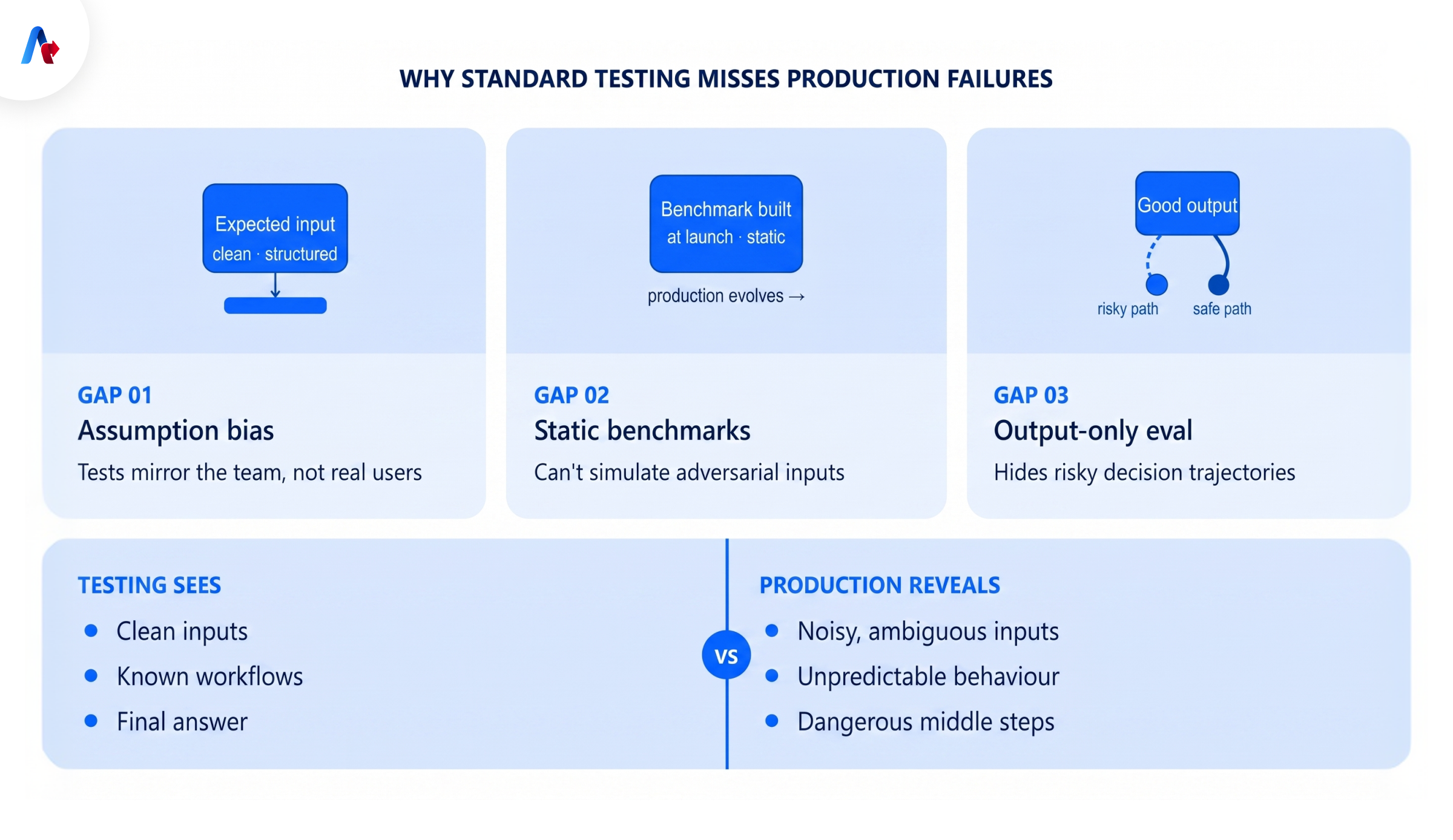
AI agents cannot be expected to stay reliable if the testing strategies are not built for real use cases. Here are three major reasons why the standard testing strategy could lead to AI agent production failure:
1. Engineers design tests around their mental model of usage, not real-user edge cases
During testing, teams often build test cases around expected workflows and known user paths, so the inputs are usually clean, complete, and structured. But this validates agents against the team’s assumptions, not against the full range of production behaviour, and this leads to agent failure
2. Synthetic benchmarks don't simulate adversarial or ambiguous inputs
A test suite is built at one point in time, based on what the team knows then. Production keeps moving. Users find new ways to use the agent, business rules change, systems get updated, and new edge cases appear. If the test set does not keep learning from production, it quickly becomes outdated.
3. Traditional evals check output quality, not trajectory quality.
An agent may produce a good-looking answer in testing but still take a risky path to get there. It may rely on the wrong context, skip a validation step, or make a weak decision halfway through the workflow. Standard testing can miss this because it focuses only on the output.
Two Production Killers That Testing Almost Never Catches: Security and Cost
Some forms of ai agent production failure are obvious: the agent gives the wrong answer, misses the goal, or fails to complete the task. But two of the most dangerous categories often stay hidden during testing: security and cost.
Security risks are hard to catch in pilots because test environments usually run with limited access, clean permissions, and carefully selected users. Production agents may connect to CRMs, ERPs, ticketing tools, document repositories, internal databases, and workflow systems. If the agent retrieves the wrong data, mishandles authentication, or exposes information outside the intended context, the failure becomes a governance and trust issue.
Cost failures are just as easy to miss. A test run may look affordable because it processes a small number of short, predictable tasks. At production scale, long conversations, repeated tool calls, large, retrieved documents, retries, and unresolved loops can quickly increase token usage and infrastructure cost. Rising cost per task often signals deeper problems such as context accumulation, inefficient retrieval, or agents that keep trying instead of escalating.
Need help testing AI agents for real production conditions?
Talk to Our Experts
How to Test AI Agents for Production: A Framework That Actually Works
Now the question is: how to prevent AI agent failures? For this teams need to change how they test. Here's a complete framework that can help enterprise move their testing from output-level QA to trajectory-level evaluation:
1. Start with a narrow, well-defined scope.
Do not start with a broad, multi-function agent. Take one task, one measurable outcome, and clear success criteria. For example, a document classifier or a routing agent is easier to evaluate than an open-ended assistant.
2. Map every system, tool, and data source.
Before scaling, create an integration inventory. Listing every CRM, ERP, API, database, document system, authentication method, rate limit, and data dependency the agent needs, can help to identify tool failures, permission issues, or silent errors.
3. Evaluate the full trajectory, not just the final answer.
Review the user request, reasoning path, tool calls, retrieved context, errors, retries, intermediate decisions, and final response. Many agent failures only become visible when the full sequence is examined end to end.
4. Test adversarial, ambiguous, and edge-case inputs.
Testing only with clean data and simple instructions will not be enough as real users may give unclear instructions or miss details. Which is why testing these difficult inputs help teams check whether the agent can respond correctly.
5. Simulate tool failures and recovery paths
Agents often depend on tools, APIs, databases, and business systems. So teams should test what happens when those tools fail. This helps to check whether these agents continue blindly and give false answers or instead retry, stop safely, or escalate to a human.
6. Measure long-session context performance.
As the conversation grows, the agent may forget an early instruction, miss a business rule, or drift away from the original goal. Teams should test long sessions to check whether the agent can keep track of important details throughout the conversation.
7. Use confidence thresholds and human review.
Not every agent output should be sent directly into a business system. If the task is risky, the data is incomplete, or the agent is not confident, the output should go to a human for review first. This prevents minor errors from becoming serious production issues.
8. Turn real failures into regression tests.
Every production issue should become a structured failure case. Capture the input, the agent’s behavior, the correct behavior, the failure category, and the trace. Then add it to the eval suite before the next model, prompt, or workflow update.
Observability and Monitoring: How to Detect AI Agent Failures Before They Cause Damage
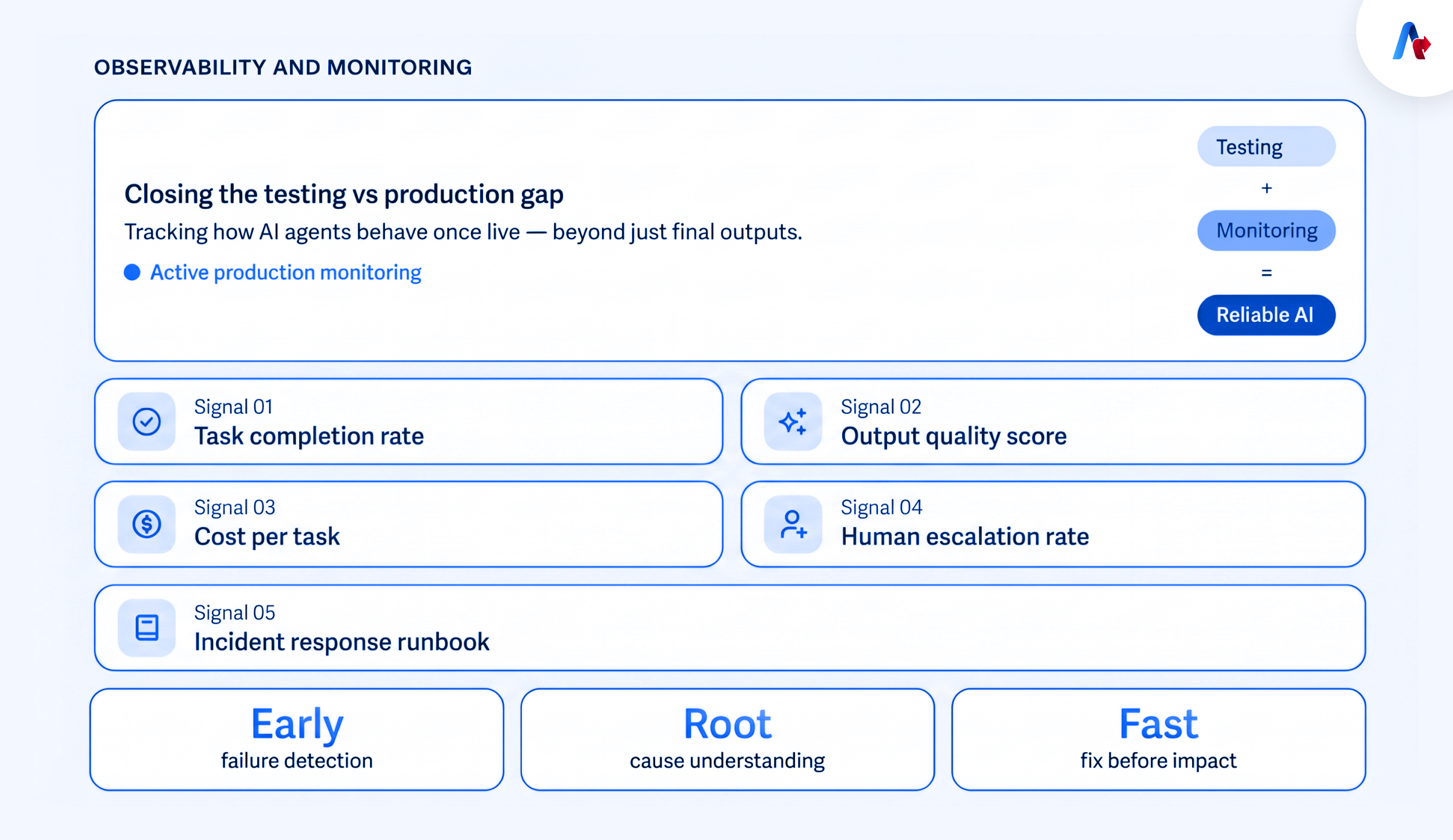
While testing plays a major role in determining whether an AI agent is ready to go live, it is still not enough to guarantee stable performance in production. Failures still occur after deployment from real users, live systems, edge cases, changing workflows, unexpected tool behavior. This is where the AI agent testing vs production gap occurs.
Observability and monitoring are the ongoing practices of tracking how an AI agent behaves once it is live. This helps to close the testing vs production gap as it not only focuses on the final output. Teams track key production health signals such as:
- Task completion rate logged and alerted per task type
- Output quality sampled and scored continuously in production
- Cost per task monitored with anomaly detection
- Human escalation rate measured independent of task completion
- Incident response runbook authored and reviewed by all owners
This helps to identify failures early, understand the reason behind them, and fix issues before they impact users, customers, or downstream workflows.
How to Build AI Agents That Survive Production: Architecture Decisions That Prevent Failure
Architecture is one of the main levers that helps prevent AI agent production failure. Here are some production-ready agent design principles teams can follow:
1. Design for narrow scope before broad autonomy
Start with one clear task since narrow agents are easier to test, monitor, and stabilize before expanding.
2. Use an orchestration layer instead of direct tool access
Integrate an orchestrator layer between the agent and business systems to manage access, retries, data formats, and errors safely.
3. Separate reasoning from execution
Agents must follow approved workflows and business rules before executing any action to reduce the risk of unsafe or incorrect actions.
4. Keep context clean and controlled
Important instructions, business rules, user constraints, and task state should be stored deliberately, not buried in a growing context window.
5. Instrument every workflow from day one
The system should capture task completion, tool errors, quality scores, cost per task, escalation rates, and user correction signals from the start.
This is where Accelirate’s agent builder and orchestration framework becomes important. The goal is not just to build an impressive demo. It is to design an agentic system with controlled workflows, governed tool access, evaluation loops, monitoring, escalation paths, and production-ready orchestration from the beginning.
Accelirate's Approach: Agentic Continuous Testing Built Into Every Deployment
What does agentic continuous testing look like when applied at enterprise scale? In one global banking case, Accelirate’s Agentic AI-led Testing COE helped reduce testing costs by 65%, cut regression cycles from 10 days to 3 days, and save 40,000+ hours annually in test execution and maintenance.
This is the foundation of Accelirate’s approach: AI agents should not be tested once and trusted forever. They need continuous validation across every deployment, workflow change, model update, prompt adjustment, and production feedback loop. Instead of treating testing as a final QA step, Accelirate builds agentic ai testing into the deployment lifecycle so teams can detect reasoning drift, tool failures, context loss, quality degradation, and escalation issues before they become production incidents.
The goal is not just to automate more tests. The goal is to build a testing model that keeps learning from every release, every failure, and every production workflow. Accelirate Expert
By combining AcceliQA, pre-built AI agents, DevOps integration, and an Agent + Operator model, Accelirate helps enterprises move from script-heavy QA to a more scalable, compliant, and production-ready testing approach.
Build AI agents that are tested, monitored, and ready for production from day one.
Book a demo
From Demo Success to Production Readiness
Testing will no longer be seen as a one-time checkpoint before launch. It will become a continuous validation process that uses production traces, failed tool calls, user corrections, and edge-case behavior to improve every future deployment.
Businesses that want to scale AI agents safely need to keep testing, monitoring, and improving them long after deployment. That is how teams will move from impressive demos to agents that can actually survive production.
Ready to make your AI agents production-ready?
Connect with our experts today!
FAQs
Agents are usually tested within clean and expected scenarios, while production brings messy inputs, real users, tool failures, longer workflows, and changing context.
Trajectory evaluation checks the full path an agent takes, including its reasoning, tool calls, errors, retries, and final output.
Agentic continuous focuses on testing agents throughout development and production, and not just before launch
Track full session traces, task completion, tool errors, output quality, cost per task, human escalations, and unusual behavior.
There is no fixed rate; what matters is that the agent detects tool failures, handles them safely, and does not fake an answer.
Prompt injection can make an agent follow unsafe or unintended instructions by giving access to tools, internal data, or business systems.