



Quick Summary
Context engineering ensures that your LLMs generate more accurate and reliable output. It is basically providing them with specific materials and situational data to generate highly relevant, factual, and grounded responses that don’t just guess, but actually know your business. Context engineering is hence becoming more vital with the scaling of enterprise AI agents.
AI agents have completely brought a big change in the workflows happen. Earlier LLMs were used very commonly for tasks like writing, summarizing, or brainstorming. A simple prompt with a few tweaks here and there would usually work. With the newer tech developments like AI agents, they are different. They run in multiple loops and use different tools to pull data form different sources and decide each step.
So, when things break, it’s rarely because the prompt was “bad.” It’s usually because the agent had the wrong context. Too much noise, so it loses focus. Missing facts, so it fills gaps with guesses. Old data, so it keeps acting on yesterday’s truth. Conflicting info, so it can’t decide what to trust.
That’s why context engineering matters. Context is limited. Every extra token competes for attention. More context doesn’t always mean better answers. Often it means distraction. Context engineering is how you control what the agent sees, how it’s structured, and when it’s injected. Prompts still matter, but they’re only one part. Context is what keeps the 50th step as clean as the first.
Context Engineering Vs Prompt Engineering
In this section we will explore how is context engineering different from prompt engineering. Prompt engineering is about writing the instruction you want the model to follow in a single moment. You’re shaping the response by choosing the right words, format, examples, and tone inside the prompt box. It works well when the task is short, one-off, and mostly self-contained.
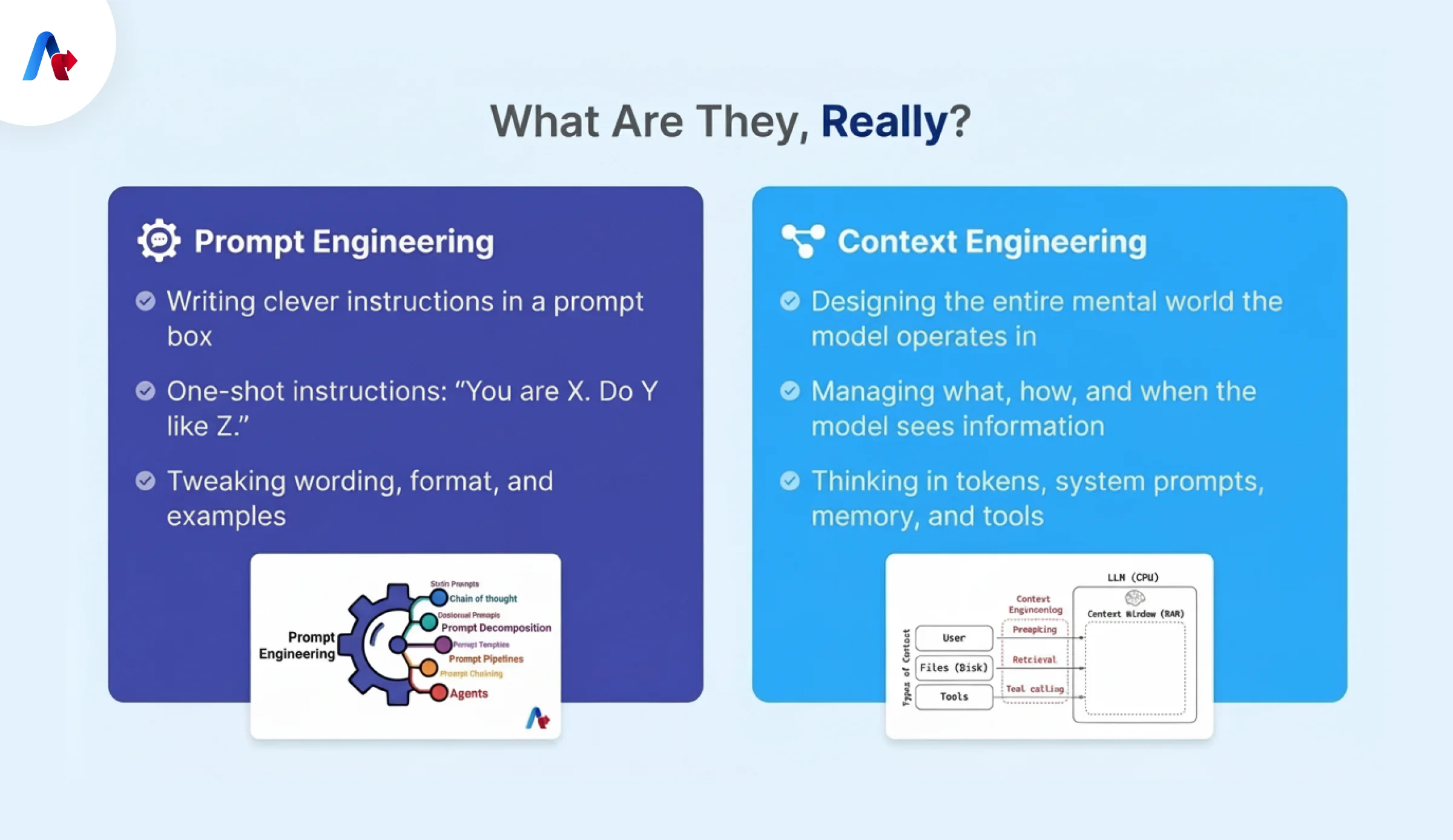
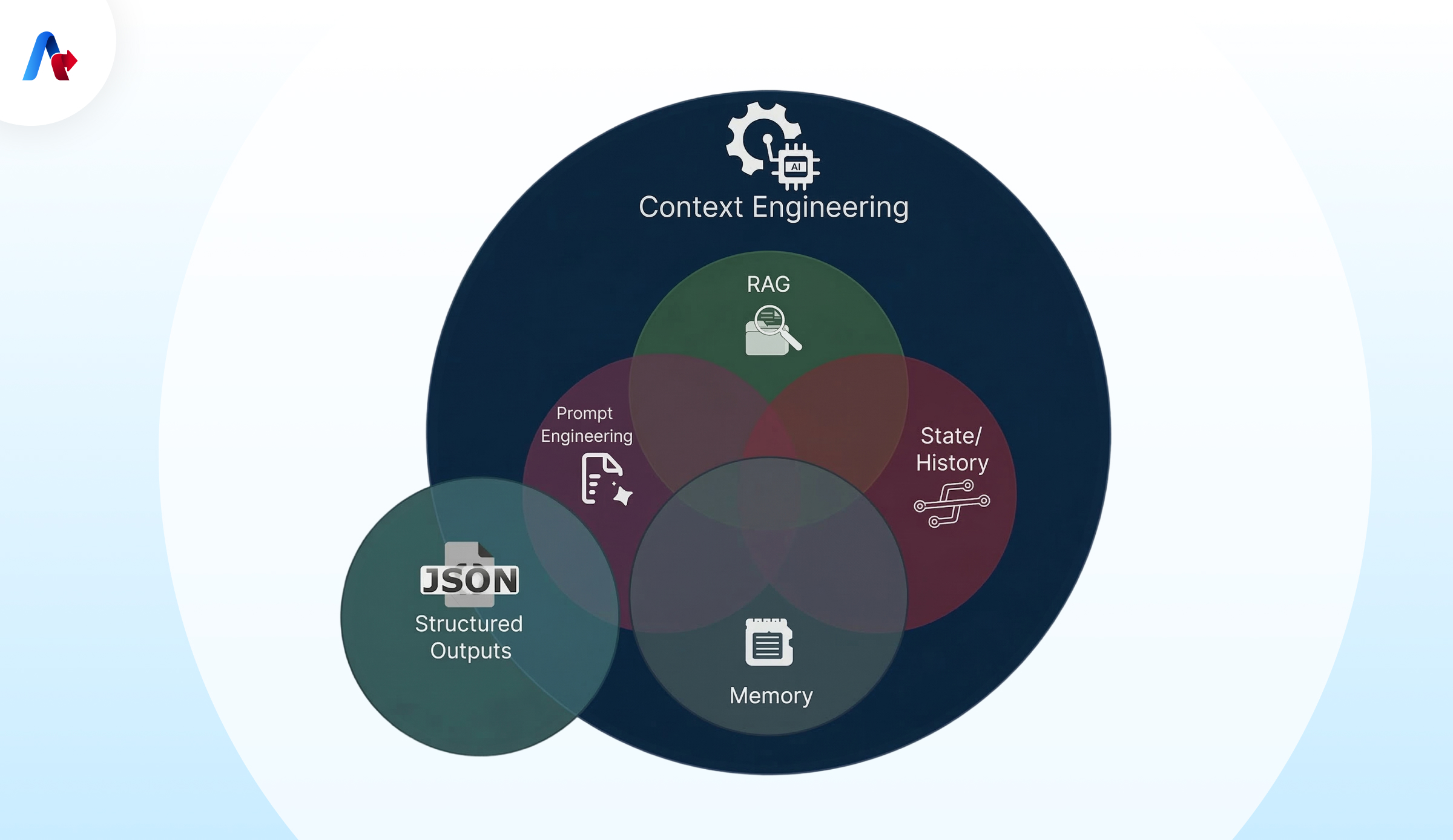
Context engineering is broader. Context engineering in simple terms is about designing what the model knows when it reads your prompt. That includes system rules, conversation history, retrieved documents, memory, tool definitions, tool outputs, and even what gets removed or summarized over time. In other words, you’re not just crafting the message. You’re designing the environment the model is reasoning inside.
Context Engineering Vs Prompt Engineering (Differentiation Table)
| Factor | Prompt Engineering | Context Engineering |
|---|---|---|
| What it focuses on | The words and structure of the instruction | The full information environment the model operates in |
| Core question | “How do I ask this to get the best answer?” | “What should the model see to behave correctly?” |
| Scope | Single request / single output | Multi-step, multi-turn, long-running behavior |
| Where it lives | Inside the prompt box (system/user message) | Across system prompt, memory, retrieval, tools, history, state |
| Best for | One-off tasks, content generation, quick experiments | Agents, support bots, workflows, production systems |
| Inputs managed | Instructions, tone, examples, formatting | Instructions + docs + tool outputs + state + memory + history |
| Time horizon | Short | Long (minutes to days, across sessions/users) |
| Main failure mode | Output is off-tone, incomplete, or ignores instructions | Agent forgets goal, gets distracted, uses wrong tools, hallucinates from bad context |
| Debugging looks like | Rewording, adding examples, tightening constraints | Inspecting context window, pruning noise, fixing retrieval, controlling memory/tool loadout |
| Repeatability at scale | Often hit-or-miss, needs ongoing manual tweaks | Designed for consistency across many runs and users |
| Tool usage | Usually none | Central (tool contracts, tool selection, tool output shaping) |
| Memory | Not required | Often required (short-term state + long-term memory) |
| Token strategy | “Make the prompt better” | “Keep the smallest high-signal context possible” |
| Success metric | The first good output | The 1,000th output still being good |
Why Prompt Engineering Alone Fails for Agentic Systems
Prompt engineering is good for tasks that you do one time. Agentic Systems do not work like that. They keep running using tools and they have to remember things from one step to the next. Even if you write a prompt, it can still fail because the Agentic System gets confused with too much information. Here is why it does not work:
- Context becomes messy quickly Every time the Agentic System uses a tool tries again or gets a message it adds more information. The important instructions get hidden under all the information, like logs and history.
- Agentic Systems need to know what’s going on Prompts do not always keep track of what has been done what needs to be done what has changed and what to do next. Without knowing what is going on Agentic Systems do the thing over and over or miss important steps.
- Tool selection can’t be replaced by rewording If there are too many tools to choose from or the tools are similar or the description of the tool is not clear the Agentic System will choose the wrong tool and waste time. There is a problem with how the tools and context are designed.
- Long workflows lose coherence Even if the Agentic System can look at a lot of information it can still get distracted and start doing what is easy or what it has done before instead of what is important.
- The Agentic System can become inconsistent If the Agentic System makes an assumption at the beginning, it will keep that assumption even if it gets new information later. This means the Agentic System is working with information that does not agree and it becomes inconsistent. Agentic Systems, like these must deal with this kind of problem.
Talk to our AI experts to learn how context-aware AI agents can automate complex workflows across your business.
Schedule an AI Strategy CallAgentic Context Engineering and How It Is Different from Traditional AI
Traditional AI systems work in a way: you put something in the model works on it and then you get something back. When you use prompts with these systems the situation is usually straightforward. Does not change much. Agentic systems are different. An agent keeps running does things uses tools looks at what happens and then changes its plan one step at a time. So, the situation with systems is not something that happens just once. The situation with systems is something that is always changing a little bit, at a time every time the agent does something.
Core Components of Effective Context Engineering for AI Agents
To make context engineering work well for AI agents think of context as layers, not a block of text.
- Instructions These instructions say what the agent’s job is, what it can and can't do how good it needs to be and how it should format its answers. These instructions are like the rules of the game. They should be clear and direct.
- State This is a snapshot of where the agent is in its work. It says what step the agent is on what its done what it still needs to do and whats important to remember. Without this layer agents can get confused. Do things twice or miss things.
- Retrieval This is where the agent finds the important information from documents, policies or databases. Retrieval should be smart. Pick only whats needed. Good retrieval gives the agent the right pieces of information in a way that it can use them easily.
- Memory Long-term memory should store things that're always true like preferences and facts that have been checked. Don't store guesses or assumptions as facts. That can create problems on.
- Tools Tools are like contracts that the agent needs to understand. If tools are not clearly defined the agent might pick the one. Strong agents use a set of well-defined tools and get clear answers from them.
- Clean Context This means getting rid of tool logs summarizing long conversations and fixing contradictions. If you don't do this the agent will become less reliable, over time and make mistakes.
Context Engineering Industry Specific Use Cases
Context Engineering becomes even more critical when look at its real-world use cases. When an agent uses tools and runs across many steps, it needs the right context at each step. The context engineering use cases below break down where good context design makes agents reliable.
- Denials & Appeals To write an appeal you need to know the denial codes have the right payer policy details, a timeline of the claim and the right documents to support it. The key to success is getting information, having a clear understanding of the situation and getting structured outputs.
- Prior Authorization A prior authorization status agent must keep track of eligibility rules, document checklists updates from the submission history. Without context control it might keep asking for the same things or miss when a status changes.
- Customer Support Support agents need to see tickets, account details, product configurations and known issues. Just dumping transcripts adds extra noise and saving guesses in memory leads to repeat mistakes. The solution is to write and retrieve memory in a way that only pulls what's important for the current issue.
- IT Ops & Incident Triage Incident triage agents often need to know about deployments, ownership, runbooks, SLAs and logs. Raw logs can be overwhelming, so tools need to summarize and filter them. Having a set of tools and periodically cleaning up help the agent stay on track during long investigations.
- Finance Close & Reconciliation Close and reconciliation workflows have a lot of rules and accuracy. The agent needs policies, exception patterns, prior decisions and audit constraints. Structured outputs and getting rid of assumptions prevent problems with updated numbers and reduce errors.
- AI Coding Assistants Coding assistants need to know about the project structure, dependencies, style rules and where functions are used. They work best with in-time file loading, short notes, for decisions and context compaction during long refactors.
How to Build Effective Context Engineering for AI Agents (Step-by-Step)
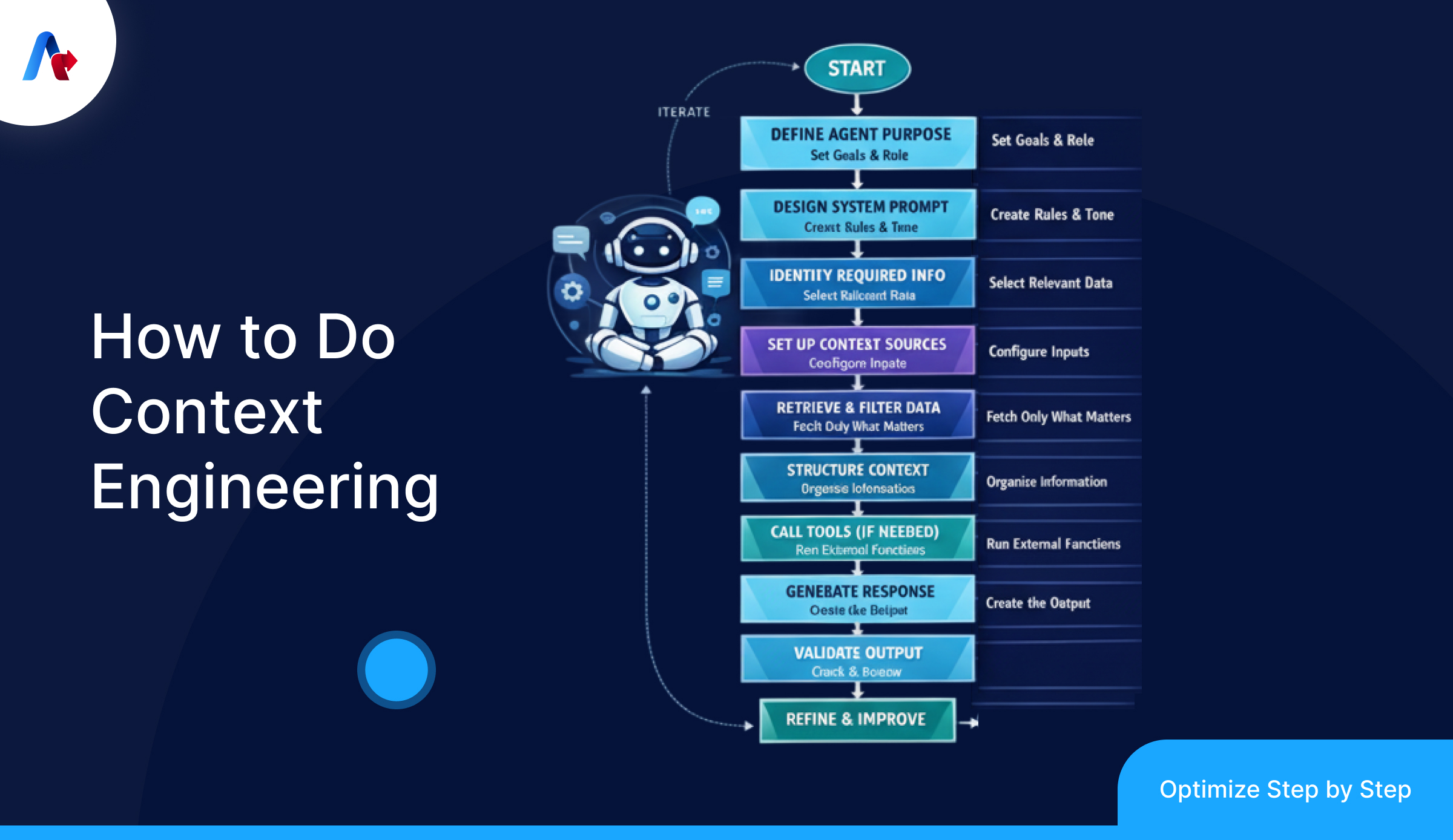
Step 1: Define the agent’s job in one sentence
Start with a clear mission statement for the agent. If you cannot describe the agents job in one line, it will not stay on track. Add boundaries away: what the agent can do, what it must not do and when it should escalate to a human.
Step 2: Split context into layers (don’t dump everything)
Think of context as layers, not one chunk. This makes it easier to control what stays and what gets removed. A practical way to split it is:
- ✓ System rules
- ✓ Task state
- ✓ Retrieved knowledge
- ✓ Tool outputs
- ✓ Memory
- ✓ History
Step 3: Write a system prompt that sets rules, not a full workflow
Keep system instructions direct for the agent. Define the behavior, quality bar, output format and tool-use rules. Avoid hardcoding if-else logic. The system prompt should guide decisions do not act like a script.
Step 4: Add a small “Task State” block to prevent drift
Agents fail when they try to figure out progress from chat history. Keep it short. Update it every loop. Keep a state block that includes:
- ✓ Current step
- ✓ What’s completed
- ✓ Pending questions
- ✓ Constraints
- ✓ Next action
Step 5: Build retrieval as “minimum useful context,” not “top 10 chunks”
Retrieval should fetch only what’s needed for the step of the agent. Prefer excerpts with titles and timestamps. If the agent needs more let it fetch right away.
Step 6: Design tools like clean APIs (and keep the toolset small)
Tools should be clear. Not overlapping for the agent. Use names and descriptions. Keep inputs strict and outputs efficient.
Step 7: Shape tool outputs
Don’t feed tool results directly back to the agent model. Summarize, filter and format outputs into a "what matters" view.
Step 8: Use structured outputs
If the agent output goes into steps use schemas. Define required fields allowed values and validation rules for the agent.
Step 9: Add memory carefully, and write to it intentionally
Only store stable facts and decisions in long-term memory for the agent. Never store guesses as truth. Label assumptions clearly.
Step 10: Add context hygiene: trim, summarize, prune contradictions
This is non-negotiable for long runs. Clear old tool logs, summarize long histories, and remove stale assumptions that conflict with new info.
Step 11: Create a “context budget” and enforce it
Set rough limits for each layer (system, state, retrieval, tool outputs, history). If one layer grows, another must shrink.
Step 12: Debug by inspecting the assembled context, not just the prompt
When things go wrong capture what the agent model saw. Most "model issues" are traceable to missing, noisy or conflicting context, for the agent.
Common Pitfalls in Context Engineering (and How to Avoid Them)
1. Dumping everything into context
What happens: Teams just throw in documents, the whole chat history and all the raw stuff in the tools. They hope the model will somehow make sense of it all. The models gets overwhelmed and starts to miss the important things.
Avoid it: Think of the context like budget. Only take out the bits that're useful, keep things short and simple and break up anything that is too big, into smaller tasks.
2. No explicit task stat
What happens: The agent tries to infer progress from conversation history. It repeats steps, forgets what it already fetched, or jumps ahead.
Avoid it: Maintain a small state block: current step, completed items, pending questions, constraints, next action. Update it every loop.
3. Storing guesses as memory
What happens: A wrong assumption gets written into memory and keeps resurfacing. Over time, the agent becomes confidently wrong.
Avoid it: Only store validated facts and stable preferences. Label assumptions clearly. Add expiry/versioning for things that change.
4. Tool overload and overlapping tools
What happens: The agent calls the wrong tool, calls too many tools, or loops because multiple tools can solve the same thing.
Avoid it: Keep tools minimal and non-overlapping. If a human can’t easily choose the right tool, the agent won’t either.
5. Raw tool outputs polluting the context
What happens: Large JSON, logs, or tables flood the window. The agent spends attention on noise and loses the thread.
Avoid it: Shape tool outputs before injecting them. Summarize, extract key fields, and show only what’s needed for the next step.
6. Retrieval that’s “top-k” instead of “task-aware”
What happens: RAG returns relevant-ish chunks, but not the specific detail needed for the step. The agent fills gaps with guesses.
Avoid it: Shape tool outputs before injecting them. Summarize, extract key fields, and show only what’s needed for the next step.
Learn how context engineering helps enterprises deploy scalable AI agent systems.
Build Reliable AI AgentsContext Is the New Control Layer for AI Agents
AI agents do not fail because the prompt was not clever. They fail because the model is using the information at the wrong time. When we talk about AI agents that can do things on their own the context is very important. It helps the agent decide what to do which tools to use what is true and how to be consistent. If the context is confusing, old or has conflicting information even a good model will seem unreliable.
So, the context needs to be clear for the agent to know what step it is on the same model will suddenly work in a predictable way. This means that making AI agents is not about writing good prompts anymore. It is more about making sure the model has the information. Keep it simple, test it with examples get rid of old information and make changes as the workflow changes. That is how you can make enterprise AI agents that work well not just sound smart.
FAQs
Because the agent is using missing, noisy, outdated, or conflicting context. Good prompts can’t fix bad inputs or bad tool data.
Give only the key facts for the current step, structured clearly. Use retrieval to pull the right snippets instead of dumping full documents.
They use short-term state (current session history) and long-term memory stored outside the chat. Good systems save validated facts and decisions, not guesses.
Yes. By grounding the agent in trusted sources, limiting irrelevant context, and validating key facts before responding.
They use it to pull the right policies, account rules, and transaction data per task. It also enforces structured outputs for audit-friendly workflows.
Not always, but many enterprise use cases need limited access to data and tools. The key is scoped access, logging, and approval steps for actions.
Set clear system rules, restrict tool permissions, and require confirmation for sensitive actions. Add allowlists for data sources and tool usage.
Yes. It reduces hallucinations, limits data exposure, and supports governance through controlled retrieval, tool access, and traceable outputs.