



Quick Summary
Multi-agent AI systems allow organizations to automate end-to-end workflows using a network of specialized agents that work together. However, they only function reliably when connected to structured enterprise data, governed APIs, secure integration layers, and consistent monitoring. MuleSoft provides the integration backbone that multi-agent systems rely on enabling agents to communicate, access trusted data sources, and operate at scale.
Enterprises are moving beyond single purpose chatbots or isolated automation scripts. Today, AI systems are being built as multi-agent networks, groups of cooperating AI components that specialize in different tasks such as extraction, validation, decisioning, and summarization. These agents reason independently but collaborate through structured interactions.
The challenge is not creating individual agents. The challenge is connecting them to enterprise systems that hold the data they need across different departments, data systems, EHRs, CRMs, policy databases, document repositories, and core business platforms.
This guide explains how to design, build, and deploy multi-agent AI systems using MuleSoft that acts as the backbone of intelligent orchestration. You will learn how agents interact with Mule APIs, how to structure a multi-layer architecture, how to handle governance, monitoring and real-time coordination between agents and systems, and how to scale agents for real enterprise workloads. The examples focus on claims processing, but the approach applies across industries such as banking, retail, insurance, and manufacturing.
Start your first multi-agent workflow with MuleSoft.
Talk to our experts today!Real-World Example of Multi-Agent Orchestration: Healthcare Claims Processing
Without a structured integration layer, multi-agent systems run into issues such as, Agents producing inconsistent results, data drifting across silos, security gaps and missing audit trails and workflows breaking when agents can’t reach a data source. This is why MuleSoft becomes a central part of any enterprise multi-agent AI strategy. MuleSoft provides governed APIs, data orchestration, connectivity to multiple backend systems, monitoring, logging, and policy enforcement and a secure and scalable integration foundation.
With MuleSoft, multi-agent systems can safely act on enterprise data while maintaining auditability and governance.
Now, to understand how this works in practice, let’s look at a healthcare organization that wants to automate its claims adjudication workflow.
Today, it’s manual and time-consuming where bot must:

- Extract data from PDF claim forms
- Validate claim codes against policy database
- Cross-check patient eligibility in Salesforce Health Cloud
- Flag anomalies for audit
- Route cases for manual review when necessary
This is labor intensive and error-prone. With a multi-agent AI system integrated with MuleSoft, this workflow becomes fully autonomous. The result is consistent, traceable claims outcomes with faster turnaround times and fewer manual tasks. Here’s what it does:
- An intake agent extracts fields from a PDF
- A validation agent checks coverage using MuleSoft APIs
- A decision agent classifies the claim as approve/reject/review
- An audit agent flags anomalies
- MuleSoft tracks every step for compliance
How many of these steps in your current workflow are still manual and repetitive?
Let’s automateArchitecture Overview of Multiple Agents
Before implementation, it helps to understand the system’s layers. Multi-agent AI systems follow a structured, three-layer model.
Architecture Components:
| Layer | Key Components | Description |
|---|---|---|
| AI Layer | Multi-Agent System (Python/FastAPI or LangGraph) | A network of agents for extraction, validation, decisioning, and learning. |
| Integration Layer | MuleSoft Anypoint Platform | Provides APIs and connectors to EHR, Salesforce, databases, and policy systems. |
| Data Layer | Data Lake, Object Store, PostgreSQL | Stores claims, logs, and contextual data for agent memory. |
| Infrastructure | Kubernetes / OpenShift + MuleSoft Runtime Fabric | Enables scalability and containerized deployment. |
Here’s a Simple Representation of the Data Flow
This model ensures agents remain lightweight while MuleSoft handles the complexity of enterprise integration.
- Mule receives a claim file via API, SFTP, or event trigger
- Mule calls the Intake Agent API (REST call)
- Intake Agent requests patient data via Mule System API
- Validation Agent uses Mule Process API to evaluate codes
- Decision Agent returns an outcome and posts updates via Mule
- Mule monitors, logs, and secures the entire workflow
Step-by-Step Implementation of Multi-Agent AI Systems with MuleSoft
Each step begins with an overview paragraph followed by detailed actions. This format helps teams follow the process in a structured way.
Step 1: Define the AI Agents and Their Responsibilities
Start by breaking the business workflow into agent tasks. Each agent should perform one well-defined job and communicate through APIs or messaging. This makes the system easier to debug, scale, and audit.
You might build these using frameworks like LangGraph, AutoGen, or CrewAI, deployed as microservices. Each agent has a clear boundary and communicates through APIs managed by MuleSoft. Below is an example breakdown for claims processing with agent types and funtions.
| Agent | Function | Output Example |
|---|---|---|
| Intake Agent | Reads claim PDF and extracts fields | JSON object with patient ID, claim code, amount |
| Validation Agent | Validates codes via MuleSoft API to policy DB | “Valid” / “Invalid” |
| Decision Agent | Applies rules or GenAI-based reasoning | “Approve”, “Reject”, “Needs Review” |
| Audit Agent | Logs anomalies and stores them in Salesforce | “Duplicate detected”, “Policy Mismatch” |
Step 2: Build MuleSoft APIs (System, Process, Experience)
For multi-agent systems, APIs must follow MuleSoft’s API-led connectivity model. This ensures clean separation between data access, business logic, and presentation.
Use MuleSoft’s API-led connectivity model:
- System APIs
- Connect to EHR, Salesforce, Policy DB
- Examples: /ehr/patient/{id}, /policy/validate
- Process APIs
- Aggregate and transform responses for AI agents
- Example: /claims/validate or /claims/details
- Experience APIs
- Expose simplified data views for AI agents or dashboards
- Example: /ai/claims/summary
MuleSoft ensures that all agents can securely consume enterprise data without direct database access.
Step 3: Enable Communication Between Agents and Mule
Agents do not talk to databases directly. They interact with MuleSoft APIs via REST or async messaging. Here are the types of interaction:
- Inbound Trigger (Mule to AI) Mule flow starts when a claim file is dropped on SFTP → Mule triggers AI Intake Agent through REST.
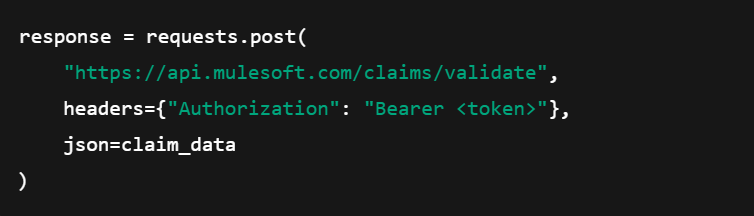
- Outbound Calls (AI to Mule) The AI Agent calls Mule APIs to validate or fetch additional data.
- Async Event Handling MuleSoft integrates with Kafka or Anypoint MQ for asynchronous agent coordination.
Example (Python call to Mule API):
Step 4: Deploy and Scale in a Containerized Environment
Agents and Mule APIs should be deployed on container-based platforms for predictable scaling. Here is the deployment setup:
- Containerize each AI Agent using Docker.
- Deploy on OpenShift or Mule Runtime Fabric for elastic scaling.
- Use Anypoint Exchange for API discovery and reuse.
- Integrate CI/CD with GitHub Actions or Jenkins for automated deployment.
Scaling happens automatically. For example:
When claim volume rises:
- Mule Load Balancer distributes requests
- Kubernetes scales Validation Agent pods
- Mule Runtime Fabric ensures high availability
This is essential for real-world workloads such as insurance, lending, or healthcare.
Step 5: Apply Governance, Monitoring, and Security
Multi-agent systems require strong governance, especially when interacting with sensitive data.
Security Controls
- OAuth 2.0
- Mutual TLS
- API Manager rate limiting
- Data masking policies
Monitoring & Observability
Use:
- Anypoint Monitoring
- CloudHub logs
- Prometheus (optional)
Track:
- Latency
- Agent-to-API call frequency
- Error rates
- Decision outcomes
Compliance Considerations
Industries such as healthcare and banking must maintain:
- Audit trails
- Retention policies
- Data access logs
- Identity verification
MuleSoft acts as the control plane for all agent communications. Every call, every decision, every API access is tracked.
Real-World Use Cases of Multi-Agent AI Systems with MuleSoft Across Industries
Multi-agent systems connected through MuleSoft apply to several sectors. If your organization relies on manual data-driven processes, it is likely a candidate for multi-agent automation.
| Industry | Use Case | Example Multi-Agent Workflow |
|---|---|---|
| Healthcare | Claims Adjudication, Patient Data Summarization | Mule integrates EHRs & AI Agents for data verification and triage. |
| Banking | Loan Underwriting | AI Agents analyze documents, verify credit data via Mule APIs, and recommend approval decisions. |
| Retail | Inventory Forecasting | Mule connects POS, supply chain, and AI agents that forecast demand collaboratively. |
| Insurance | Policy Renewal & Fraud Detection | AI Agents evaluate claim patterns; Mule APIs connect actuarial data and policy systems. |
| Manufacturing | Predictive Maintenance | Agents analyze IoT sensor data (via Mule connectors) to predict machine failure. |
Example Deployment Stack
This stack balances flexibility with enterprise governance.
| Layer | Technology |
|---|---|
| AI Agents | LangGraph + Python (FastAPI), OpenAI or Anthropic Models |
| Integration | MuleSoft Anypoint Platform (System, Process, Experience APIs) |
| Message Queue | Kafka / Anypoint MQ |
| Infrastructure | OpenShift / AWS EKS / Mule Runtime Fabric |
| Monitoring | Anypoint Monitoring + Prometheus |
| Security | OAuth 2.0, TLS, API Manager Policies |
Performance and Scaling Considerations for Multi-Agent AI Systems with MuleSoft
- Horizontal Scaling: Add more AI agents when request volumes increase.
- Caching Layer: Use Mule Object Store or Redis for caching common lookups.
- Batch vs Stream: Use Mule Batch jobs for bulk document handling; event streams for real-time use cases.
- Backpressure Handling: Mule throttling and circuit breaker policies protect downstream systems.
Key Take Aways from Real Enterprise Deployments
Based on real implementations, several patterns consistently help teams succeed.
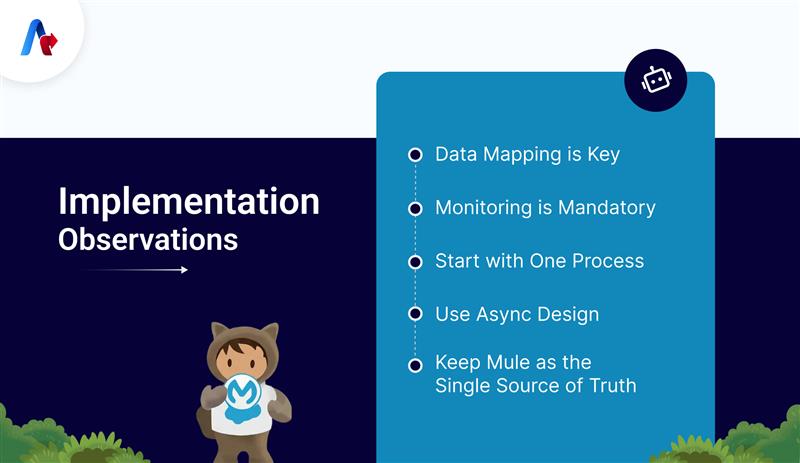
- Data Mapping is Key – AI Agents rely on consistent, clean data from Mule APIs. Spend time designing the data model properly.
- Monitoring is Mandatory – Set up dashboards early; debugging multi-agent behavior without visibility is complex.
- Start with One Process – Don’t build a huge agent ecosystem at once; automate one workflow end-to-end.
- Use Async Design – Avoid synchronous chains between agents; Mule MQ or Kafka improves reliability.
- Keep Mule as the Single Source of Truth – It enforces consistency, governance, and auditability across AI actions.
Get Started with Mulesoft’s Multi-Agent AI Systems
By combining MuleSoft’s enterprise / power with multi-agent AI frameworks, organizations can deploy scalable, intelligent automation systems that handle real-world complexity, securely, audibly, and efficiently. MuleSoft acts as the digital nervous system, ensuring agents can access enterprise data safely, workflows remain traceable and compliant, and systems scale as business demands grow.
Here are some quick steps to implement this in your organization:
- Identify a high-impact process (like claims or customer onboarding).
- Build 2–3 specialized AI agents using LangGraph or CrewAI.
- Expose required data via MuleSoft System APIs.
- Orchestrate interactions using MuleSoft Process APIs and queues.
- Monitor, optimize, and then scale organization-wide.
Starting with a single workflow such as claims, underwriting, or onboarding allows teams to validate results before expanding to other domains. Associating with a dedicated MuleSoft consulting partner, like Accelirate, can provide you with a faster roadmap and implementation steps. Connect with us today.
FAQs
Agents call MuleSoft APIs using REST or messaging (Kafka or Anypoint MQ). Mule handles data access, security, and orchestration.
Yes. MuleSoft connects to Python microservices, LangGraph agents, AutoGen-based agents, CrewAI, or any HTTP/JSON-compatible system.
Using OAuth 2.0, TLS, rate limiting, threat protection, and data masking policies applied centrally via MuleSoft API Manager.
Automate one workflow with 2–3 agents. Build System APIs, then Process APIs, then connect the agents.
It is recommended for large-scale deployments but not mandatory. It improves high availability and auto-scaling for agent workloads.
Yes. MuleSoft provides audit logs, secure APIs, and governance required for HIPAA, SOC2, PCI-DSS, and more.