Quick Summary
Buying a prebuilt AI agent is a good option if that meets your business needs, but building a custom agent becomes a choice if the existing tool cannot meet requirements. While making a build vs buy AI agents decision, enterprises need to ask several questions about whether an agent can complete your workflow, customization, costs, and setup time. A team also needs to ask about testing, handling mistakes, protecting data, maintenance, and changing AI providers if necessary.
Should you build or buy AI agents? That's the question most companies are asking today. When comparing build vs buy AI agents options, companies must check them deeply. The situations are different because buying is an option when an existing product meets your needs but needs some additional management changes. If the important requirements are unmet, it is a good option to build one that is just for you. In the second scenario, enterprises should ensure that they have the resources to build custom AI agents.
According to McKinsey’s 2026 State of AI Survey, 32% of respondents said their organizations had decided against purchasing at least one software product because they could build it using AI coding tools. This finding clearly shows that software purchases are happening, not building AI alone.
That does not mean that building is the right choice for every business. Before deciding, ask questions about the costs, testing facilities, maintenance, and fixing if any problems arise. These questions may help you compare the work, costs and responsibility.
What Does it Mean to “Build” or “Buy” AI Agents?
Both are different but fit based on the situation. Buying is actually choosing a ready-made solution for a particular task. Building is different because you need to create it yourself to meet the business requirements by using development tools.
Think of a customer support team that needs an agent to answer product questions. The team is also looking for one to check order details, detect the company's return policy and send requests to a particular person.
Here, the needs differ, so it's important to check whether the product can handle those tasks. Companies can also check whether something is missing, adjust the product or build something separately to complete the work. This doesn't mean building has to start from scratch. Organizations today can use existing platforms to connect business information.
Own what differentiates your business.— PwC
Certainly, there is a difference between buying an agent and buying a platform to build agents, so it is important to compare price, what they do, what still needs to be done, and who will do that work.
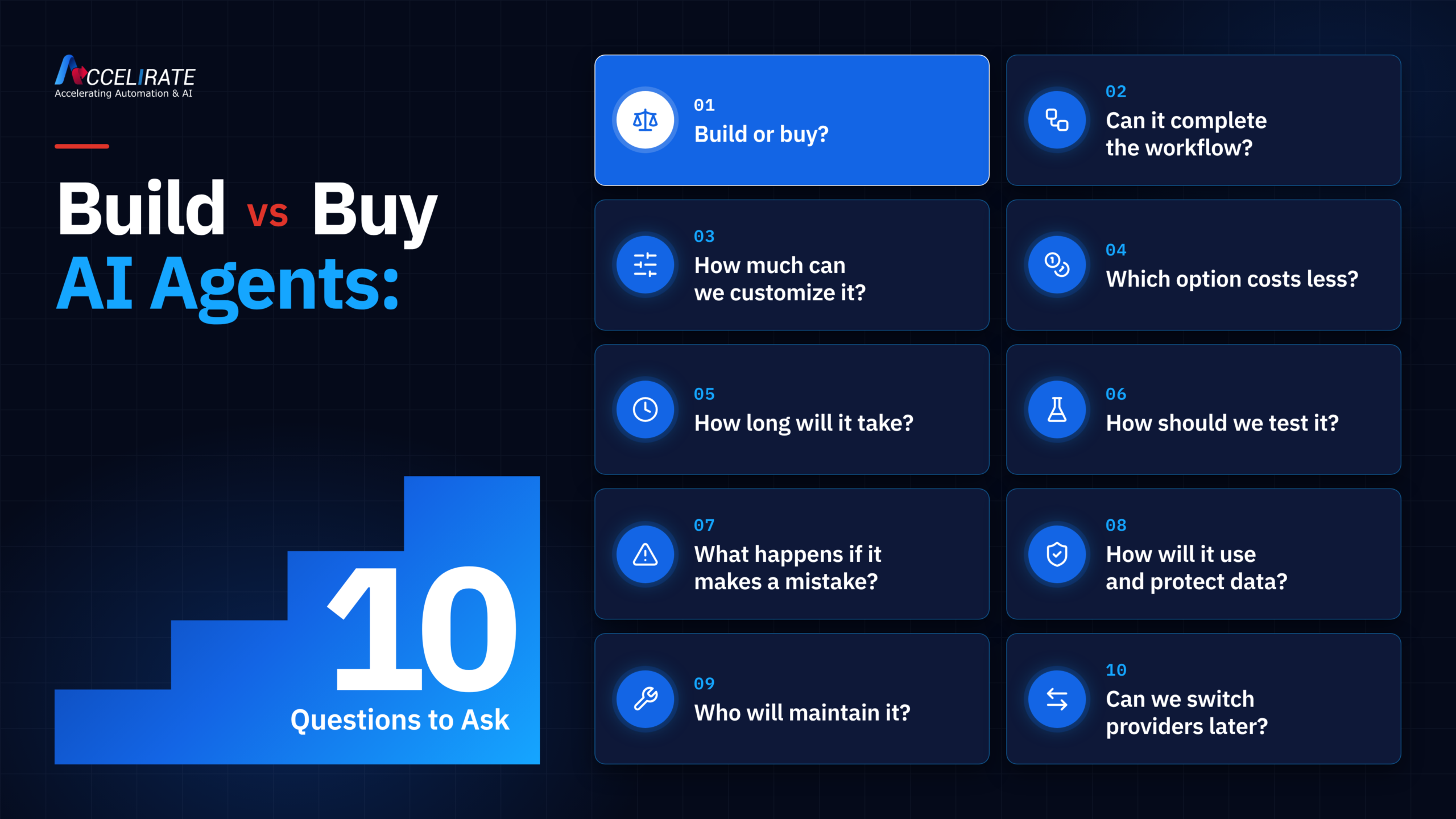
Let's get into the ten questions a business should ask before the commitment.
1. When Should a Business Build an AI Agent Instead of Buying One?
When ready-made options don’t fit your business needs, decide to build a custom AI agent. Always start with the tasks AI has to do. Separate essential requirements from features that would be just nice to have. Later, ask providers to show how their products meet your requirements.
Think of a situation where a manufacturer needs an agent to review supplier quotes. Here, the AI must compare delivery dates, check suppliers, and follow purchasing rules that may be different in locations. If you are looking for custom development, check whether you have an option to adjust the existing product to handle essential steps.
Many think that having a specific company rule means you can build from scratch. There is always a difference between ready-made agents, tools for customizing agents, and fully custom development. The right level of customization depends on how much work is involved.
Companies need to be very clear about who is going to look after the agent post launch. Instead, building on your own needs a plan for testing, updates, and bug fixing. Write down the requirements that remain unmet after the ready-made option. It can explain why a custom build is worth considering for your business.
The robots work, but they were built for a different kind of environment, one that was more structured, predictable and followed rules.— Harsh Thakar, COO, Accelirate
2. Can a Prebuilt AI Agent Complete Our Workflow or Only Make Suggestions?
Check whether the prebuilt agent completes the work or only recommends the next step. Ask specifically what type of work it can handle and what it cannot.
There is a clear difference between these two. For example, a company is looking for agents for customer support. During the demonstration, check if the AI is giving helpful answers or giving only recommendations:
| What the agent suggests | What to ask the provider to demonstrate |
|---|---|
| Check the customer’s order | Can it find the correct order and check its status? |
| This request needs a manager’s approval. | Can it send the request and supporting details to the right manager? |
| Let the customer know. | Can it send an approved message and record it in the customer’s account? |
It is recommended to measure how agents perform as intended and how they support your business outcomes. That can give a better comparison than a demonstration. Human support still matters to workflows. Clarify where the agent’s responsibility ends and what happens next.
Before committing, ask the provider to walk through one of your requests from start to finish. This can bring a lot of clarity on how it works effectively.
3. How Much Can We Customize a Prebuilt AI Agent?
At one look or demo, you can feel everything fits at first, but the real question is how far you can change it if your process is different. Check out the essential questions when you buy agents, such as:
- Can you connect your own documents and systems?
- Is it possible to add approval steps if needed?
- Does the tool have an option to control when a human needs to review the work?
- Are there any options to change how the agent handles exceptions?
- Can you change the business rules it follows?
Understand that there is a real difference between changing the agent’s instructions and changing how the workflow actually works. Modifying a prompt may be simple, but if the agent needs to update your ERP, check CRM, and follow company rules, you may need additional development support.
At this point, the decision of build vs buy AI agents becomes less clear. Even a built product may need changes, but an AI agent can be built on existing platforms and customized. You don't have to start from scratch. Ask the provider to show one change that matters to your business because it can give an idea of how flexible the product is.
Not sure what to customize? Let Accelirate help you map the workflow first, then build only where it adds value.
Assess Your Workflow4. Which One is Cheaper: Build or Buy AI Agents?
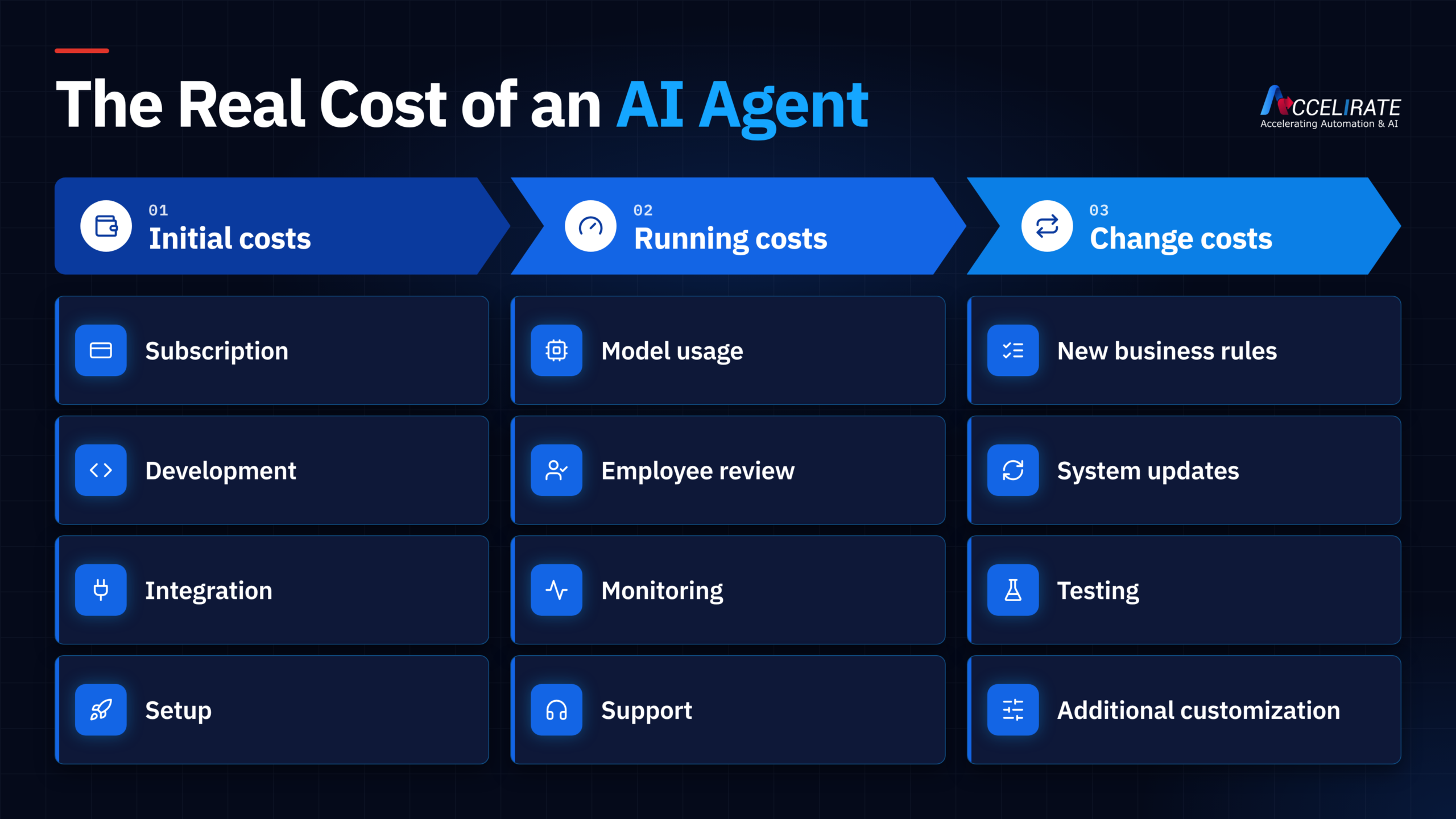
At first glance, the prebuilt AI agents might look cheaper. Companies should make sure that they get the complete cost before launch. The initial cost may look expensive to build it yourself, but sometimes that can save you money in the future.
Get the complete quotation covering:
- Subscription charges
- Integration and development work
- Model or usage charges
- Testing & updates
- Time for employee review
- Continued help
- Changes as the business process changes
Example
Building will be better looking than buying a prebuilt one, but teams may spend extra time customizing options. In this situation, the cost can spike.
Gartner predicted that more than 40% of agentic AI projects would be canceled by the end of 2027. One of the important factors is the cost, but there are other reasons such as unclear business value and weak risk controls. That is just a forecast, but it highlights that companies should take care of the cost before committing to the tool.
5. How Long Does It Take to Build an AI Agent?
There is no set time to build agents. Depending on the agent’s capacity, the systems to be connected and the time for testing them can be different. In contrast, buying can help you get started sooner than building. A custom AI agent takes more work but saves money in the long run.
A timeline typically includes four stages:
- Define the work (Agreeing on the tasks, rules, approvals and the expected results)
- Integrate systems (Granting access to data, applications, and business tools)
- Test the workflow (testing normal cases, exceptions, failed actions and human approval)
- Launch readiness (Assign support owners and decide how updates will be handled)
If a company buys an agent for customer service, the product may already be answering questions. It takes longer because you have to connect it to your CRM, order system and approval process. So, when comparing build vs buy AI agents, do not ask only how fast we can get a demo. Instead, ask how long it will take before this agent can handle real work. This is what decides the total timeline.
6. How Do We Test an AI Agent Before Committing?
Before you go into a solution, get a real-life example from your business. Enterprises give a demo, but it may not show how agents behave when the system fails.
A normal test can include the following:
- Normal Cases: Can the agent complete the everyday tasks it was designed for?
- Difficult Cases: What happens if the agent gets ambiguous information?
- Missing Information: Does the agent stop and ask for what it needs when information is missing, instead of guessing?
- Human Approval: Does the agent hand over decisions that should not be made automatically?
- System Actions: Can you confirm that the action was completed correctly if the agent updates a CRM or ERP?
The main purpose is not to test whether the agents complete an answer once. Know whether it can complete work consistently. Also, you need to check how much correction your team needs while using the tool.
Before you build or buy AI agents, test agents against expected outcomes instead of relying on general demonstration.
7. What Happens When an AI Agent Makes a Mistake?
A small mistake may have big impacts, so the agents should know when to stop or flag issues. It should at least know when to seek human support. The workflow should also record the incident so the team can review it and recover from the mistake.
There are many reasons for this: agents may get incomplete data or misunderstand the request. Before finalizing a solution, test how they behave, such as:
- If information is missing, the agent should ask what to do or send the case for review.
- If two sources do not match, the agents should not guess the correct answer.
- If a system fails to take action, the workflow should confirm the failure before trying again.
- If the decision is risky, there should be a human review before the action.
Agents can appear successful even when the final business outcome is wrong. As discussed earlier, an agent may approve a refund, but if the payment system fails, the customer still does not receive the refund.
For these reasons, experts recommend testing more than just task completion. QA teams should also verify that the right person receives the alert and that proper tracking is available after the action is completed.
Will your AI agent handle real-world failures? Test exceptions, failed actions, and human approvals before you scale.
Test Your AI Agent With Us8. How Will the AI Agent Use and Protect Our Business Data?
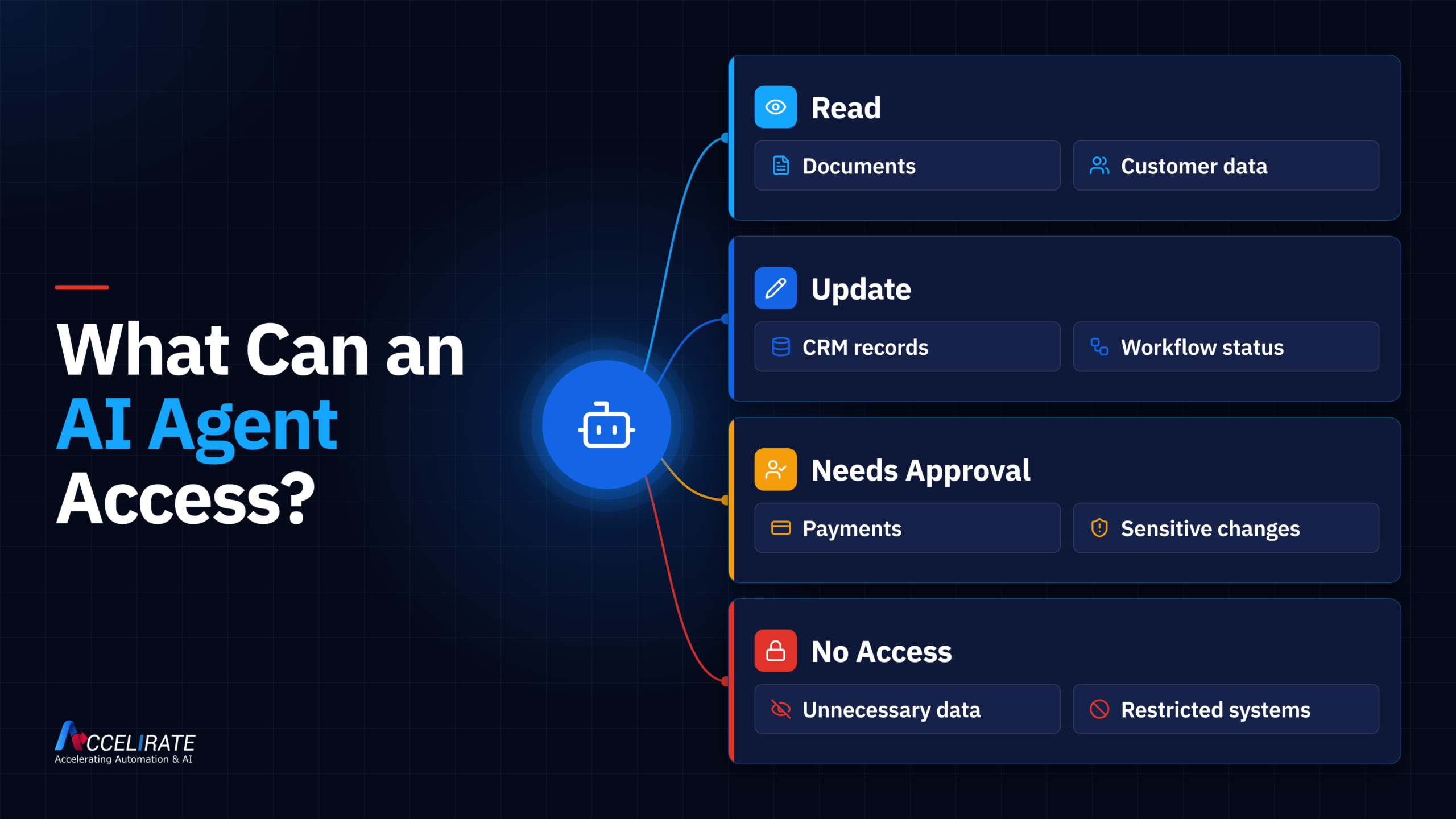
For this, AI needs access to the data it needs, use it within defined permissions, and keep sensitive information protected throughout the workflow. Before choosing a solution, check where the data is stored, how long it retains it, who accesses it and whether the providers use it to train their models.
Begin with what agents actually need to do. An AI agent used for invoice processing may need access to invoices, purchase orders, supplier details, and approval rules. It does not mean that agents need permission to access all the records.
A company also needs to know what actions agents take because reading information is very different from updating records, approving requests, or triggering payments. Higher-risk areas should always have human control, and that must be clearly defined.
The build vs buy AI agents decision also affects who manages these controls. If you build one, there can be some protection, but the team may need to configure it according to the situation. If you buy a custom agent, you may have more control, but you have more responsibility for controlling it correctly.
Before you make a final call, get data flow details and permission work from the providers. It's important to understand what the agent can see, what it can change and what happens to the data after the task is completed.
9. Who Will Maintain the AI Agent After Launch?
When agents are live, someone should be responsible for fixing failures, updating business rules and testing changes. This planning should also include who will step in if something is not working to support the users.
| If you choose to buy an AI agent | If you build a custom AI agent |
|---|---|
| The provider may handle product updates and platform issues. | Your team or implementation partner must handle the updates. |
| Your team may still manage permissions, business rules, and integrations. | Your team needs a clear plan for models, integrations, testing, and support. |
| Some changes may require additional vendor support. | Need internal resources to make changes |
Before launch, clarify who will be responsible for maintaining the agent when:
- A connected system change.
- A business rule needs updating.
- The agent starts producing incorrect results.
- A new data source needs to be added.
- Users report a problem.
- The underlying model or platform changes.
Example
A company uses an agent that reviews purchase requests. Six months after launch, you need to change its approval limits. In this time, someone needs to update those rules, test the agent again, and confirm that the new approval system works properly. This is why ongoing support should be part of the build vs buy AI agents decision from the beginning onwards.
Ask for a clear support plan in writing. It has to say who is dealing with issues, how long it will take to respond, how updates will be given, and what changes will cost more.
10. Can We Change AI Providers Without Starting Over?
Yes, it can be done if you can export your data, configurations, custom code, test cases and documentation. If you think you might change providers in the future, make sure you ask what you can keep and what you would have to rebuild. This is particularly important if you lean heavily on the vendor's platform.
Before you sign a long-term agreement with the vendor, ask these questions:
- Can we export the business data and the agent setups?
- Can we reuse prompts, workflows, or custom logic elsewhere?
- Who has the authority if any custom code is written for us?
- Can another team help the agent with the provided documentation?
- What happens to our data after the contract is over?
- Which parts would we need to rebuild if we moved to another platform?
Imagine a company that takes months building an AI agent around its internal approval process. If those rules, test cases, and integrations cannot be transferred later, changing providers could mean rebuilding everything from the beginning.
This does not mean everything is portable. There are many things that you don't get if it is based on a provider’s own models, tools, or integrations. It must be a priority before you choose between building vs. buying AI agents for your business.
Build vs Buy AI agents: Which Approach Fits Best?
The better choice is the one that meets your main needs, does not create too much extra work, fits your budget, and supports your team. Also compare the customization, the support and what happens if you change the provider later.
| Approach | Consider it when | What to check before deciding |
|---|---|---|
| Buy a prebuilt AI agent | An existing product already handles most of the work you need. | How much setup, customization, and support will still be required? |
| Build a custom AI agent | Your process has important requirements that existing products cannot meet. | Do you have the budget, skills, and support plan to maintain it? |
When Does Combination Fit?
Combining is a good choice where existing automation satisfies common needs, but some parts of the process still need custom solutions. Here, companies should have clarity on who will build and maintain custom parts.
A business may have the choice to use a prebuilt platform for identity, permissions, and model access, but build custom logic for its approval rules and system integrations.
For this reason, we can say that the build vs buy AI agents decision does not always end with one or the other. In many cases, the better answer is to reuse what already works and build only where the business has a real gap.
Choose the Approach You Can Support Long Term
An enterprise can choose either a build or buy option based on its requirements, reliability needs and support needs. For some, prebuilt AI agents work, but for others, custom solutions make sense because they have specific requirements. Another group uses prebuilt options for common requirements and custom options for other needs.
Don't focus only on the demo, development speed and initial price. For example, the price may look cheap at first, but it changes when you need support and other services.
Check the items below without fail:
- What the agent can complete
- How much customization is needed
- What it will cost over time
- How it will be tested
- Who will maintain it?
- What happens if you change providers later
At Accelirate, we start with the process before choosing the technology. This unique approach can identify what can stay as-is, what needs customization, and where AI agents can add value without rebuilding everything from scratch.
Still deciding on build vs buy AI agents? Let's talk about your process, current systems, and the approach to make a better choice.
Talk to an Automation ExpertFAQs
Custom building starts with understanding what you want and the problem AI needs to solve. The next step is to define an agent's goal, the data it needs, rules to follow, and the tasks that require human support. Later, select the model and connect the agent with the tools and systems. Test it with a real scenario to make sure it works before you launch.
The build vs buy AI agents decision is different for each organization. It is based on workflow, customization, worker’s skills, cost, and long-term support. If the requirements are standard, then a prebuilt one is a good option. In contrast, if you have unique business rules, systems, and approvals, building custom models may be right for you. Some companies use a mix of both as per their requirements.
If your current tool can’t handle what you need, custom model agents are helpful. These can include company-specific rules, approvals, and integrations. Using a custom approach is better if you need more control, but companies should take control of everything from development to testing.
AI development costs should include integration, model usage, testing, and data access. In addition, companies may also ask about review, maintenance, updates and ongoing support. This will give you a clear idea of whether you should buy one or build it yourself.