



Quick Summary
Agentforce implementation is helping enterprises to improve three areas: customer service, sales lead qualification, and business process automation. Based on Accelirate deployment experience, customers who use automation reduced their reporting time up to 99%, improved their stakeholders' satisfaction from 72% to 91% and mitigated the manual intervention in the daily tasks. With smart AI agents like this, the businesses also improved their onboarding, mitigated errors and got maximum ROI in just a few weeks.
Artificial intelligence is not a future. Yet most businesses are still relying on the traditional automation, where lots of human intervention is essential. The disadvantage is that these old models increase your operational costs, have slower response times and frustrate your workers and the customers who use them.
An Agentforce implementation within the current system can offer many advantages. It is not like RPA or traditional chatbots, as these AI agents can understand the context, plan and act accordingly without frequent human intervention in every stage.
In order to make this successful, an enterprise needs planning, clear data, and an understanding of how this platform works.
In this step-by-step Agentforce implementation guide, we cover everything, such as what the platform is, when you need it, how to deploy your first agent, the challenges, and the best practices to avoid expensive experiments.
What Is Salesforce Agentforce?
Agentforce is an AI agent platform built inside Salesforce that helps businesses create and handle tasks automatically. These agents can understand the context, make decisions, and complete work without continuous support from human employees. A normal chatbot only gives preset answers, but these intelligent agents can work like an employee, understand the situation and act accordingly.
Agentforce runs on three main layers:
- Atlas Reasoning Engine – It helps the AI understand requests and decide the best action.
- Data Cloud Grounding – This one connects the AI to real customer and business data for better and more accurate responses.
- Einstein Trust Layer – A trust layer like this can protect sensitive customer information and support compliance requirements.
All these features are built to create autonomous agents that can work 24/7, manage large volumes of tasks, and involve human teams only when necessary. Some people may be confused about Agentforce and Einstein Copilot.
There are lots of differences between these two. Agentforce works independently and can handle emails, forms or workflows. Einstein Copilot is different because it can give suggestions to users inside Salesforce.
For more details, read: Salesforce Agentforce Explained: Unlocking the Power of Autonomous AI Agents.
When Do You Need Agentforce Implementation?
An organization needs Agentforce (Salesforce) support when the business is struggling with repeated manual work, inconsistent customer experience, and unworked sales reports. By implementing this support, you can automate tasks, improve response time, provide 24/7 support and scale business without increasing the headcount.
Consider the Salesforce tool if your organization faces one or more of the following situations:
1. Your Support Teams Spending More Time on Repetitive Queries
If there is a situation where your agents are spending a significant amount of time on high-volume tasks, such as order status checks, password resets, billing FAQs, or policy lookups, it is the right situation to automate with AI agents. A trusted implementation partner can help with the tasks and free up your team for other complex tasks.
2. Your Sales Pipeline Has Unworked Leads
This is a situation in many organizations where they get leads but are uncontacted for days due to capacity issues. It is a situation where companies face revenue leakage, but Agentforce can manage these leads automatically by sending personalized messages and booking meetings without a sales rep touching every record.
3. If You Have Complex and Multi-Step Workflows That Are Still Manual
If your enterprise is still using manual support for escalations, record updates, and approvals, this tool can help. An Agentforce implementation expert automation helps you take over those decisions and apply rules intelligently and consistently.
4. Your Customer Experience (CX) Is Inconsistent Across Channels
When customers receive different answers across channels, it undermines the organization's trust. When there is automation, it pulls data from the same sources and ensures consistency across channels, websites, mobile devices and email.
5. If You Have a Plan to Scale Operations Without Improving Headcount
In some situations, the business grows faster than expected and hiring new staff can be challenging because it requires more resources, money and training. Agentforce AI changes this scenario and takes more responsibility without hiring staff and training challenges.
6. You Need 24/7 Coverage Without Appointing Human Staff
Salesforce agents are available 24 hours a day. It means that a customer can interact with a brand at their convenience. By doing this, the company can save money and give its customers more time.
Not sure if Agentforce is right for you? We have a team that can provide expert advice tailored to your needs.
Get a free readiness assessmentSalesforce Agentforce Implementation: Step-by-Step
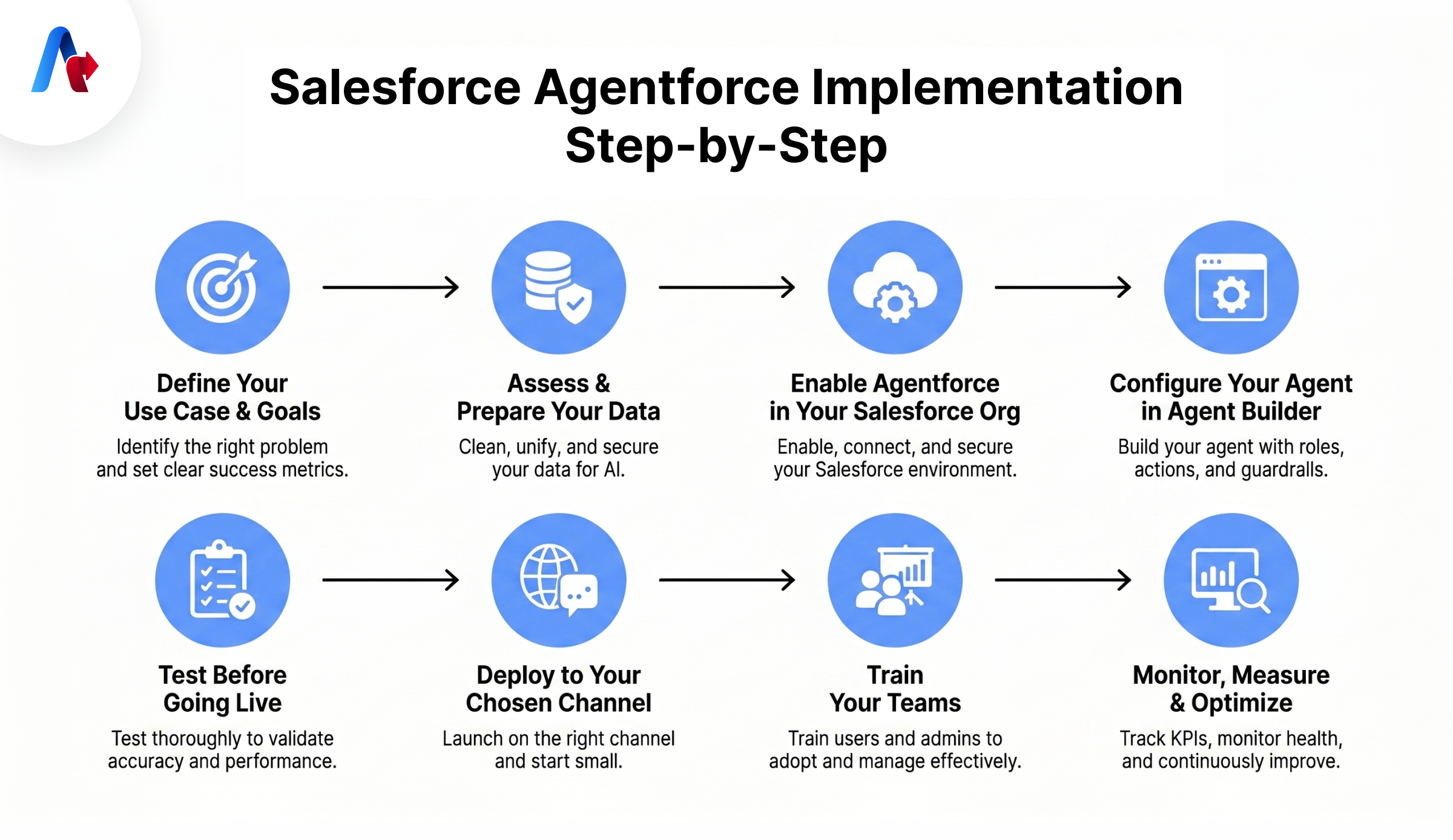
An organization that wants to succeed follows these steps to implement the Agentforce tool. It starts with a clear use case, clean data, and proper testing. More than that, it can also begin with one simple workflow, prepare their Salesforce data, configure AI agents in Agent Builder, test thoroughly, and then expand it across channels. Continuous monitoring and team training are also part of this implementation process.
Here’s how to deploy your first AI agent:
Step 1: Define Your Use Case and Goals
This is one of the common issues that most projects fail because the company tries one agent for everything. To avoid this, a company must define the specific problem it is facing.
- Identify high-volume and low complexity use cases in the beginning (e.g., resolving shipping disputes and answering billing FAQs)
- Define clear success metrics, such as resolution time, deflection rate, customer satisfaction score, and lead conversion rate.
- Identify the current workflow in detail (who does what, when, and with which data).
- Identify the stakeholders and users (who will interact with the agent).
Step 2: Assess and Prepare Your Data
This is the hardest part of the Salesforce Agentforce implementation steps, but it is very important. Your agent works better if the data is good.
- Audit your CRM data for duplicates, stale records, and incomplete fields.
- Make sure Data Cloud is on, and each customer has one clean and complete profile.
- Convert relevant knowledge articles to PDFs, SOPs, and policy documents into vector embeddings that the Atlas Reasoning Engine can index.
- Check security settings to restrict access to sensitive data appropriately.
- Configure the Einstein Trust Layer to mask PII before it goes to LLM.
Step 3: Enable Agentforce in Your Salesforce Org
As one of the popular Agentforce implementation experts, Accelirate recommends setting up the Salesforce platform first before launching your first AI agent. Start by opening Salesforce Setup with admin access. Then enable Agentforce, connect to Data Cloud, and make sure your organization has the correct licenses for use.
After that, turn on Einstein Trust Layer settings to keep customer data secure. This will ensure no data leaves and that it is protected in accordance with the major compliance standards. Finally, set the permissions and sharing rules your AI agents will follow. A strong setup like this will help the organization run smoothly and securely.
Step 4: Configure Your Agent in Agent Builder
The next step is to configure your agent in the agent builder. Follow these steps to implement Agentforce using this tool:
- Open Agent Builder from the Salesforce Setup menu
- Select ‘New Agent’ and describe your agent’s purpose in simple language.
- Define the agent’s Role, such as its persona, scope, target audience, and deployment environment.
- Next, set up the main conversation themes and task types, as they will guide how the agent responds and what actions it can perform.
- Connect the agent to Flows, Prompt Templates, and Apex classes. It is vital for an agent to perform tasks automatically, such as updating records, sending emails, or scheduling meetings.
- Write in natural language that explains what the agent can and cannot do, so you can prevent policy violations or unintended behavior.
- It is good to set a limit on agent conversations. A starting limit of 10 is advisable to prevent endless loops and reduce unnecessary Credit usage.
- Use Prompt Builder to create prompt templates that match your business needs, workflows, and brand voice.
Step 5: Test Before Going Live
Never deploy an Agentforce agent to production without testing it. This testing process will determine whether it is working.
- Run AI-generated business scenarios to stimulate interactions.
- Test typical interactions, edge cases, and other restricted scenarios.
- Validate agent behavior against your success metrics.
- Review audit logs for any unexpected actions, data exposures, and violations.
- If anything is wrong, refine prompts, permissions, and guardrails.
- Conduct user acceptance testing with a team member, and learn how it performs.
Step 6: Deploy to Your Chosen Channel
Your Agentforce deployment becomes more powerful when agents meet customers, so an enterprise can deploy it to:
- Website (embedded chat widget)
- Mobile apps
- Slack (for internal employee agents)
- WhatsApp and SMS (via Messaging in Flow)
A good strategy is to start with one channel and see how it works. Later, you can expand it to other areas. Instead, rushing multi-channel deployment may cause inconsistent agent behavior.
Step 7: Train Your Teams
There is no doubt that Agentforce can improve how your teams work, but employees use it only if they receive proper training. Once everything is ready, a business must teach both users and administrators how Agentforce works, what tasks AI agents can handle, and when the agents will pass it for human assistance.
Train especially administrators on updating topics, actions, and guardrails as business needs change. It also helps a group to adopt first and later support others in supporting teams in implementing the tool.
Step 8: Monitor, Measure, and Optimize
The deployment is not completed after implementation and training. New threats and technologies emerge, so it is vital for organizations to monitor how intelligent agents behave, measure their success and optimize for the new challenges. Here is how you can monitor the Salesforce AI agent.
Track KPIs including resolution time, customer satisfaction, lead conversion rate, agent usage, and cost per interaction
- Go for daily monitoring. Conduct daily monitoring of agent health and error rates.
- Run weekly validation tests to check agents' behaviors.
- Perform monthly regression checks, especially after any configuration change.
- Conduct quarterly reviews to identify new use cases for scaling.
- Use A/B testing to compare and improve outcomes.
- Update Data Cloud grounding indexes to ensure accuracy.
8 Steps of Agentfore Implementation
| Step | Action | Key Focus | Owner |
|---|---|---|---|
| 1 | Define Use Case & Goals | Identify high-volume, low-complexity tasks | Business Analyst / Project Lead |
| 2 | Assess & Prepare Data | Clean CRM data, enable Data Cloud | Data/CRM Admin |
| 3 | Enable Agentforce in Org | Admin setup, licenses, Trust Layer | Salesforce Admin |
| 4 | Configure Agent in Agent Builder | Roles, topics, flows, guardrails | Salesforce Developer |
| 5 | Test Before Going Live | Simulate scenarios, audit logs, UAT | QA + Stakeholders |
| 6 | Deploy to Channel | Website, mobile, Slack, email, WhatsApp | Dev + Marketing |
| 7 | Train Your Teams | Users and admins, change management | HR / Enablement |
| 8 | Monitor, Measure & Optimize | KPIs, A/B testing, quarterly reviews | Lead Ops / Admin |
Want help implementing these steps? Let Accelirate's certified team guide you.
Schedule a free assessmentWhat are the challenges in Agentforce implementation?
A company faces several challenges while implementing the Agentforce AI agent. It includes poor data quality, unclear use cases, a lack of employee training, security risks, and integration issues. As a business, you can mitigate these kinds of risk with proper strategies, governance, and monitoring.
1. Poor Data Quality
Data quality is one of the biggest problems in this group. It can happen in several ways, including duplicate records and outdated contact information, and it will affect your Agentforce deployments. If the data is bad, it leads to inaccuracies that damage your trust and adoption.
- Solution: Check the quality of your data before starting. Clean duplicates, update knowledge articles, and establish a data governance policy to maintain quality frequently.
2. Poorly Use Cases
Many think that a single agent can handle everything, but this will end up with AI handling nothing well. Agentforce implementation challenges like these will lead to vague output and poor actions that may harm reputation and leak sensitive data.
- Solution: Start with a single use case. Add more after validating each use case in production.
3. Lack of Employee Training and Change Management
There is no doubt that a technology like this will change how teams work. Without a proper plan in change management, employees may use AI agents incorrectly, affecting the ROI of the entire implementation.
- Solution: Invest in training programs and offer a bonus to encourage users. Explain clearly what agents do, what they do not do, and how human escalation works if they cannot handle a certain situation.
4. Security and Compliance Gaps
In some situations, intelligent agents use too much data or deploy without proper guardrails. Such a situation will expose sensitive information and create compliance issues.
- Solution: Explain the agent roles and data access. Use the Einstein Trust Layer for PII masking. Apply least-privilege principles to all agent permissions. Ensure action and output logging for compliance monitoring.
5. Integration Challenge
Some situations demand integration of third-party systems, legacy databases and external APIs. While integrating, a business encounters issues with authentication, data format and other relevant issues.
- Solution: Use integration solutions like MuleSoft for complex scenarios. Use the Salesforce API Catalog as a centralized repository and apply governance controls before connecting external systems.
A Fortune 500 global retailer faced problems across SAP, Salesforce, and Shopify. After Agentforce and MuleSoft integration, inventory lag dropped 90%, and they saved $3.8M per quarter. Read this full case study here.
Best Practices for Successful Agentforce Implementation
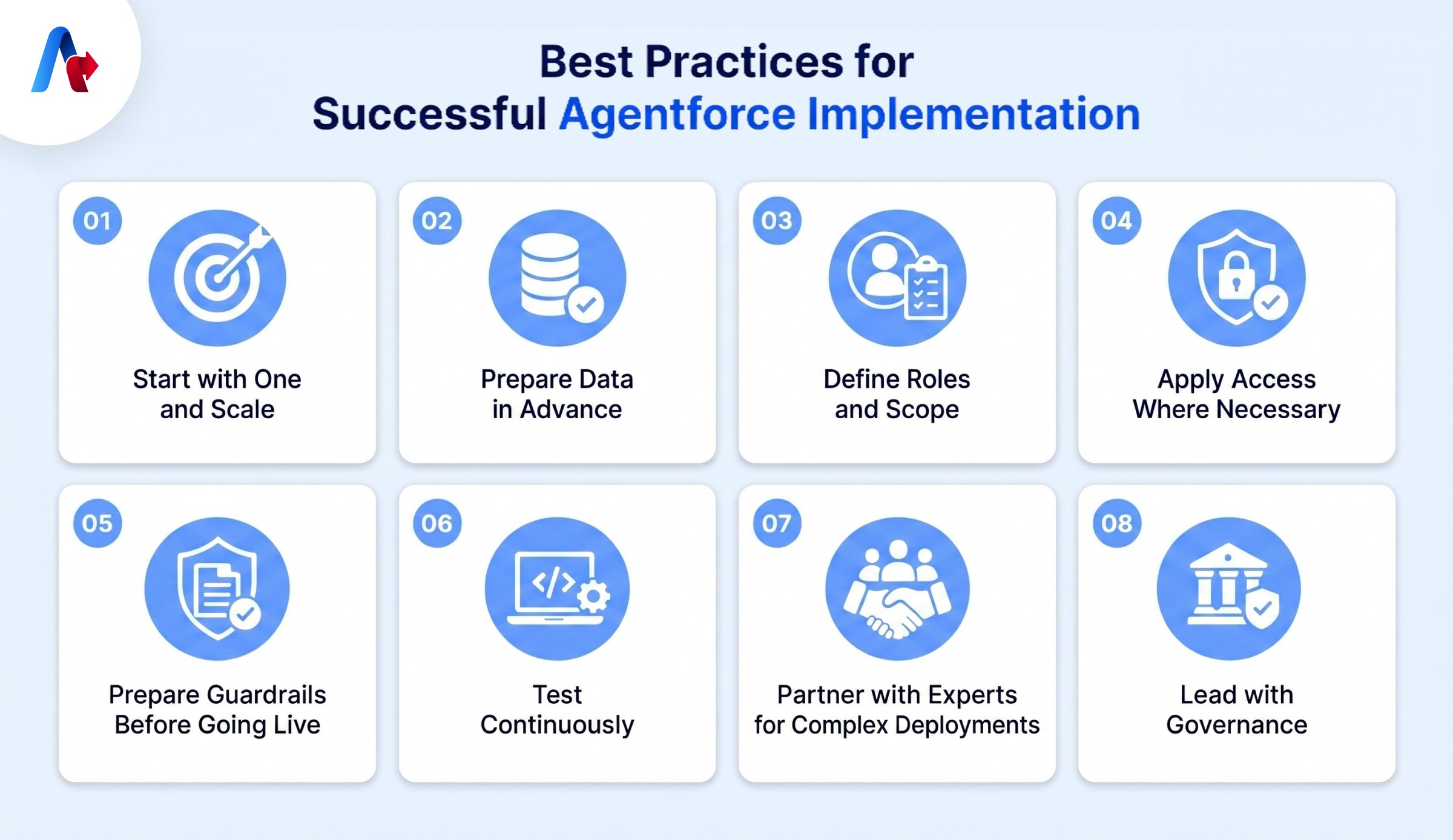
A good Salesforce implementation starts with one use case, clean data, strong security, and proper testing. As a company, you should apply a step-by-step approach, monitor the performance of the AI, apply guardrails, and refine prompts to achieve better results.
- Start with One and Scale: Pick one high-volume use case for your first agent. Check the performance, measure results, and expand it from there.
- Prepare Data in Advance, Not Later: Your implementation with Agentforce will be good if the data is clean, so you must start early before configuring agents.
- Define Roles and Scope: Mention what roles agents are going to perform and their scope. Document the agent’s purpose, actions, and the data it can and cannot access.
- Apply Access Where Necessary: Give access to agents where it is necessary, not in all areas. Over-permission will create security and compliance risk.
- Prepare Guardrails Before Going Live: Write natural language guardrails carefully, test them, and treat them as living documents.
- Test Continuously: Test the agent even after implementation. The goal of this process is to identify problems before users do.
- Partner with Experts for Complex Deployments: There can be situations where workers struggle with the processes. In such situations, it is better to partner with experienced service providers.
- Lead with Governance: It is vital to get the trust of the users and other stakeholders while using artificial intelligence. Show them the security controls, the audit logging, and the escalation protocols.
Start Your Agentforce Journey the Right Way
Agentforce is not like a chatbot or RPA, but a smart system that can help employees with its autonomous actions and continuously improve across the functions of your business to face future needs. An organization that works with traditional AI cannot expect this function to be there.
The result of this implementation is purely based on how well you do it. There are many things you need to care about here, such as clean data, clear use cases, testing, guardrails and more. With those in hand, an enterprise can reduce manual burden, improve speed and get maximum ROI.
The future of enterprise work is a combination of humans and AI, and if you take a step, you will become a successful person in business. Agentforce implementation makes the future available today and gives a smart way to handle tasks and problems. Always begin with one use case, see how it works and scale with others.
Start your Agentforce journey with an experienced partner who can guide you through the entire process.
Talk to our Agentforce ExpertsFAQs
Implementing Salesforce Agentforce involves eight important steps: defining your use case, assessing and preparing data, enabling Agentforce in your Salesforce org, configuring your agent in Agent Builder, testing to know the accuracy, deploying to the channel, training your teams, and monitoring for better outcomes. Understand that the success of your implementation is based on the strategy, data usage and configuring the agent before deployment.
While implementing Agentforce, a company needs admin access, data cloud, licensing and clean data. It is also vital to define use case, security settings, workflow and integration method. Beyond that, you should also consider testing, employee training, and governance to ensure AI automation work as expected.
A basic implementation can take four to eight weeks. If there are complex scenarios like multi-agent and integrations with legacy systems, it may take from three to six months, but it is based on the complexity. Working with an experienced partner can compress timelines and avoid common mistakes.
It is technically possible to implement Agentforce without a partner, but working with a certified partner can take the best from the tools and avoid consequences. An Experienced partner will bring deep knowledge, Data Cloud grounding, and MuleSoft integrations that may not be available with your present team. Most internal teams lack. If the integration is complex or highly regulated, it is better to seek help from a partner.