



Quick Summary
Delivery speed, quality, and reliability are the most vital parts of today’s software development, which wasn’t easy with traditional automation. This is why many businesses are integrating AI test automation tools in their development process. Automation testing is smart because it automatically detects bugs, scales testing, and speeds up your releases. When QA teams use AI-driven innovation, the testing becomes smarter and stays ahead of this competitive development landscape.
Software teams today release updates faster than ever. Many teams introduce new features every week or even daily that once stretched over months. Developing and testing with a standard tool helps businesses innovate quickly, but there is a greater risk of bugs reaching production.
Committing a small mistake in the application can affect user experience, revenue, and brand trust. This is why most smart teams use test automation tools in their software development to automatically detect mistakes early, reduce manual burden, and auto-heal when there is any change to the application.
AI testing solutions take different approaches for creating and maintaining automated tests, such as AI-assisted test creation and maintenance. These tools can also run tests faster, repeat them consistently, and validate application performance across browsers, devices, and environments.
According to McKinsey, organizations adopting AI in their software development are seeing 16–30% improvements in team productivity. When a team includes AI automation tools, they also see improvements of 31–45% in software quality.
This article today explores the best QA automation tools available in the market, compares leading platforms, and examines how they improve the quality of the software without wasting productive time.
What Are Test Automation Tools?
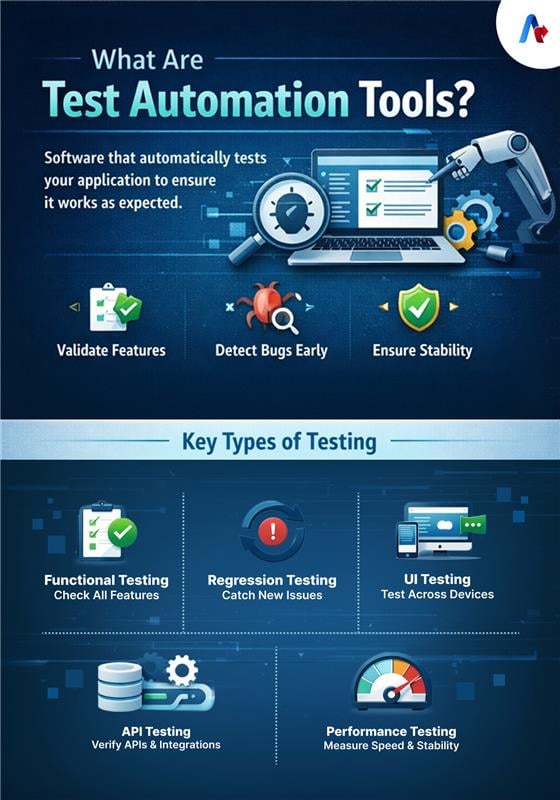
Automation testing tools are software applications that automatically execute test cases to ensure the software works as planned. Earlier, teams performed this task manually, which took up valuable time on repetitive steps, such as identifying changes, updating the script, and mitigating test maintenance.
These types of quality assurance automation tools can validate features, detect bugs, and ensure software stability. Some of the common functions of automations are:
- Functional testing – It can verify that all the features work correctly.
- Regression testing – This testing helps ensure that new changes do not affect existing features.
- UI testing – This testing can validate user interface elements across browsers and devices.
- API testing – Testers can check whether backend services respond correctly.
- Performance testing – It will check system speed and stability under load.
Top AI Test Automation Tools in 2026
The landscape of testing tools is not what you have seen before. Earlier, most QA teams depended only on scripted frameworks, but today, they combine QA tools with other AI automation platforms to improve software quality.
Now, let's go into the automation testing tools comparison that helps you choose one that fits your needs.
1. Accelirate QA Agentic AI Testing
Agentic AI automation is leading across every sector of business, and that is reflected in QA testing, too. Accelirate’s QA Agentic AI testing uses autonomous testing agents that perform various actions and optimize tests with minimal human intervention.
Traditional QA software mostly works on manual scripting. That's where the trouble lies: when the application changes, these scripts often fail, forcing your team to spend significant time fixing issues.
AI agents change this perspective by understanding testing objectives and generating tests based on scenarios. For example, if the goal is to validate a flow, the AI agent analyzes the application interface, identifies UI elements, creates test scenarios, executes them, and automatically verifies outcomes.
The self-healing automation capability of the Accelirate QA tool can detect UI changes and update test steps, rather than breaking the app completely. More than that, this tool can convert user stories into automated test cases, freeing up time for other essential tasks.
Key Features
- AI agents automatically generate and execute test cases.
- Self-healing for UI changes.
- Convert the requirement into a test.
- Cross-layer testing for UI, APIs, and workflows
- Continuous testing with the CI/CD pipelines
Best For: If you are an enterprise looking to adopt AI-driven autonomous testing and scale QA automation with minimal maintenance, this tool is the right solution.
Read a case study: How Agentic AI-Led COE Saves Over 40K Hours and 65% Costs in Testing for a Global Bank.
See how our service is different from others. Talk to our team right now and learn how you can improve QA testing.
Get a call from our expert team2. UiPath Test Suite
Some enterprises may seek a unified platform that not only supports automated testing but also handles other tasks. In that case, UiPath is your best choice. It is a tool that not only focuses on the UI or API layer but also helps test web, mobile, desktop, and enterprise systems, such as SAP and Salesforce, in a single place.
You can see many test automation tools, but this one stands out with its features, including autopilot and AI agents. Along with this option, a team can generate tests, manage test data and optimize test execution with minimal human effort.
Key Features
- Provide AI-powered test automation with built-in agents and self-healing.
- Offer you end-to-end testing across web, mobile, API, and other enterprise apps.
- An option available for a unified platform that supports application testing and RPA testing.
- You can opt for low-code or code-based test creation, depending on your requirements.
- Support CI/CD and ALM integrations.
Best For: If you are looking for AI-driven testing combined with RPA and scale testing across complex systems.
3. Tricentis (Tosca)
A large enterprise that looks for scalable and end-to-end testing can choose Tricentis. Instead of traditional scripting, this app uses a model-based and cordless approach to create reusable test components. This option is vital because it reduces the maintenance burden associated with application changes.
With features like Vision AI and agentic testing, it supports generating test cases from natural language, adapting to UI changes, and prioritizing tests according to the risk level. By focusing on high-impact areas, a QA team can avoid problems and improve its release confidence.
Key Features
- You get Model-based and codeless test automation.
- It creates test cases from natural language.
- Tosca provides self-healing automation with Vision AI.
- You can prioritize tests based on the risks.
- End-to-end testing across enterprise applications
Best For: This tool is suitable for large enterprises that are looking for AI-powered, low-maintenance, and risk-based testing.
4. Selenium
It is one of the QA automation tools fit for web application testing. This automation framework has been used for many years and still remains a good tool that offers the best option for testing software.
Selenium allows automating browser actions such as clicking buttons, filling forms, navigating pages, and validating UI elements. Since it is open source, many use this in their quality assurance framework.
Key Features
- Get cross-browser testing options across Chrome, Firefox, Safari, and Edge.
- Greatly support languages such as Java, Python, JavaScript, and C+.
- A team can integrate it with Jenkins and GitHub Actions.
- It gives a flexible framework for building custom automation solutions.
- You get extensive documentation opportunities.
Best For: This tool is suitable if your team is building custom web automation frameworks.
5. Playwright
Playwright is one of the best test automation tools by Microsoft for modern web applications. It helps a QA team with cross-browser testing by using a single framework. This tool supports Chromium, Firefox, and WebKit.
One of the greatest advantages of this tool is that it will wait for elements to load automatically before performing an action. An option like this can reduce flaky tests and improve software quality.
Key Features
- Testers can use cross-browser automation with one API.
- Automatic waiting for elements and page events.
- Parallel test execution across different areas for faster testing.
- Offer network request interception for debugging.
- Multi-language support, including JavaScript, Python, and Java.
Best For: Playwright is well-suited for teams building modern web applications that require reliable cross-browser testing.
6. Cypress
It is one of the most popular QA tools among developers and QA engineers. The difference is that this tool can directly integrate into the browser. This option is vital as the testers can observe application behavior while building.
This approach makes Cypress different from others. With this, a team can debug more easily and gain greater visibility into test execution.
Key Features
- Provide real-time browser-based testing.
- Automatic waiting for page elements.
- Offer time-travel debugging for analyzing failures.
- Built-in screenshots and video recording
- Strong integration with modern JavaScript frameworks
Best For: It is suitable for front-end teams focusing on UI and end-to-end testing.
7. Appium
Among these test automation tools, this one primarily focuses on mobile automation testing. With this tool in hand, a software team can test Android and iOS applications and ensure everything works as planned.
Appium interacts with mobile apps the same way a user would, so it is easy to validate real-world user interactions.
Key Features Include
- Cross-platform testing for Android and iOS.
- It supports multiple programming languages.
- You can test it with native, hybrid, and mobile web apps.
- Teams can integrate it with Selenium-based frameworks.
- Support for real devices and emulators.
Best For: Software teams developing cross-platform mobile applications.
Are you still comparing the tools? Let Accelirate help you with the right tools to give you more confidence when releasing your software.
Talk to our team today8. Robot Framework
Robot Framework is different from the rest for its keyword-driven testing approach. There are many QA tools, but this one uses natural language for its tests, so anyone can understand them more easily.
With this tool in hand, you can improve collaboration between developers, testers, and business stakeholders.
Key Features
- It supports keyword-driven automation testing.
- Provide you with readable test scripts for easier collaboration.
- Robot Framework supports API, UI, and acceptance testing.
- Easy to integrate with external libraries and automation tools.
- Get an extensible architecture with plugins.
Best Fit For: A team that wants simple and readable automation scripts.
If you are looking to build with existing AI, read: How to Build a Custom QA Agent Using Existing AI Models.
9. TestCafe
If you are looking for a test automation tool that is well-suited to a modern automation framework, this may be your choice. TestCafe allows testers to write automation scripts without browser plugins or WebDriver installations. It is particularly useful for teams that want a simple setup and fast test execution.
Key Features of TestCafe
- No need for WebDriver or browser plugins.
- Cross-browser testing support.
- It has built-in test runner and reporting tools.
- You can execute tests in parallel.
- Easy setup and configuration for the team.
Best Fit: Teams who seek quick setup and simple web automation testing.
10. Gauge
This is one of the test automation tools designed to simplify your test creation and maintenance. What makes it different is that it uses a specification-based testing approach, where teams get test scenarios in a readable format.
Gauge makes it easier for the team to define test behavior before implementing automation. This makes this tool one of the best automation testing tools with measurable results.
What are the key features of Gauge?
- QA teams get a specification-based testing approach.
- Produce human-readable test scenarios.
- Multi-language support.
- Integration with CI/CD pipelines.
- Provide an extensible plugin ecosystem.
Best For: QA teams adopting behavior-driven or specification-driven testing.
11. Karate
With the Karate QA automation tool, testers can check and verify APIs faster. The advantage is that you don't need a heavy setup to move with this application, as it is a lightweight framework.
The best part is that testers do not need to be expert programmers to use this tool. What they have to do is write test cases in a simple, easy-to-read format that almost anyone can understand.
Most modern apps and websites today work together. Considering this scenario, an API has its role to coordinate them, which makes API testing necessary. Karate helps teams do this test them easily, making it a popular choice among many software teams.
Important Features
- It simplifies API automation.
- You get built-in support for API validation.
- Companies can integrate them with performance testing tools.
- Need only minimal coding requirements.
- Fast execution for backend testing
Best For: Teams working with API-driven and microservices architectures.
12. WebdriverIO
You have seen many test automation tools above, but this one is unique as it is built using JavaScript. This tool works on two important technologies, such as WebDriver and DevTools protocols. They can help communicate with browsers and control them during testing.
WebdriverIO gives teams the freedom to build their own testing setups, so you can scale as the project grows. Many teams prefer this as it fits naturally into their JavaScript environments.
Key Features
- You get a JavaScript-based automation framework.
- Integration with WebDriver and DevTools protocols
- Support for UI and API testing
- Plugin ecosystem for extended functionality
- Easy integration with modern development tools
Best For: Teams building JavaScript-based automation frameworks.
Top Test Automation Tools Comparison (2026)
| Tool | AI Capabilities | Platforms Supported | Primary Use Case |
|---|---|---|---|
| Accelirate QA Agentic Testing | Autonomous agents, self-healing, test generation | Web, API, workflows | Enterprise AI-driven testing |
| UiPath Test Suite | AI agents, RPA testing, test generation | Web, Mobile, Enterprise apps | Business process + QA testing |
| Tricentis Tosca | Vision AI, risk-based testing, self-healing | Web, API, Enterprise apps | Scalable enterprise QA |
| Selenium | Get AI support via integrations | Web | Custom automation frameworks |
| Playwright | AI via integrations, smart auto-waiting | Web | Modern web application testing |
| Cypress | Get AI power through integrations, intelligent waits | Web | Front-end and UI testing |
| Appium | Limited with integration | Mobile (iOS, Android) | Mobile application testing |
| Robot Framework | AI via integrations | Web, API | Low-code automation frameworks |
| TestCafe | Supports AI through integrations | Web | Quick web testing setups |
| Gauge | Works with AI-powered tools | Web, API | Behavior-driven testing |
| Karate | AI-assisted (via external tools) | API | API and microservices testing |
| WebdriverIO | AI via integrations | Web, API, Mobile | JS-based automation frameworks |
Confused about which tool fits your QA needs? Don’t worry. Our team helps you evaluate and implement the right tool for your needs.
Get expert guidance nowHow to Pick the Best Test Automation Tool for Your QA Team
Before you select one, ensure the tool is a good fit for your work. This is because many look perfect on paper, but when put into practice, they do not help with testing.
The best approach is to evaluate a tool with clear criteria. The test automation tools list is wide, so choosing them is easy when you follow a structured method. Let’s see how you can do that.
1. Identify Your Testing Needs
This step is an important one because identifying your needs can clarify many things. Understand what type of applications your team needs to test. Different tools are designed for different environments, so learning what you want to test can help a lot in the beginning. Remember to ask questions.
- Are you testing web, mobile, or desktop applications?
- Which workflows or features require automation?
- Do you need UI, API, or performance testing?
2. Look for Automation-Friendly Features
QA automation testing tools should simplify the testing process. Look for tools that support automated builds, test execution, and testing to improve efficiency.
There are many tools that support continuous testing, such as automated test triggers during code generation. Such tools can help QA teams detect issues early in the development cycle, so you can avoid problems later.
3. Evaluate Coding Requirements
Assessing your team's technical skills is another important factor to consider when using test automation tools. If the QA team is comfortable with programming, they prefer tools that support popular languages such as Java, Python, or JavaScript.
On the other hand, some enterprises prefer codeless platforms. They are best because testers can create automated tests using visual interfaces. These tools are suitable for teams with only limited programming experience. Choose one that makes your automation adoption much smoother.
4. Ensure Platform and Device Compatibility
Good automation tools should support the platforms where your application runs. This means that the tools must have capabilities with:
- Different web browsers
- Multiple mobile operating systems
- Various devices and environments
Some platforms even support end-to-end testing across web and desktop environments, so your QA can validate entire user workflows without any trouble.
5. Check CI/CD and DevOps Integration
This is one of the most important parts of the tool selection. Teams must deliver software quickly, so a good test automation tool with agents should integrate with platforms such as Jenkins and GitHub Actions.
A good integration lets you run tests automatically whenever developers push new code. Continuous testing across all areas helps detect defects early and improves overall release quality.
Important read: How to Claim ROI Test Automation from Day One Using Agentic AI.
Future Trends in Test Automation Tools (2026–2030)
The software release cycle is not what you have seen before. Companies are now moving faster with updates that traditional systems struggle to handle. Modern automation tools are designed to handle such issues because they are more intelligent, adaptive, and integrated into the entire software development lifecycle.
One of the major shifts happening in this field is the use of autonomous testing with AI agents. Teams can save time on other vital tasks since this invention can automatically generate test cases. Autonomous agents in QA execute tests, detect failures, and even improve overall testing strategies.
Another trend in the QA side is prompt-based test creation. In this model, testers describe a scenario in simple human language, and the automation platform converts it into executable tests. This makes automation more accessible, especially for teams with limited coding knowledge.
Maintenance was the biggest challenge during testing, especially after the update. Now, this is easier with agentic QA testing. When a UI element changes, automation platforms automatically detect the change and update test steps without manual intervention.
An enterprise does not use a single application for its daily tasks. Instead, they use many, and it gets bigger every year. Running every test for every release is difficult, and it can slow down your process. AI testing tools are an advantage here because they analyze past results and prioritize tests where defects can happen. In this way, QA teams focus on the most important tests that need more attention.
Choose the Right Automation Tool to Move Your QA Strategy Forward
A modern software team cannot rely on manual testing alone in this competitive world. As releases move faster, a business needs smarter, scalable testing approaches to address challenges. The application you select should improve test coverage, reduce manual effort, and detect issues earlier in the development process.
Industry data also highlights how quickly automation is evolving in diverse areas. According to Gartner, 70% of enterprises are expected to integrate AI-powered testing tools into their software engineering by 2028, which was only 20% in early 2025. It shows how important test automation tools are in modern quality engineering.
If your team is evaluating current AI testing tools, a better strategy will help you reap maximum benefits from the implementation. With Accelirate expertise, you can build a scalable automation framework and improve releases without compromising quality. An experienced automation partner makes your testing into a strategic advantage for faster results that not only help today but also for future essentials.
Ready to test your apps with a tool that scales along with your business? Let’s talk today and design a QA test that fits your team.
Get StartedFAQs
Some of the best quality assurance automation tools for modern QA teams include Accelirate QA Solutions, Selenium, Playwright, Cypress, Appium, Robot Framework, TestCafe, Gauge, Karate and WebdriverIO. Most of these tools are designed to generate test cases, optimize test execution, and reduce manual effort, which saves time for other essential matters.
A tool that uses its AI power can offer many advantages to a QA team. It brings more speed to the test execution compared to the manual work, covers more areas such as browsers and devices simultaneously, provides coverage across browsers and devices, reduces human errors, and learn from the past to avoid mistakes in the future. A team can also check the quality of applications before delivery and ensure that changes in one area do not affect the whole system.
Some common factors to consider are the types of applications you need to test (web or mobile), programming language support, integration with CI/CD pipelines, cross-web support, scalability, and documentation. You need to choose a testing tool based on your project requirements and the skills your team needs.
Traditional QA mostly relies on scripted test cases, where teams must create and maintain them manually. The problem is that when something changes, the script needs manual updating. This is different from AI automation tools because it analyzes application behavior, generates test scenarios, and automatically heals when UI elements change. This will reduce the team's maintenance effort and make testing smarter and more adaptive.


