



Quick Summary
AI is changing how enterprises manage document workflows because it can largely replace manual processes and free up time for decision-related work. This type of automated tool can handle automated capture, classification, data extraction, and routing to the right person. Instead of your employees spending hours entering information and searching files, an AI document management system can process documents automatically and make work easier than ever. Through document processing and AI data extraction, a company can avoid frustrating their workers and utilize their skills where necessary.
Every day, your employees spend hours opening documents, copying data, and checking for mistakes. When you look at this, it may look like routine work, but think about it differently when they check thousands of invoices, contracts, claims, and forms. Now, your perspective will change because it is a costly affair now.
The solution for this is to use an AI document management system that uses OCR, machine learning, and natural language processing to read, sort, and route documents automatically to the right place. This method helps companies avoid manual filing, data entry and document handling, so employees can concentrate on what matters most.
In September 2025, Gartner published its Magic Quadrant for Intelligent Document Processing Solutions, clearly showing how document processing has become an important enterprise technology category. So, it is not just an office task; you can control and make it an auditable workflow that connects with existing business systems.
This guide explains how AI document management works, how it differs from traditional systems, and how it can reduce costs, errors, and processing delays.
What Is an AI Document Management System?
An AI document system is a software platform that includes artificial intelligence to read, understand, and act on documents with minimal human intervention. In the traditional method, we simply store the file, but in AI document processing, it can identify what a document is, extract the right information, organize it, and send it to the right person or store where it is necessary.
Through this method, a company can turn the documents into searchable, useful data and reduce the amount of manual work that once took days to process.
A traditional DMS is useful for storing files, creating folders, and searching by filename. This is different in an AI DMS because it is smart and reads the content of the document itself, understands context, generates summaries and moves documents to the right person.
For example, it can tell the difference between an invoice number and a purchase order number, even if they are in similar digits. An automated document system like this also sends an invoice for approval, flags contract clauses, and updates the business system automatically.
There is a difference when you plan in terms of budget: the old DMS is only used for storing, whereas the artificial intelligence DMS can automate solutions and improve work speed, not just store the documents of your organization.
What Technologies Power an AI Document Management System?
- Optical Character Recognition
- Machine Learning
- Computer Vision
- NLP and LLMs
In short, an AI document management system can automatically read documents, understand what they are, extract important information, and send that information to the right business process. Technology like this can reduce the manual effort employees take and data entry work to make searches easier than ever.
Why Are Enterprises Adopting AI Document Management Systems in 2026?
Enterprises are adopting automated documentation systems because manual document work can cause errors and slow down the process. Technology has also improved a lot, and using AI can help companies understand messy and inconsistent documents that take more time with the traditional method of document management.
What Is the Cost of Manual Document Work?
The cost of the old document method is not just connected to employee time. There are other problems with this, such as:
- Data-entry mistakes
- Create approvals delay
- Missed contract terms
- Slow reconciliations
- Compliance risks
- Growing backlogs
One inefficient document workflow can cost time and money. Not sure where yours stands?
Talk to our team for a quick workflow reviewIn one Accelirate project for a supply chain and logistics company, there was a problem where employees spent more than 50 minutes processing each transaction across over 150 repetitive manual steps. We used UiPath Document Understanding to solve this issue, and the result was like this:
- The company has reduced more than 12,300 hours of manual work.
- Saved over $740,000 each year.
- Reduced processing time by 60% for each employee
This is the best example of how one inefficient document process can cost your enterprise when you do not move with the latest technology.
What Are the Latest Market and Adoption Trends of AI-based Document Management System?
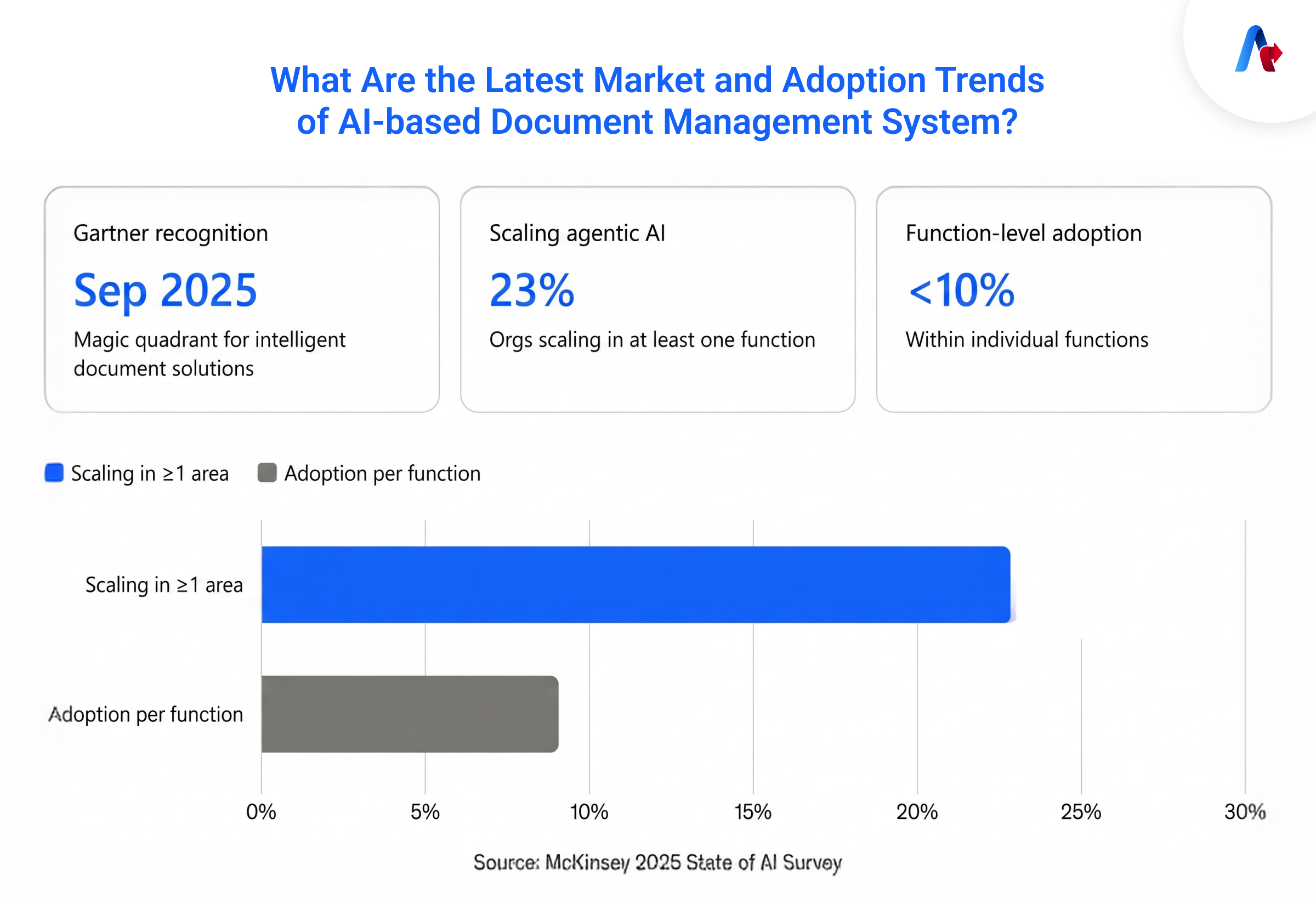
Organizations from small to big are moving from small AI experiments to daily document work. You can consider the following trends.
- Gartner published the Magic Quadrant for Intelligent Document Solutions in September 2025. This report shows that document processing is becoming more important, and more companies are accepting this as an established enterprise technology category.
- Accelirate’s 2026 AI and Automation report also says that automated document processing is the best place to start with AI. Workflows like this are repetitive, high-volume, and easy to measure, so as an organization, you can prove its value before expanding automation further.
- Another one is McKinsey’s 2025 State of AI Survey. It was found that 23% of organizations were scaling agentic AI in at least one business area to improve their productivity, but the adoption within individual functions was still below 10%. This is the same trend that we see in the document processing section too: plenty of pilots, but only a few are scaling.
What Accelirate sees in the AI document management system is that the problem isn’t with the technology. Most of the time, the client tries to automate everything in the first phase instead of starting with one important item, such as invoice and claim intake.
For example, one of our clients, TLF Graphics, started with accounts payable invoices and purchase order entry first. This method helped the company move into production faster and build confidence. Later, they expanded it to other processes.
Does Your Organization Need a Digital Document Management System?
The need for AI agent support for document management can be proven with these points:
- You have a team spending hours entering data from PDFs or scanned documents.
- Document backlogs delay payments, claims, audits, and other important work.
- Different departments classify documents in different ways that lead to confusion.
- Manual handling of these documents is increasing compliance and audit risk.
- Document volume is growing, and it is more than what your team can handle.
- Employees take on overtime to keep up with processing demand.
How Does an AI-Powered Document Management System Work?
An AI DMS works through a pipeline, where it captures from wherever they come, classifies and tags automatically, extracts and validates data, then routes through a workflow. All these processes happen while maintaining version control, audit trails, and compliance controls.
Document Capture and Ingestion
Documents usually come from email attachments, scanned uploads, shared drives, EDI feeds, and system integrations. A modern automation here collects, extracts and improves data without a single standardized format. A capability like this matters a lot because in the real enterprise scenario, you don’t get everything in one consistent shape.
Intelligent Classification and Auto-Tagging
After ingestion, the system identifies what kind of document it's looking at, such as an invoice, contract, claim form or ID document. Later, it adds useful tags and more details automatically. The advantage is that when the system processes more document formats, it becomes better at handling other types of files.
Data Extraction and Validation
The next process is to extract items, such as invoice number, vendor name and contract effective date. After this, it will cross-check them against business rules and existing records before moving forward. The validation process is what makes an AI-based document management system unique from old methods because it can identify errors early.
Workflow Automation and Routing
The validation is over, and now the system sends the document to the next step automatically. For example:
- An invoice goes to the right person for approval.
- If it is a claim, it will go for review.
- Some documents are not clear, so they go to the employees again for verification.
Search, Retrieval, and Natural Language Querying
This is one of the real advantages of AI documentation because a user can ask questions in plain language: "show me all vendor contracts expiring in the next 90 days". The system will search the entire area and give you the most appropriate answer.
Storage, Version Control, and Compliance
After completing the job, the system will record the change, approvals and users’ activity. More than that, it can also apply access controls, retention rules, and audit requirements on its own. This is important for industries where we have strict compliance requirements.
What are the Features of an Automated Document Processing System?
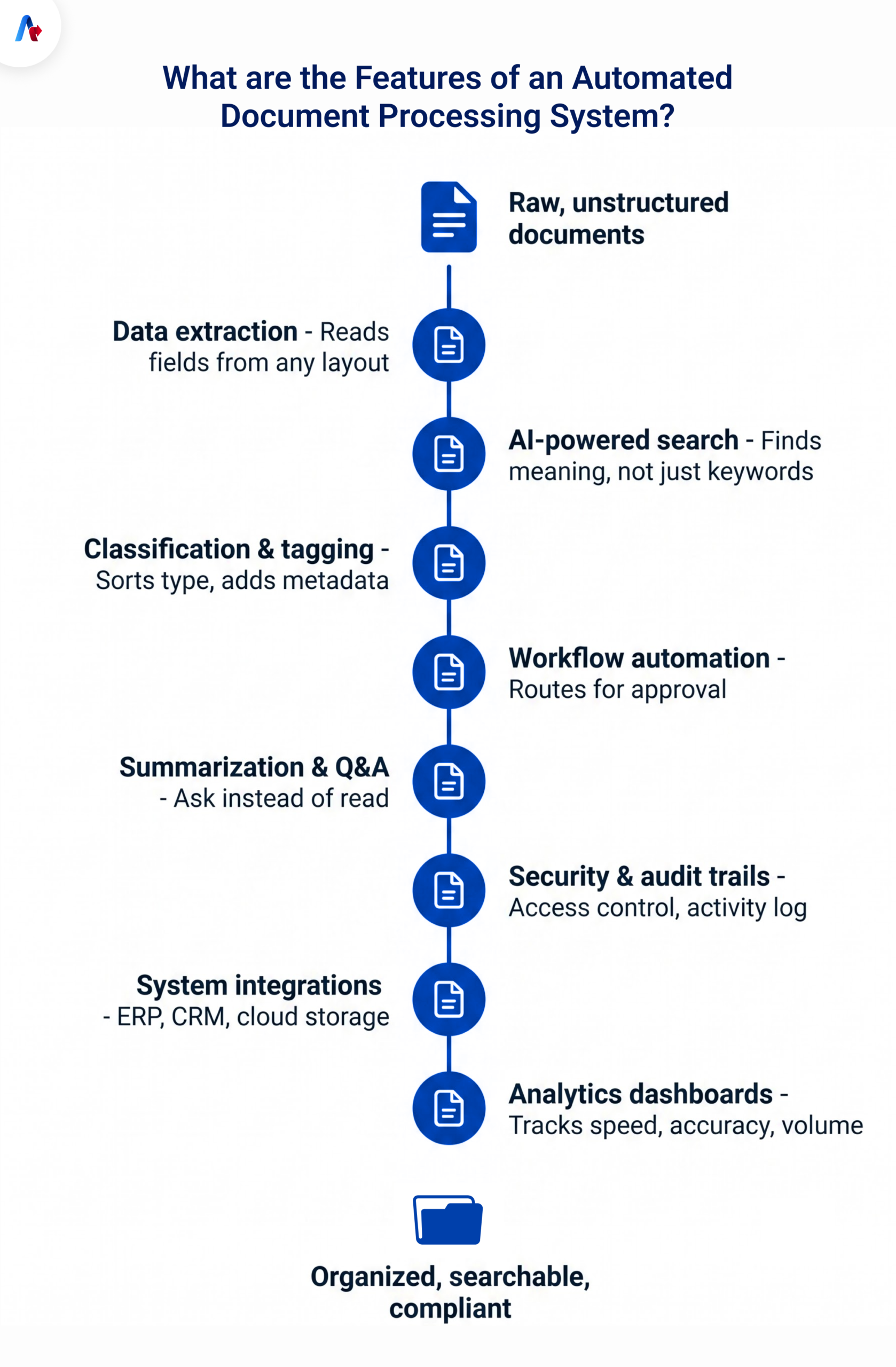
AI document management system features mostly depend on the organization and industry, but the common features include AI data extraction, AI-powered search, automatic classification, workflow automation, document summarization, secure access controls, system integrations, and analytics.
Intelligent Data Extraction and Field Recognition
In this feature, the system reads documents and extracts important information, such as names, dates, invoice numbers, totals, and contract terms. The advantage is that the automation can work with even unstructured documents and if the layout changes.
Accelirate uses similar Intelligent Document Processing services that combine OCR, machine learning, and validation rules. This tool also matches specific document types and business needs of your organization.
AI-Powered Search
AI-powered search is vital here to understand the meaning behind a search, not just the exact words used, but also semantic keywords. For example, if someone is searching for “termination clause”, the system can find more related contract language even when those exact words are not written in the document.
Automated Classification and Metadata Tagging
This part of intelligent solutions identifies the document type and adds useful tags. Through this option, it can recognize a file's invoice number, contract, claim, and other vital details, such as date, vendor, department, and account number. This is very important for organizing and searching documents.
Smart Workflow and Approval Automation
Now that the extraction and checking are over, the system sends the document to the next step, such as for approval and review. In the traditional method, this will happen manually by forwarding files and doing follow-up emails.
Document Summarization and AI Q&A
Here, employees can ask simple questions on contracts, reports and policies. Some of the example questions are:
- What are the payment terms?
- When does this contract expire with this vendor?
This AI document management system makes your work easy, all without reading the entire document.
Security, Access Control, and Audit Trails
The system controls everything, like who can view, edit, and approve documents. Also, it keeps recording all the activity, approvals and actions. These action records are significant for many industries, such as finance and healthcare.
Integration With ERPs, CRMs, and Cloud Storage
An AI-based document management system seamlessly connects with other tools, such as Salesforce, SAP, Oracle, Workday, SharePoint, Box, and cloud storage platforms. A step-up like this is vital today as it allows data to move directly into the systems employees already use without replacing everything.
Analytics and Reporting Dashboards
Finally, the dashboards show the document process is working. With this feature, a company can understand the number of processed documents, time taken, exception rates, level of accuracy, approval delays and the manual review volume. Through this, an organization can measure performance, identify problems and take next action.
Document Processing and AI Data Extraction: The Core Engine of Modern DMS
As an organization, you need to understand that just storing the document does not create operational value. The real value comes from how AI document processing turns those details into reliable information that can be searched, validated, analyzed, and used for real use.
What Is Intelligent Data Extraction?
Data extraction is a method of automation that can identify and pull specific pieces of information from a document. It can be anything like dates, amounts, names, clauses and convert them into usable data that a system can use without human support in each section.
What Is the Difference Between Structured and Unstructured Data Extraction?
Structured data has predictable formats, like standard application forms, tax forms and internal checklists. This is not the case with unstructured extraction because it does not have a fixed layout. For example, contracts, medical notes, emails, and reports.
Most of the time, enterprises will encounter a large number of unstructured categories, which is why you cannot use only basic OCR.
Difference Between Traditional OCR vs. AI-Based Data Extraction
| Capability | Traditional OCR | AI-Based Data Extraction |
|---|---|---|
| Converts images into text | Yes | Yes |
| Understands document type | Limited | Yes |
| Extracts fields by context | Limited | Yes |
| Handles layout variation | Limited | Stronger |
| Understands tables and relationships | Basic | Advanced |
| Supports semantic interpretation | No | Yes |
| Learns from reviewed documents | Usually no | Yes |
| Routes workflow based on content | No | Yes |
| Supports summarization and Q&A | No | Yes |
What Types of Documents Can a Document Management System Process?
This type of AI can process many types of high-volume data that include:
- Invoices
- Purchase orders
- Contracts
- Receipts
- Expense claims
- Insurance claims
- Patient records
- Identity documents
- Loan documents
- Tax forms
- Shipping documents
- Customs forms
- Resumes
Accuracy Benchmarks: How Reliable Is AI Data Extraction Today?
There is no benchmark on how accurate this tool is, but it is based on image quality, document consistency, language, field complexity, model selection, training, and validation rules. A company can measure accuracy by document type and by field rather than relying on one overall number.
Reports from AWS and Rocket Close show that a mortgage-document solution achieved approximately 90% accuracy across document segmentation, classification, and field extraction. AI document management system reduced processing from 30 minutes per package to under two minutes.
Accelirate also experienced a similar type of result by processing documents for a global enterprise. By using our tool, the client achieved 95% document-extraction accuracy and reduced claim-validation time from 30 minutes to under five minutes.
Accuracy mostly depends on your documents, not a generic benchmark.
Talk to our teamDocument Processing and AI Data Extraction: Types and Use Cases by Industry
AI document processing is famous across many industries today as it can reduce manual work, improve productivity, and move document workflows faster than before. Some of the common examples are:
How Is AI Used for Invoice Processing and Reconciliation?
A team can use artificial intelligence to extract invoice data, extract details in short, check with records and later send for approval automatically. The company also wanted to connect automation with its Label Traxx, a system that did not have native API support.
Our expert team stepped in and implemented a FastTrack solution for one of our clients that delivered:
- 89% faster order entry
- 70% higher accuracy
- No additional headcount required
Read the TLF Graphics case study.
In another project, a financial team of a national Professional Employer Organization was facing a problem with timing, as they must check the payment report every 15 minutes. This was creating problems with their payroll, and we used AI agents to monitor payment reports and improve invoice reconciliation.
What was the outcome of this solution?
- 95% less manual effort
- 70% faster reconciliation
- More than 2,500 hours saved each year
Read the invoice reconciliation case study.
Accounts Payable (AP) is a good place where you can start with automation. It reduces repetitive work and gives employees more time to focus on higher-value tasks without changing the entire department.— Ahmed Zaidi, CEO, Accelirate
How Is Automation Document Processing Used in Healthcare for Recording and Auditing?
In healthcare, AI documentation can collect, organize, review and send it to the person who is responsible. It is useful for medical records, claims, and compliance-related documents.
One of Accelirate’s auditing firm clients used manual methods to gather records from different areas, such as Patient Accounting, Medical Records, and Case Management teams. The problem is that the manual work took around two weeks and delayed their auditing work.
Our automation delivered:
- 40–50% less document-gathering time
- 20–30% faster audit completion
- 90% of audits completed on time
Read the healthcare audit automation case study.
How Does an AI Document Management System Help HR and Education?
In HR and education sectors, AI can manually classify the forms, extract vital information, identify missing documents and update the system. With manual work, employees may take days or even weeks to review a large number of files.
Stride is an online company that faces a similar type of problem, especially due to manual processes and data entry errors. They used our UiPath document management system to tackle this situation. Process enrollment documents in different formats.
The solution delivered:
- 72% of documents processed without manual input
- 79% automatic document classification
- Saved $67,000 annually
Read the Stride document processing case study.
How Does Automation Work for Contracts and Insurance Claims?
Today, many legal and insurance teams use AI document processing to review contracts, claims, policies, and supporting evidence. While using this solution, a company can:
- Identify the document types easily.
- Extract clauses, dates, and claim details.
- Find missing information.
- Flag if there are any unusual terms or exceptions
- Route complex cases for human review
Automation is a helpful tool here because these areas are where you face higher compliance risk, so AI documentation can improve accuracy and support compliance checks.
Have a problem in finance, healthcare, or claims paperwork? Our team can find the fastest, highest-ROI place to start automating.
Talk to an ExpertWhat are the Benefits of an AI Document Management System?
An AI document system is useful for a business as it can process documents faster, reduce errors, improve compliance, and reduce operating costs. It also makes your information easy to find and share, which took hours before. The important value of this tool is to remove repetitive manual work that allows employees to spend time making decisions.
- Speed Up Document Processing: Using an AI DMS removes manual steps and allows your team to work where it is necessary. It means the team can save time on data entry, file sorting, and document searches.
- Increase Accuracy: When a system processes the document, it can check against your business rules. In this way, you can avoid mistakes and catch any issues before they reach production.
- Improved Compliance and Audit Readiness: An automated document records everything, such as document changes and approvals. Whether you need it for compliance and auditing, the system will have everything to show to the right person.
- Cost Savings and ROI: The cost of document processing includes employee time, error correction, delays, and rework. The savings come here by avoiding manual work and improving productivity. Though the initial cost for the tool is high, in the future it will improve your ROI.
- Better Cross-Team Collaboration: In an organization, these questions are common: who has the latest file? Where is the document stored? Once you take this type of document tool in your organization, you can avoid these questions and reduce the chance of duplicate work.
AI Document Management System vs. Traditional DMS
Here is the comparison of traditional and AI DMS.
| Criterion | Traditional DMS | AI Document Processing | Accelirate's Recommendation |
|---|---|---|---|
| Search | Keyword and filename-based | Work with semantic and natural language search | Move to AI-powered search if your teams regularly search by content, not just filename |
| Data entry | Manual keying from documents | Automated extraction with validation | Prioritize AI DMS wherever manual work is high and repetitive |
| Classification | Manual folder/tag assignment | Automatic classification and metadata tagging | Automate classification first — it's usually the fastest win with the lowest risk |
| Workflow routing | Manual forwarding/approval chasing | Automated, rule-based routing | Combine automated routing with human-in-the-loop review for high-risk tasks |
| Compliance | Manual audit trail assembly | Automatic, continuous audit logging | Essential for regulated industries, so treat as a requirement |
| Setup investment | Low | High upfront cost but mostly based on the document complexity | Start with one high-volume document type to prove ROI before expansion |
Cost and ROI Comparison
Traditional DMS costs are usually low, where you need to spend on storage and licensing. This is not the case with AI DMS, because the costs scale with document complexity and volume. The fact is that this AI document management system can pay back in terms of labor hours and error reduction, as you have seen in the case studies.
The financial comparison should therefore include both software costs and the operational cost of the current process.
When Traditional DMS Is Still Enough
A team can still use this traditional document system when:
- Document volume is genuinely low.
- Your formats are already fully standardized.
- Manual review isn't creating any bottleneck.
- Manual processing creates little delay or cost.
- Your company does not need data extraction.
- Documents contain limited operational information.
Challenges and Limitations of Using AI in Document Management
There is no doubt that AI document processing can increase speed, but it has limitations, including system integration, poor data, and unusual document formats. A successful AI DMS needs the right balance between automation and human review.
- Legacy system integration is one of the major challenges companies may face. For example, TLF Graphics experienced issues with native API support and integration. In such cases, it will take more effort and time to create one, or they must use an external API.
- Human review for edge cases is another issue you may encounter. This can come if the scanning is not clear, if there is missing information, or if the document has an uncommon format. When automation is not confident, it should send it to human review because automating everything will lead to errors.
- Change management is the third area where we face limitations. A team that has worked manually for years needs training and assurance that this tool is not going to eliminate their work but remove repetitive work.
- Data quality issues can affect the performance of the AI, especially if the data is inaccurate or inconsistent. More than that, inconsistent vendor details and incomplete data can affect the quality of the AI document management system.
The Future of AI Document Management (2026 and Beyond)
The future of AI-powered document management will change as they are going to be more useful, secure, and easier to work with. The tool is mostly concentrated on storing and searching for files, but advanced technology in the future may allow people to understand documents and act faster than before. This will improve privacy, teamwork, and decision-making.
There is a prediction that AI will get better at long and complex documents. Today, it can give only a short summary, but in the future, it may also highlight risks, deadlines, action items and missing information.
The future of document reading may concentrate more on finding private and confidential information. With this action, the tool will be able to identify and protect information, such as:
- Personal details
- Financial information
- Medical data
- Customer records
- Confidential business information
AI can make the team more organized as it may suggest the right reviewer, collect feedback, explain what changed, and identify related documents. This ability will make the work easier for the team to work together in the company without losing track of versions and comments.
AI document management system is going to make search more conversational. With this option, a user can ask questions such as, when does this agreement expire? What are the main risks in this proposal? What changed in the latest version? The system will answer using the information inside the document instead of a long search.
There is also a new addition coming that may connect with security, identity, analytics, and verification tools. These tools are going to help determine whether a document is genuine, control who can access it, track changes and create stronger audit records.
This option in the future can make documentation work faster, safer, and easier to manage.
Turn Your Documents into Actionable Business Data
An organization that uses AI documentation can turn everything into usable business information. By using this, a team can classify documents, extract data, and find missing information. Apart from that, you can also route to the right approvals, answer questions, update systems, and preserve an audit trail for compliance.
But remember that the success of your implementation depends on the selection workflow, risk, understanding where human touch is necessary, measuring accuracy and who will own the process. A strong digital document management system will combine various things, such as workflow automation, integration, security, governance, and human oversight.
Accelirate is one of the leaders in AI document management systems, where we can help design and implement document-processing workflows using UiPath, AI, automated data extraction, and human-in-the-loop governance. Our solution can support industries like finance, supply chain, healthcare, education, and other document-related operations.
Ready to stop losing hours to manual document work? Talk to our Document Processing team to map your highest-impact opportunity.
FAQs
An AI-powered document system is software that uses technologies such as OCR, machine learning, and LLMs. With these, the tool can automatically capture, classify, extract data and route documents to the right person. This automated document system can avoid manual filing and data entry, and you also get an auditable and governed workflow.
The cost of an AI document system is based on document volume, format, and integration complexity. There is no fixed cost that we can say, but you can calculate the total cost of your current manual process versus the automated one over 12–18 months.
Yes, document management software can integrate with ERP, CRM, and other systems. Integration with legacy systems is a little more difficult compared to new ones, but with the right technology, we can overcome this situation.
Finance and accounting can benefit from invoice processing; the healthcare sector can record and audit documentation; the education sector will get help from enrollment processing, and the insurance sector will benefit from claims processing. All these industries can see strong ROI as they have more document volume and repeatable workflows.
While extracting data, the system uses various technologies inside, such as OCR to read the invoice. Machine learning is another one to identify and classify specific fields (vendor name, invoice number, amount, due date). With validation logic, the system can cross-check those fields against records like purchase orders before routing the invoice for approval.
There are many solutions in the market, like UiPath Document Understanding, but the best solution is always dependent on the types of documents you usually handle. It is also based on your current systems and your processing volume. A tool that works well for a standard form may not fit with unstructured documents. The safest approach is to test the solution with your own documents before making a final decision.
For this, an organization wants to see how documents are entered, moved, and stored in your system. Later, choose a platform, organize document types, set rules, and connect it with existing systems. In the final stage, you will be able to add AI for data extraction, search, and approvals, but make sure you test with one before expansion.