



Quick Summary
AI is already showing up in day-to-day healthcare work. It is helping teams read documents, sort requests, summarize information, check records, and reduce repetitive admin work. AI agents take that a step further. They can move between systems, follow rules, and trigger the next action without waiting for someone to do every step manually.
That sounds useful. And it is. But healthcare has a hard boundary: patient data. Once an AI system starts handling protected health information, or PHI, the question is no longer just whether the tool works. You need to know where the data goes. Who can see it. What gets stored. Which vendors are involved. And what happens if the system gets something wrong. That is the point of HIPAA-compliant AI automation.
What Is HIPAA-Compliant AI Automation?
HIPAA-compliant AI automation means using AI inside healthcare workflows that handle PHI while putting the right privacy, security, access, and governance controls around that work.
Think about a denied claim. An AI system might read the denial reason, pull the relevant information, identify what is missing, and suggest the next step.
Automation can then create a task, update a system, or route the case to the right person. The AI is doing part of the interpretation. The automation is moving the work forward. But the entire process still has to protect PHI. This is where teams can get confused.
A vendor may say its product supports HIPAA use. That does not mean every version of the product, every feature, every connected model, and every deployment setup is automatically safe for PHI.
There is no single HIPAA switch. The way the system is configured matters. The contract matters. The data flow matters. The people and systems that can access PHI matter too. So instead of asking only: Is this AI tool HIPAA compliant? Ask: Can this tool be used safely inside our HIPAA-regulated workflow? That question gets you much closer to the real issue.
A consumer chatbot and an enterprise AI setup may use similar underlying technology, but the way data is handled can be completely different. That difference matters.
Ready to explore AI automation for your healthcare workflows?
Talk to Our Healthcare Automation ExpertsThe Core Requirements for HIPAA-Compliant AI Automation
A healthcare team does not become compliant by adding encryption and signing one document. Several pieces have to line up.
Business Associate Agreements
Start with the BAA. If a third-party vendor handles PHI on behalf of a covered entity or business associate, the relationship generally needs a Business Associate Agreement.
The BAA explains how PHI can be used, protected, and disclosed. It also sets responsibilities if something goes wrong. The tricky part with AI is that one workflow may involve more vendors than it first appears.
You may have:
- an automation platform
- an AI model provider
- a cloud platform
- a document storage service
- connectors to healthcare systems
- logging or monitoring tools
Not all of them will necessarily handle PHI. But if they do, you need to know. A BAA with one vendor does not automatically cover every other service connected to it. This is why mapping the actual workflow matters more than reading a security page.
Access Controls
An AI agent should not be able to see everything simply because it needs access to something. Take an eligibility workflow. It may need patient demographics, insurance details, and coverage information. It probably does not need full clinical notes. That access should be restricted.
The same applies to people. Someone building an automation may need to configure a workflow without having broad access to patient records. A billing employee may need access to financial information but not every part of the clinical record. Keep permissions tied to the job being done. This sounds basic. In practice, it becomes harder as more systems, agents, and integrations are connected.
Read more: Automated Medical Document Retrieval and Processing
Audit Logs and Traceability
If an AI agent makes a mistake, your team should be able to figure out what happened. Not guess. You should be able to see:
- what triggered the workflow
- what data was accessed
- which tools or systems were called
- what the AI returned
- what action happened next
- whether a person approved it
- where the process failed, if it failed
A login history will not tell you that. AI agents can make several tool calls in a single workflow. If those steps are not visible, investigating a problem becomes much harder. Good logging is useful during audits, but it is just as valuable on a normal Tuesday when someone asks why a case went to the wrong queue.
Secure Data Handling
PHI does not stay neatly inside one patient record. It can appear in prompts. It can show up in uploaded files, model outputs, logs, backups, temporary storage, or cached data. That means security teams need to look beyond the final application.
- Where is the information processed?
- Where is it stored?
- How long is it kept?
- Who can retrieve it?
- What gets backed up?
- What happens when a workflow is deleted?
Encryption matters, both when data moves and when it is stored. But encryption alone does not answer the whole question. You still need to understand where the data goes.
Data Minimization
AI systems often work better when they have more context. Healthcare teams still need to be selective. If an agent needs five fields, do not send an entire patient record. If a task can be completed without identifiable information, remove it. If only part of a document is relevant, do not expose the rest by default.
There is a practical benefit here too. Smaller data scopes are easier to secure, easier to review, and usually easier to troubleshoot.
Human Oversight
Some workflows can run with very little human involvement. Others should not. To take an example a patient eligibility check is very different from an AI-supported decision that could affect treatment, coverage, or a high-value financial action.
That is where human review comes in. An AI agent may prepare the work. It may gather information. It may flag what looks wrong. It may even recommend an action. But there should be clear rules for when the system stops and hands the case to a person.
That is not a weakness in the automation. It is good design.
How Does HIPAA-Compliant AI Automation Work in Practice?
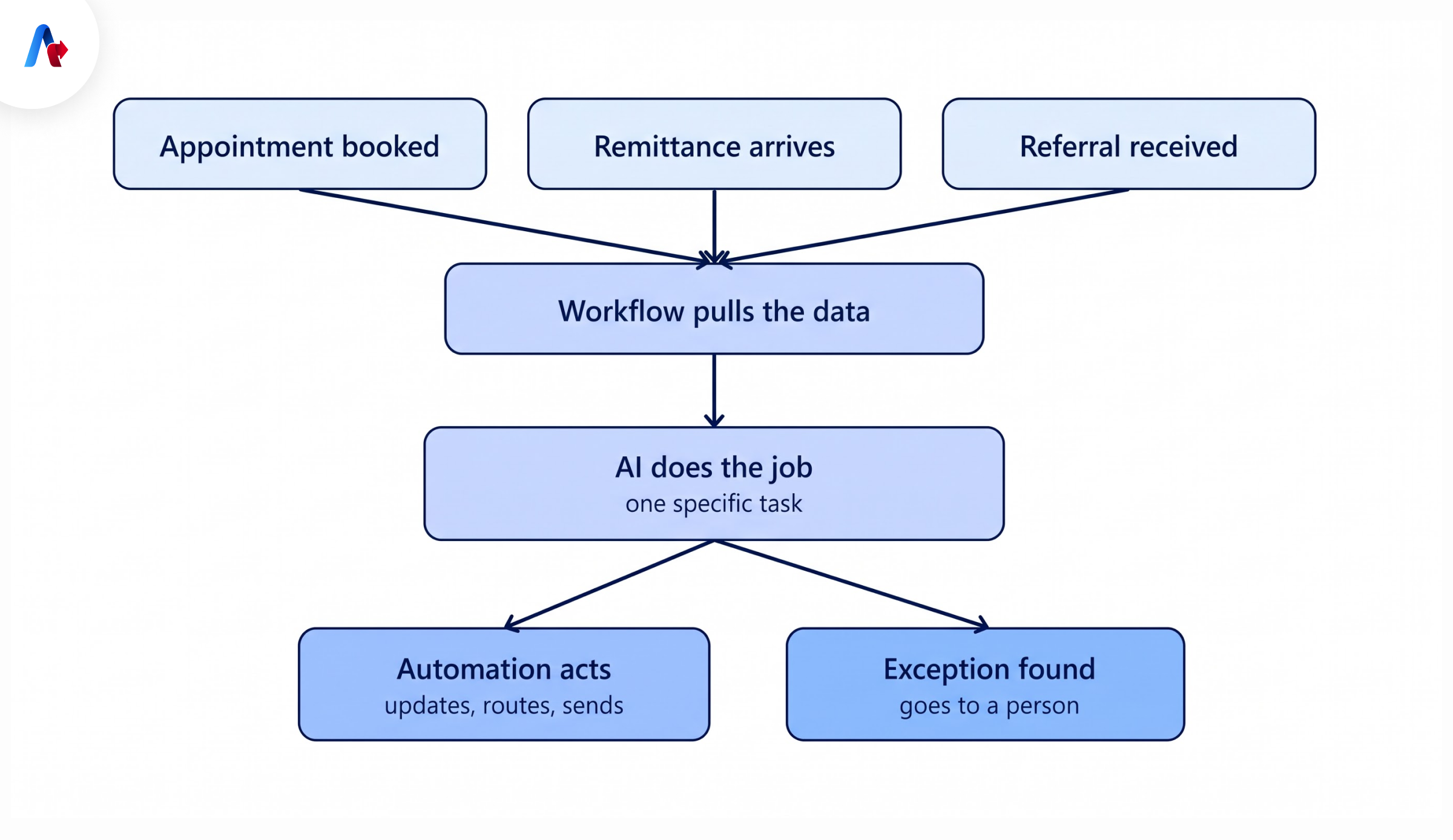
Most healthcare AI workflows are easier to understand when you strip away the technical jargon. But just in case when something happens, that becomes a trigger and claim is denied.
But in the case when a patient schedules an appointment. A remittance file arrives. A referral comes in. The workflow pulls the information needed for that task. Then AI does a specific job.
It might classify something, summarize a case, extract details, compare records, or interpret an unclear response. The automation takes over from there. It updates a system. Creates a task. Sends a request. Routes the case. Or stops.
That last option is important. Real healthcare processes are full of exceptions. Information is missing. Payer responses do not match. APIs fail. Documents arrive in strange formats. Patients have unusual coverage situations. A production workflow needs to deal with those cases without falling apart.
Sometimes the right next action is simply: Send this to a person.
Real-World Use Cases for HIPAA-Compliant AI Automation
1. Patient Eligibility Verification
A patient books an appointment. That starts the workflow. The automation collects the information needed to check coverage and sends the request through an approved payer channel. The response comes back. If it is clear, the workflow can update the patient's record.
If the response is messy or incomplete, AI can help interpret it, identify missing information, or classify the issue. Then there are two paths. A clean case moves forward. An unclear case goes to staff. The employee sees the problem with the relevant details already attached instead of opening three systems and starting again.
2. Prior Authorization
A service, procedure, or medication requires authorization. The workflow gathers the required patient, clinical, and insurance information from approved systems.
AI can help organize the documents, identify missing details, and summarize the information needed for the request. From there, automation can prepare the case for submission or route it for review.
Not every authorization should follow the exact same path. A straightforward case may move quickly. A complex case may need a clinician or specialist to step in. The workflow should know the difference.
3. Payment Posting
A new remittance file arrives. The system reads the payment and adjustment information and tries to match it to the right account.
A clean match is easy. An unusual adjustment code or inconsistent description is where AI can help. It can classify the exception, interpret the text, and suggest the likely match.
If the confidence is high and the rule allows it, the transaction can continue. If not, it moves to a queue. No guessing. No forcing the workflow through.
4. Denials Management
A payer denies a claim. The workflow pulls the denial reason, claim details, payer information, and supporting documents. AI can classify the denial and summarize what happened. It can also flag missing documentation or help prepare the next step.
Some administrative denials may follow a predictable path. Others may involve unclear payer rules, clinical questions, or high-value claims. Those cases should go to experienced staff. This is usually where AI adds the most value in healthcare operations. Not by replacing every person in the process. By getting routine work out of their way.
Explore how AI agents can help automate eligibility verification, prior authorization, claims, and other healthcare workflows.
Explore Healthcare AI AutomationHow to Choose a HIPAA-Compliant AI Automation Platform
A healthcare team can sit through a strong product demo and still learn very little about how the platform will behave with real patient data. That is the part worth testing.
Take one workflow you already know well. Eligibility verification is a good example. So is payment posting or denial handling. Walk through the process as it works today and mark every point where PHI appears, moves, gets stored, or reaches another system.
Now look at the platform against that workflow. Can it support the process without giving people or agents more access than they need? Can you see what happened after an action is taken? Do you know which vendor is handling the data at each step? Those answers are more useful than a long feature list.
Check the BAA Scope
A vendor may say it supports HIPAA use and can sign a BAA. Good. Now go one level deeper. Which product is covered? Which plan? Which API? Which AI model? Which features? This matters because a single platform may include services that fall under different terms.
An automation tool may use one company’s model, another company’s cloud, and several third-party connectors. The main vendor may be ready for HIPAA-regulated work while one connected service is not. That is why the exact setup has to be reviewed, not just the vendor name. If PHI can move through a service, that service belongs in the conversation.
Review Access Carefully
Access is easier to control when the workflow is small. It gets harder once more agents, users, systems, and teams are added. An agent checking insurance eligibility may need a patient’s basic information and coverage details. It does not need the full medical history. A developer may need to change workflow logic but may not need to view patient records.
A revenue cycle employee may need claims information without access to unrelated clinical data. The platform should let you separate those permissions without making the setup difficult to manage. Look at what users can see, but also look at what agents can do.
Ask questions like: Can an agent only read? Can it update a record? Can it submit something externally? Can it call another tool? Those permissions should be clear before the workflow goes live.
Look at the Audit Trail
Most platforms will tell you they support audit logging. That is not the same as showing you what actually gets recorded. Suppose an AI agent updates the wrong patient account. Nobody notices for two weeks. Can you go back and see what triggered the workflow, what information the agent used, which system it accessed, what action it took, and whether anyone approved that action?
You should be able to. That kind of detail becomes much more important once an AI agent can take several actions in the same process. A basic activity log may tell you that a workflow ran. It may not tell you enough to understand why the workflow made a certain decision. Ask to see a real example of the logs before you buy.
Find Out What Happens to the Data
This part is easy to overlook because most of it happens behind the interface. A user may upload a file, get an answer, and close the screen. That does not tell you whether the file was stored, whether the output was logged, or whether copies remain in backup systems.
So follow the data. Find out where prompts are processed. Ask whether uploaded documents are stored. Check whether logs can contain PHI. Understand how long model outputs are retained and whether your team can change those retention settings.
Also ask what happens when information is deleted. Does it disappear from the active system only, or from backups as well? And if the platform uses an external AI model, confirm whether your data can be used to train or improve a shared model. These are basic questions, but they often uncover more than a broad security statement.
Decide Where a Person Still Needs to Step In
Some parts of a healthcare workflow are easy to automate. Others need judgment. A denial workflow is a good example. An agent may be able to collect the claim, read the denial reason, pull supporting documents, and prepare a response. That can remove a lot of repetitive work. But a complicated clinical denial or high-value claim may still need an experienced reviewer before anything is submitted.
That handoff should be part of the workflow from the beginning. The same applies when the AI is uncertain. If required information is missing or the case falls outside the rules, the system should not guess just to keep the process moving. It should stop and send the case to the right person.
Do Not Ignore the Integrations
The AI platform is rarely working on its own. It may connect to an EHR, payer portal, clearinghouse, billing platform, CRM, document system, or internal database. Each connection gives the workflow another way to read or change information.
Check what each integration is allowed to do. Some may only need read access. Others may need to update records or send data to another system. You should also know what happens when a connection fails. This sounds operational rather than compliance-related, but the two overlap.
If a workflow updates one system and then fails before updating the next one, you can end up with inconsistent records. The team needs to know whether the process retries, rolls back, or sends the case for review.
Questions to Ask Vendors Before Signing
A few direct questions can save a lot of time later.
- Does the BAA cover the exact product and services we plan to use?
- Which AI models and APIs are part of that setup?
- Which subprocessors may handle PHI?
- Where is PHI processed and stored?
- How long are prompts, files, outputs, and logs kept?
- Can any of our data be used to train a shared model?
- Can we limit what an agent can read and what it can change?
- Can selected actions require human approval?
- What does the audit trail show?
- Can we export those logs?
- What happens if a workflow fails after completing only part of the process?
- How are security incidents reported?
- What happens to our stored data when the contract ends?
You may not get every answer from the salesperson on the first call. That is fine. A serious vendor should still be able to bring in someone who can explain the architecture and the data path clearly. If nobody can explain where your PHI goes, that is a much bigger concern than whether the demo looked good.
Talk with our experts about your workflow, integration requirements, PHI controls, and automation goals.
Talk to Our ExpertsRed Flags That a Tool May Not Be Ready for PHI
One claim to watch closely is "HIPAA certified." HHS does not provide an official product certification that automatically makes software HIPAA compliant. A vendor may still have strong security certifications or independent audits. Those are useful, but they answer different questions. You still need to understand how the tool will be used inside your environment.
Other signs deserve a closer look.
- The vendor will not sign a BAA.
- The BAA does not cover a feature you need.
- The company cannot clearly explain where PHI is stored.
- Customer data may be used to train a shared model.
- Agent actions do not appear in the logs.
- Users or agents receive broad access by default.
- Third-party integrations are poorly documented.
- Sensitive actions cannot be held for approval.
- Retention rules are unclear.
- Encryption is treated as the complete compliance answer.
A warning sign does not always mean the product is unusable. It does mean the team should understand the issue before moving ahead.
Risks and Penalties of Using Non-Compliant AI in Healthcare
AI compliance problems do not always begin with a large deployment. Sometimes they begin with one person trying to save ten minutes. A patient note is pasted into a chatbot for a quick summary. A claim is uploaded because someone wants help writing an appeal. A team connects a new AI tool to an internal system and assumes the security review can happen later. The intention is usually harmless. The data exposure may not be. Once PHI enters an unapproved service, the organization may need to determine what information was involved, where it went, whether it was stored, and who may have had access to it.
Privacy, security, compliance, and legal teams may all need to get involved. Depending on what happened, the organization may need to complete a breach assessment, take corrective action, issue notifications, or respond to regulatory review. There is a practical cost too.
Work may stop while the issue is investigated. Projects can get delayed. Security teams lose time to cleanup. Staff may become more cautious about using approved AI tools because confidence in the broader program drops. A small shortcut can become a much larger problem.
Getting Started With HIPAA-Compliant AI Automation
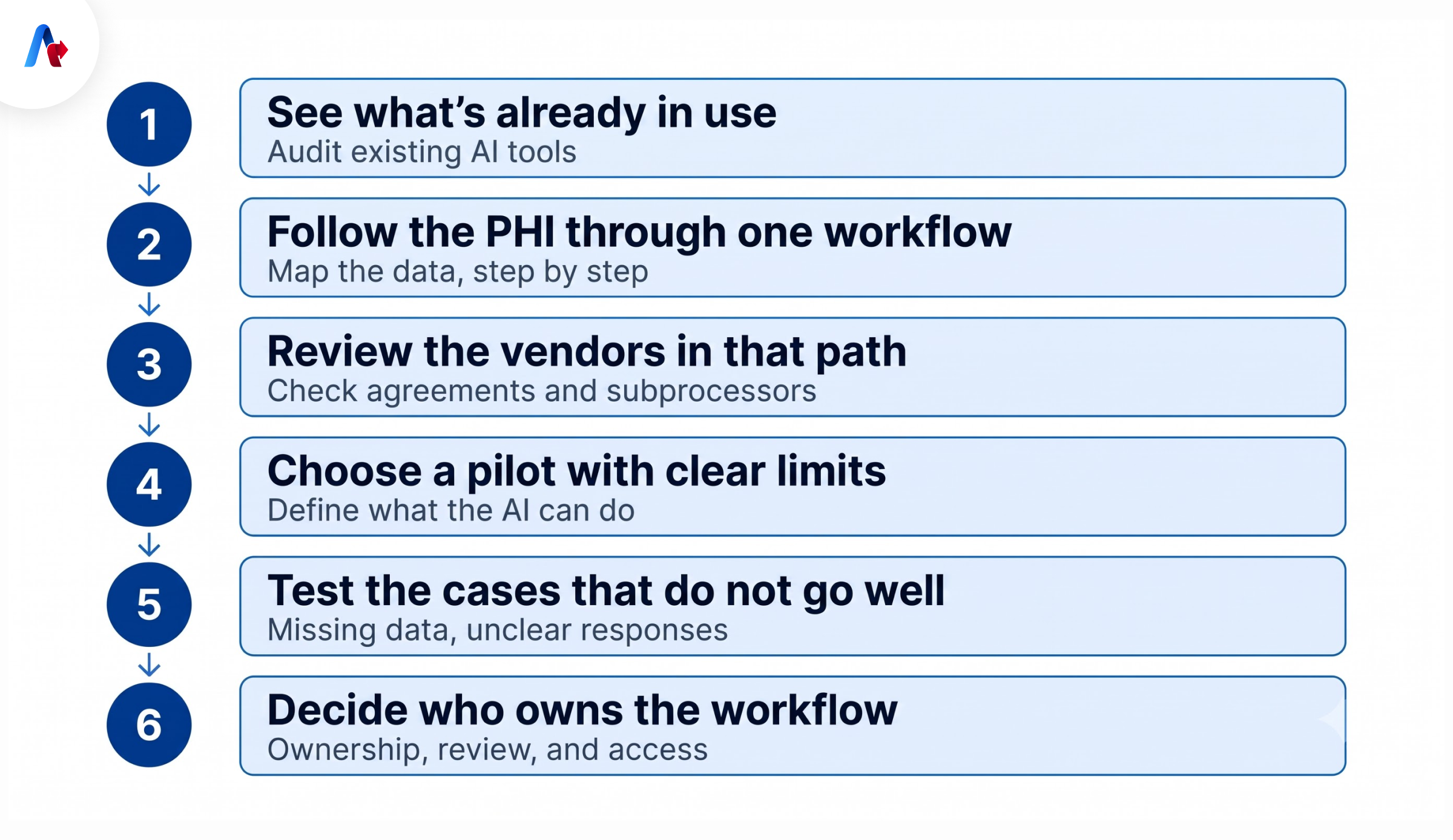
A first AI automation project does not need to be ambitious. It needs to be understandable. Choose a workflow where the inputs are known, the systems are easy to identify, and the team can tell whether the result is actually better than the current process. Then work through it carefully.
Step 1: See What People Are Already Using
Before adding another AI platform, find out what is already being used inside the organization.
Employees may use AI for emails, document review, research, summarization, or administrative work. Some of that may never involve PHI. Some of it may. You are trying to find the areas where patient data could be entering tools that have never gone through a formal review. That gives you a much clearer view of where the current risk sits.
Step 2: Follow the PHI Through One Workflow
Pick a process and trace the data from the first step to the last. For eligibility, the workflow may start with patient information, move to a payer, return with coverage details, and finish with an update in another system.
A denial workflow may involve claim data, payer responses, documents, an AI model, and a work queue. Write down which systems receive PHI and what they do with it. You do not need a complicated architecture diagram. A few boxes and arrows will usually tell you enough.
Step 3: Review the Vendors in That Path
Once the workflow is visible, vendor review becomes easier. You can see which companies actually receive, maintain, or process PHI instead of treating every technology provider the same way. Check the agreement that applies to each service.
Look at subprocessors as well, especially when the platform calls an outside model or cloud service. This is often where hidden gaps appear. The main platform may be covered correctly while another service inside the workflow is not. Finding that before launch is much easier than fixing it after patient data has started moving through the system.
Step 4: Choose a Pilot With Clear Limits
Your first project should be useful, but it should also be easy to control. Eligibility verification, claim-status work, document classification, administrative denials, and payment exceptions can all be reasonable starting points depending on the organization. Before development starts, agree on the boundaries.
What can the AI read? What can it change? Can it submit information outside the organization? Which decisions need approval? These questions are much easier to answer before the workflow becomes part of daily operations.
Step 5: Test the Cases That Do Not Go Well
The easy case usually works. The harder part is what happens when information is missing, two records look similar, a payer response is unclear, an API goes down, or the AI produces an uncertain result. Test those situations on purpose.
If the automation cannot continue safely, it should stop. Then the case should go to someone who can see what has already happened and continue from there.
That handoff is important. A workflow that sends every exception back to the beginning may technically work, but staff will quickly stop trusting it.
Step 6: Decide Who Owns the Workflow After Launch
Once the pilot is stable, someone has to own what happens next. Who can change the workflow? Who approves a new model? Who reviews exceptions? Who checks the logs? Who updates access when someone changes roles? Those questions become more important as more processes are automated. AI platforms also change quickly. New models are added. Connectors are replaced. Settings change. Features appear that were not part of the original review.
If one of those changes affects how PHI is handled, the workflow should be looked at again. HIPAA review should not be treated as something that happens once at launch.
Before You Scale AI, Follow the PHI
If your organization is scaling AI, do not start with the question, "Which AI platform should we buy?" Start with the workflow. See where patient data enters, where it moves, which systems touch it, and what happens to it after the work is done. That will tell you far more about whether the automation is safe, governed, and ready to scale. And if you are exploring HIPAA-compliant AI automation and want to understand how it can fit into your healthcare workflows, talk to our experts at Accelirate.
FAQs
HIPAA-compliant AI automation means using AI as part of a healthcare workflow that handles PHI while keeping the required privacy, security, access, and contractual controls in place. AI may help read, classify, summarize, or interpret information. Automation handles the surrounding process.
There is no single feature that makes an AI product HIPAA compliant. The organization needs to review the full setup, including BAA coverage, access, logging, data storage, retention, security controls, and any other services used in the workflow. How the tool is used is just as important as the product itself.
Standard consumer accounts should not be assumed to be appropriate for PHI. OpenAI and Anthropic offer certain enterprise and API options that may support healthcare use when the correct agreements and configurations are in place. Healthcare teams should review the exact service they plan to use because coverage can differ between products and plans.
There is no one platform that is the right fit for every healthcare organisation. The platform must be evaluated against the workflow it will support, encompassing BAA coverage, permissions, audit logs, data handling, integrations, and human approval steps. Also, examine whether the platform uses any outside models or third-party services.
Yes, when access and actions are limited appropriately.
An agent should only receive the information it needs for the task and should only be able to take actions that the organization has approved. Its activity should be logged, and uncertain or higher-risk cases should move to a person when needed.
HIPAA-compliant AI focuses on the AI system being used with PHI. HIPAA-compliant automation examines the broader process that transfers information and actions between systems. AI may do the interpreting or classifying, and automation may do the steps around it, all together.
A third-party vendor that creates, receives, maintains, or transmits PHI on behalf of a covered entity or business associate generally needs the appropriate BAA. Subcontractors can also be part of that chain. Following the PHI through the workflow will usually show which vendor relationships need review.
If PHI is entered into an unapproved AI tool, it may create an impermissible use or disclosure. The organisation will need to figure out what information was involved, where it went, and whether additional action is required. Depending on the circumstances, this could entail an internal investigation, breach assessment, corrective action, or notifications.
Related Blogs