



Quick Summary
Automation systems are not immune to errors. Applications timeout, APIs return unexpected codes, and business data sometimes arrives incomplete. Traditionally, exception handling in RPA relied on static “try-catch” logic that often stopped processes in their tracks. With UiPath Agents and Agentic AI, exception handling has evolved into a dynamic, intelligent process. Modern agents detect, classify, escalate, and even resolve exceptions autonomously reducing downtime, improving reliability, and keeping automation running smoothly.
Every automation journey reaches the point where something doesn’t go as planned. Applications crash, files go missing, APIs slow down, or business inputs fail validation. A successful automation strategy is not about preventing every single exception but about handling them intelligently.
With the rise of UiPath Agents and Agentic AI, exception handling is no longer limited to simple “try-catch blocks.” Now, agents not only find errors but also handle them by retrying, escalating, and resolving automatically. This approach helps organizations move from reactive automation to proactive exception management, ensuring processes continue running even under unexpected conditions.
In this article, we’ll see how to handle exceptions in UiPath Agents, the types of errors you’ll come across, and practical examples of escalation strategies.
Want to make your automations more resilient?
Start by auditing how your UiPath Agents handle exceptions todayUnderstanding Exceptions in UiPath Agents
Before building an exception-handling strategy, it’s important to understand the two major categories of exceptions that UiPath Agents encounter.
1. Business Exceptions
These occur when the process logic is not followed. Meaning when the input data or business logic doesn’t meet defined rules. The automation itself is fine but the data it processes isn’t. These exceptions usually require human intervention because the data itself needs correction.
Here are some examples:
- Missing policy number in an insurance claim
- Invalid date of birth in a patient form
- Incorrect invoice amount or tax field
2. System Exceptions
These happen when something technical goes wrong like application crashes, API errors, or infrastructure timeouts. Unlike business exceptions, system exceptions can often be handled automatically through retries or alternate workflows.
Here are some examples:
- API returns 500 Internal Server Error
- Email server temporarily down
- Network timeout when accessing SAP
UiPath Agents intelligently distinguish between these exception types, automatically routing each to the most efficient resolution path whether retrying, escalating, or resolving autonomously.
Best Practices for Exception Handling in UiPath Agents
Let’s look at some of the best practices that can enable you to handle exceptions much better in UiPath Agents.

1. Use Try-Catch-Finally Wisely
The foundation of any exception strategy is still the Try-Catch-Finally construct, but with UiPath Agents, it goes beyond simple error trapping. This ensures your agents don’t just detect errors, they leave your environment stable after an interruption.
- Separate BusinessException and SystemException in your logic.
- Add structured logging in each catch block.
- In the Finally section, ensure cleanup tasks like closing applications or releasing resources happen smoothly.
2. Leverage Smart Retry Mechanisms
Not all exceptions require human attention. Many system issues like slow connections or transient timeouts can be resolved through retries.
- Use Retry Scope activities to automatically attempt transient operations.
- Configure Orchestrator Queue retries for transaction-level exceptions.
- Define exponential backoff strategies to prevent overwhelming systems.
Example: If a database connection times out, an agent can retry after 5, 10, and 30 seconds before escalating minimizing disruption without human input.
3. Implement Logging & Alerts
Without good visibility, even the smartest automation can fail silently. Send detailed logs to UiPath’s Orchestrator that integrates with tools like Elastic Stack, Application Insights, or Splunk to centralize logs and performance data. This data also becomes valuable input for continuous AI model training.
Set up:
- Real-time alerts via email, Microsoft Teams, or Slack for escalated exceptions.
- Custom dashboards to track error frequency and resolution time.
- Audit trails to trace escalations and interventions for compliance.
4. Design Agent-Driven Escalations (Human-in-the-Loop)
In some cases, an agent needs a human touch. UiPath’s Action Center enables human-in-the-loop collaboration when data or business judgment is required. These are tools used to involve users in agent’s running process, evaluate or validate an agent’s decisions and supply input that the agent might not have. We use UiPath Action Centre for human-in-the-loop interventions. You can configure escalation severity (critical, moderate, or low) to ensure priority handling.
When an exception occurs:
- The agent routes the case to the right SME or department with all pre-filled details (claim ID, error logs, screenshots).
- Users review, correct, or approve the task.
- The agent resumes processing automatically after validation.

Real-World Examples of Exception Handling and Escalation in UiPath Agents
Let’s see how these principles work in practical automation scenarios.
Example 1: Document Understanding Failure
Scenario: An invoice misses a mandatory “Tax ID” field.
How the Agent Handles It:
- The agent validates extracted fields.
- Detects missing data → raises a Business Exception.
- Exception is routed to Action Center for human correction.
- Business user inputs missing Tax ID.
- The agent resumes posting the invoice into ERP.
Flowchart:

Outcome: The process continues without stopping the overall workflow.
Escalation Benefit: Prevents process failure while ensuring compliance with tax regulations.
Example 2: Claims Processing in Healthcare
Scenario: A healthcare claim submission fails due to an invalid insurance policy number.
How the Agent Handles It:
- The agent validates the policy number in the insurance database.
- The lookup fails → Business Exception raised.
- Agent categorizes escalation type:
- If policy exists but inactive → escalate to Claims SME.
- If policy not found → email customer support for correction.
- Once resolved, the resolution is logged for AI learning.
Flowchart:

Outcome: Fewer claim rejections, faster turnaround, and smarter future automation.
Escalation Benefit: Reduces claim rejection rates and improves turnaround time.
Healthcare automation teams report up to 35% fewer claim errors after implementing AI-driven exception handling (UiPath Customer Case Study).
How UiPath Agents Manage and Improve Exception Processes?
Exception handling isn’t a one-time setup; it’s a living system that improves with experience.
Here’s how to keep your automation resilient and evolving:
- Standardize procedures: Define consistent retry, escalation, and logging rules for all agents.
- Measure performance: Track metrics like resolution time, escalation frequency, and repeat errors.
- Feed learnings back: Use resolved exceptions to train AI models for future prevention.
Introducing Agent Memory
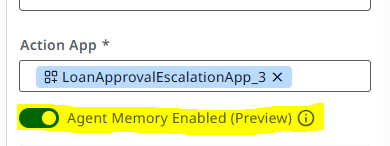
Agent Memory is a service provided in each agent that allows it to maintain the facts and observations of all the traces/runs. It enables agents to make more informed decisions with help of past escalations and their resolutions, hence supporting long-term memory alongside Context Grounding indexes. UiPath’s Agent Memory allows agents to “remember” past resolutions. Each agent stores facts and learnings from previous runs in a shared memory space. This feature supports contextual and long-term learning, helping agents make more informed decisions and reduce redundant escalations.
Here’s how it works:
- When an exception occurs, the agent checks if a similar case exists in memory.
- If found, it applies the same resolution automatically.
- If not, it escalates and then saves the new outcome for future reference.
The Future of Exception Handling in Agentic Automation
UiPath Agents in the future will not only handle exceptions but also predict and prevent them. Imagine an agent that detects a slowing API before it fails, or one that automatically learns to correct recurring data mismatches without human help.
With AI and orchestration, handling exceptions will change from responding after errors occur to predicting and avoiding them, showing how far digital transformation has come.
Gartner predicts that by 2027, 60% of automation workflows will include predictive exception management powered by AI agents.
Turning Exceptions into Intelligent Opportunities in UiPath Agents
Exception handling is no longer about “try and catch.” With UiPath Agents and Agentic Automation, it’s about catch, classify, escalate, and resolve — all while keeping the business moving forward.
By combining automation, AI, and human collaboration, organizations can transform exceptions from painful roadblocks into opportunities for continuous improvement. The result? A resilient automation ecosystem where agents not only work faster but also work smarter. Small improvements in escalation and memory handling can yield massive reliability gains tomorrow.
How much time could you save if your agents remembered every resolution they’d ever encountered?
Let’s find outFAQs
Business exceptions occur due to invalid or missing data. System exceptions are technical issues like timeouts or application crashes. UiPath Agents handle each differently, escalating business issues and retrying system ones.
Through Action Center, agents send exception details to business users or SMEs for human validation and correction. Once approved, processing resumes automatically.
Agent Memory allows agents to store past resolutions, helping them automatically resolve similar future issues without human input.
Yes. With AI and orchestration, agents can analyze historical trends to predict potential issues—like slow APIs or recurring validation failures, before they impact workflows.
Unresolved exceptions cause downtime and manual intervention costs. Smart exception handling reduces disruptions, boosts accuracy, and increases the scalability of automation programs.