



Quick Summary
UiPath Data Fabric is a new tool where you can unify enterprise data from multiple places into a single place. In this way, AI and automation agents will be able to access data in real time and work effectively with more precision. By connecting various things, such as ERP, CRM, emails, PDFs, and cloud platforms, this platform can support scalable automation and improve decision-making in industries like banking, telecom, healthcare, and retail.
UiPath Data Fabric or Data Service is a new cloud-based tool that is created to help organizations connect data from different systems in one place, without moving the data. This is an app that will allow AI agents to access data using a simple no-code setup in real time. Whether you are in banking, telecom or retail, it can solve the problem of disconnected data by connecting everything in real-time, which helps automation work more accurately without any duplication of work.
Think about a situation where an organization runs on several systems where HR uses one tool, payroll uses another, customer data is spread across CRM, and the approvals take days. That means that the data is fragmented, duplicated, and trapped in different areas. This is a challenge for an agentic ear like this because if the data is scattered, the AI cannot give an accurate answer, and it will affect the final output too.
This is a big problem for many people. Forrester research found that workers lose an average of 12 hours every week simply searching for information across disconnected systems.
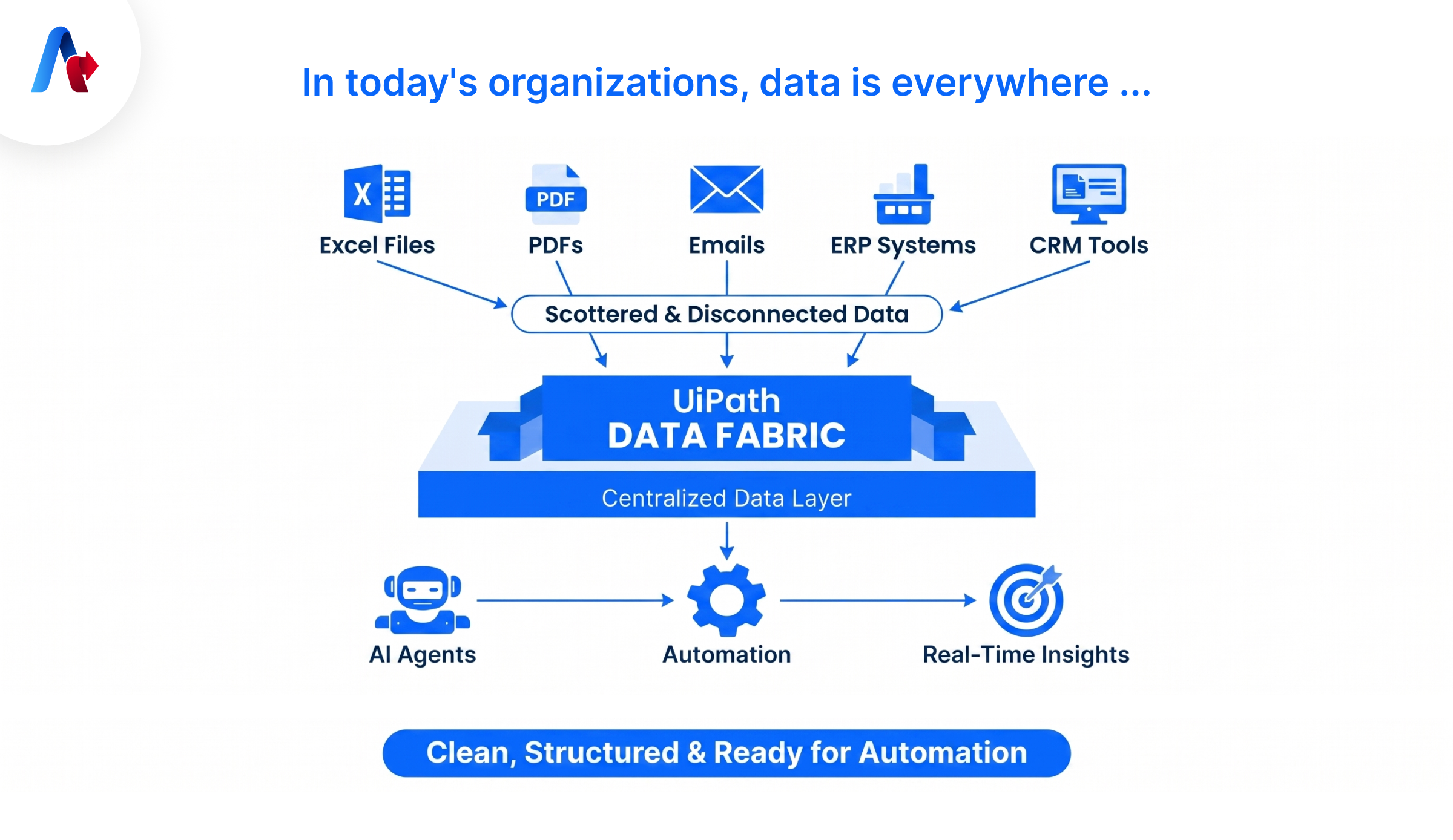
That is what UiPath Fabric is trying to solve. With this tool, a company can connect and unify data such as Excel sheets, PDFs, emails, ERP systems and CRM tools. This blog explains what UiPath AI Fabric is, why it is important, talks about its core concepts and features and its latest updates and details.
What exactly is UiPath Data Fabric?
UiPath Fabric, also called Data Service, is a cloud-based data storage and management service that allows enterprises to manage and orchestrate business data without coding. You can think of it as a structured, secure, and scalable central data layer that makes all the company’s data ready for automation and AI agents.
Instead of copying data across platforms, UiPath services organize everything in a single central place that AI can access easily. It uses tables and rows to create a single reliable source of data that AI can access and use when necessary.
A Simple Example with an Indian Office Scenario
Look at a company in Pune managing employee details in two different ways.
Without Data Fabric:
- Excel file for HR
- Database for payroll
- Emails for approvals
With UiPath Data Service, this will look different:
- One employee entity
- Fields like name, salary, department
- All systems use the same data.
The advantage of this connected system is more because they avoid confusion, duplication, and provide a better environment for employees.
Why Data Fabric is Important in Today’s AI World
AI agents are becoming common in automation as they can perceive, make decisions and act with limited human interventions. But the fact is that AI agents are only as smart as the data they can access. They work accurately based on the data we provide them as input.
Most companies face problems like data silos, duplicate data, or outdated information. Data Fabric solves this by providing real-time data access, removing duplication, and connecting systems.
According to Gartner, data quality can cause a huge amount for organizations. It means that data is more important, especially in this agentic world. With this solution in hand, you can avoid such losses and maintain the company’s goodwill.
Most organizations dealing with agentic AI have these issues. Their AI can handle the logic, but the data is scattered. An agent is trying to do something as seemingly simple as assigning a salesperson to a new account.
In this scenario, the AI needs to pull data from different places where there is no duplication. By using UiPath Data Fabric, an organization can ensure that the AI they use provides accurate data and works as expected.
Example of Banking Use Case in India
A bank processes hundreds of loan applications every day. The challenge is that the information is stored in different places, such as
- Customer data is in CRM.
- Income data uploaded in PDF.
- Emails for approvals
The data is here disconnected, and the employees must spend more time collecting and validating information manually. This will slow every process.
Solution with the UiPath Services
- All data is stored in one place.
- Connected everything to a structured entity
- An AI agent checks eligibility instantly for the loan approval.
Result
- Faster loan approvals
- Reduced manual effort
- Better customer experience
- More accurate decision-making
Want the same results for your enterprise? Our certified UiPath experts help you connect data and deploy intelligent agents fast.
Talk to our team.
What are the Core Concepts of UiPath Fabric?
If you want to understand how data services work, you need to understand their basics. Let’s see the concepts in detail.
1. Entities: These are also known as tables. Entities are the main building blocks where data is stored.
Example:
- Customer
- Invoice
- Employee
2. Fields (Columns): They are also called columns and explain the type of information stored in an entity.
Examples:
- Text
- Number
- Date
- Yes/No values
- File attachments
3. Records (Rows): Records are called rows. They are the actual data entries stored inside the entity.
Example of the Telecom Industry
- Entity: Tower Equipment
- Fields: Equipment Type | Quantity | Manufacturer
- Record: RRU | 3 | Ericsson
This structure makes automation easy and avoids confusion.
Key Features of UiPath Data Fabric
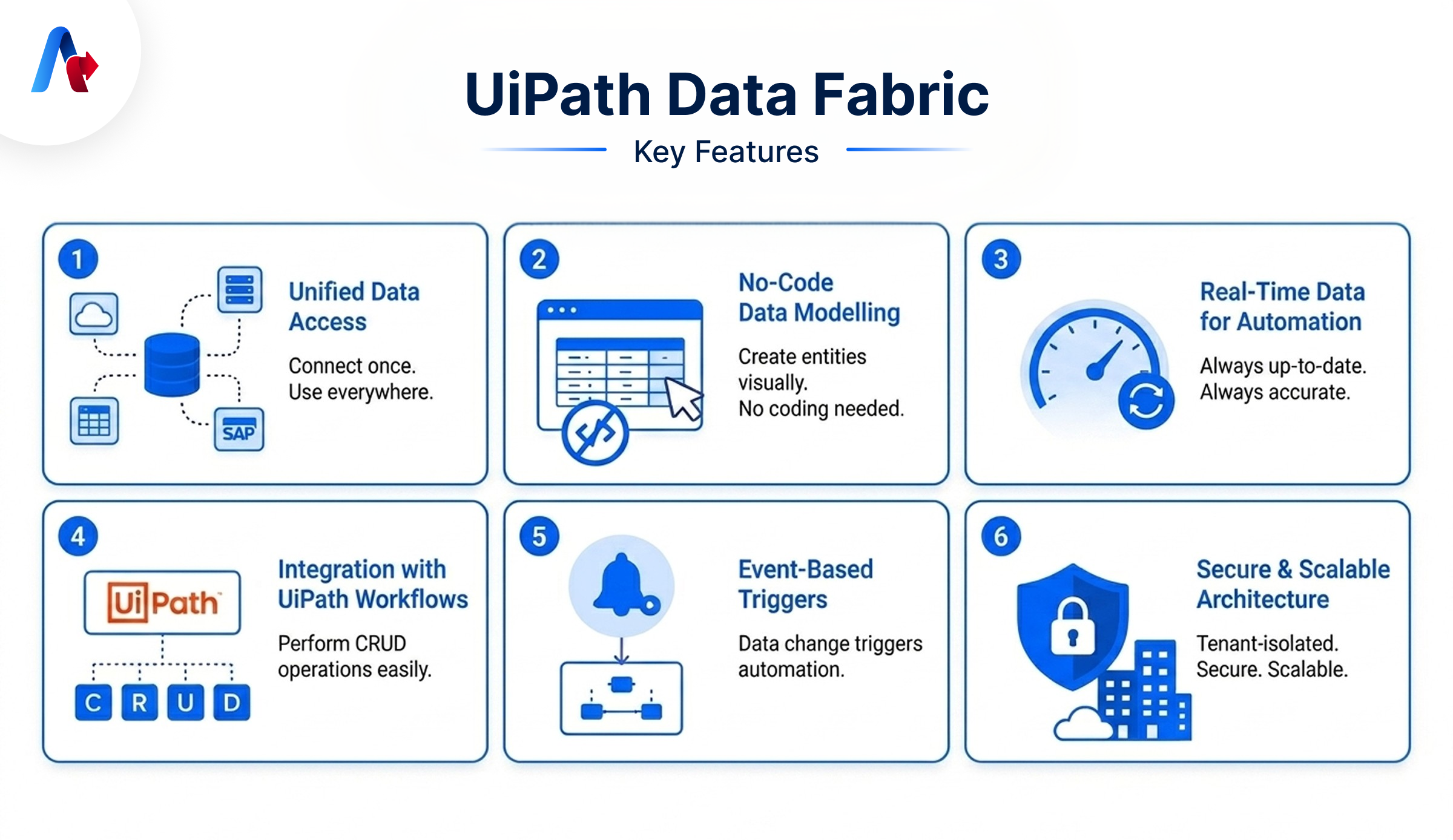
With the help of UiPath's Data Fabric, organizations can manage and gather all the business data in a single place. This is a great strategic advantage because it can improve accuracy and simplify data access.
- Unified Data Access: Data Fabric connects data from multiple systems without duplication of work. For example, instead of saving customer data in 3 different systems, the team can use one Data Fabric entity to simplify their work.
- No-Code Data Modeling: You don’t need coding knowledge to create entities here. For example, a business analyst can create a “Vendor Master” table directly with this application.
- Real-Time Data for Automation: Real-time accessibility is more important to ensure accuracy. Here, the tools offer this option automatically. For instance, stock quantity updates immediately when a sale happens.
- Integration with Other Workflows: Here, the AI can easily create, view, update, and delete data records within UiPath workflows. It is a feature that makes data management faster and more efficient.
- Event-Based Triggers: This is a method where the automation starts when data changes. For instance, when an invoice is added, it starts the approval workflow.
- Secure and Scalable Architecture: This feature allows you to store data in a safe place. It is fully isolated and secure for large-scale operations.
Latest Updation of UiPath Fabrics in 2024–2025
With recent updates, Data Fabric is making automation smarter and more connected to manage everything easily.
- Autopilot: A customer can describe in simple language, and AI creates entities automatically. For example, you can type: “Create employee database with name, salary, department”. Everything gets created automatically here.
- Microsoft 365 Integration: With new updates, the data from SharePoint, OneDrive and Azure AD can be directly connected and unified. For example, employee documents from SharePoint are linked with Data Fabric.
- API Access for External Systems: This is an update to use APIs to connect to external apps securely. For example, a mobile app fetching customer data from Data Fabric.
How Data Fabric Powers Intelligent AI Agents
Modern automation is moving towards the arrival of Agentic AI. In this scenario, UiPath acts as the data backbone for these automations by providing context-rich data, real-time updates, and cross-system visibility.
Let’s see an example with a customer Support Bot.
Situation without Data Fabric:
- The bot asks basic questions.
- There is no context
By using UiPath:
- AI automation sees the full customer history.
- It provides an accurate solution.
What is the Result?
- Better customer satisfaction
See how enterprises like yours use this service with AI agents to cut manual work and improve decisions.
Explore real success stories.
Best Practices to follow while using UiPath AI Fabric
Let’s see some of the best practices you can follow while using this tool.
- Keep entity design simple.
- Use standard naming (Quantity instead of Qty/QTY)
- Avoid duplicate entities
- Use relationships between entities.
- Monitor data quality regularly.
Power Your AI Agents with Unified Business Data
UiPath Data Fabric is not just a simple solution anymore because it consolidates diverse data into a single place to improve accuracy and workflow. By connecting business data, organizations can avoid problems, improve reliability, and make faster decisions in this fast-moving world.
As a company that continues to adopt AI solutions, having connected accessible data in a single place is more important in this world. With this solution, you can build that foundation while supporting scalable, real-time, and context-aware automation.
Ready to unify your business data with UiPath? Let Accelirate build your automation foundation today.
Talk to Accelirate’s UiPath team.
FAQs
Data AI Fabric by UiPath is a cloud-based layer that helps organizations connect and manage business data in a systematic way. When you use this method, AI can get real-time and contextual data that support accurate decisions, mitigate manual effort, and improve overall performance.
Using such data is useful for organizations to reduce data confusion, simplify data management, and support real-time workflows. This service also makes it simple for its users, as there is no need for coding knowledge.
A client can set up an AI Fabric service by using their UiPath Automation Cloud account. After the activation, you can deploy ML models, manage projects, and connect them with your automation workflows. This allows AI-powered processes to make smarter decisions using data and machine learning.