



NOV 24, 2025 |
How to Build a Custom QA Agent Using Existing AI Models

Quick Summary
Today, you don't need to build a QA agent from scratch. Instead, you can develop your existing working agent into a quality assurance agent that generates test cases, creates automation scripts, validates outputs, and integrates with tools like TestRail or Azure DevOps. With agentic automation, a team can reduce testing time, improve quality, and ensure tools meet the industry standard.
If you are a quality manager, you know what your team goes through. They spend a lot of time on repetitive manual tasks, such as writing test cases, creating scripts, and preparing test reports. This causes many errors, increases costs and slows down your entire process.
The rise of AI models, especially LLMs, has changed this scenario. Today, you don't have to build a quality assurance (QA) system from zero. Instead, you can turn the existing QA agent into smart intelligent systems that understand your business, goals and products.
A survey explains that 78% of software testers use AI in their testing workflows. This is proof that building agents are more important than ever, and AI-based solutions are becoming real in the software testing field. This guide will share valuable insights on how a team can turn the existing agent into a helpful tool to test their applications.
What Can a QA Agent Do?
A customized Agent in QA can do things other than going with manual tasks, depending on your team’s goals. It helps the teams to work faster, mitigate errors and reduce costs up to 40%. Below, we can see what the QA automation can do and why each capability is helpful.
Requirement Analysis
AI Agents in your testing can read requirements and translate them into clear, testable points. Many teams struggle to identify vague requirements, but agents make it easy from start to finish. It can:
- Pull out testable conditions from written requirements
- Identify ambiguities and inconsistencies
- Create a simple requirement-to-test traceability list
Test Case Generation
After understanding the requirements, your automation can generate detailed test cases. With the help of test automation, you can reduce the time and use it for other relevant tasks. It creates:
- Functional test cases
- Negative and boundary test cases
- API test scenarios
- UI test steps
- Regression test coverage
Test Prioritization
When you use a QA testing agent, it decides which should go first and which should go last.
This is useful because not all cases are equally important. QA AI Agents can:
- Classifies test cases based on the risk level.
- Identifies areas that typically fail
- Suggests the order of execution
Test Script Authoring
Your test cases are ready at this stage. With the help of a QA Agent, a team can convert them into automation-ready scripts. You may generate scripts in:
- Python
- Java
- JavaScript
- Robot Framework
- Playwright
- Other automation tools
Apart from the above, it can also generate:
- Gherkin scenarios
- Basic mocks and stubs
Test Execution Assistance
During test execution, a smart agent can troubleshoot issues faster. This will help you avoid jumping between multiple tools to understand the failure. You get assistance with:
- Detecting logs, errors, traces, and screenshots
- Answering natural-language questions about test execution
- Providing possible reasons for failure
Reporting and Documentation
A QA Agent is not only swift in working and finding errors, but it can also automatically prepare test reports. It generates reports, such as:
- Daily or weekly summaries
- Release readiness reports
- Defect trends and insights
Validation Layer
It can also implement rules to get the correct output. Some of them are:
- Test case must include expected outcomes
- IDs must be unique
- Script must compile
Important Read: What Is AI Powered QA Automation and How Is It Changing Software Testing?
Thinking of automating your QA tasks? Let’s connect to build one agent for your workflow.
Get StartedThe Architectural Overview of Customized Agent
A tailored automation agent in QA works better for testing and other related tasks. It also integrates with the workflow you run to deliver better results.
A quality assurance agent system follows this structure:
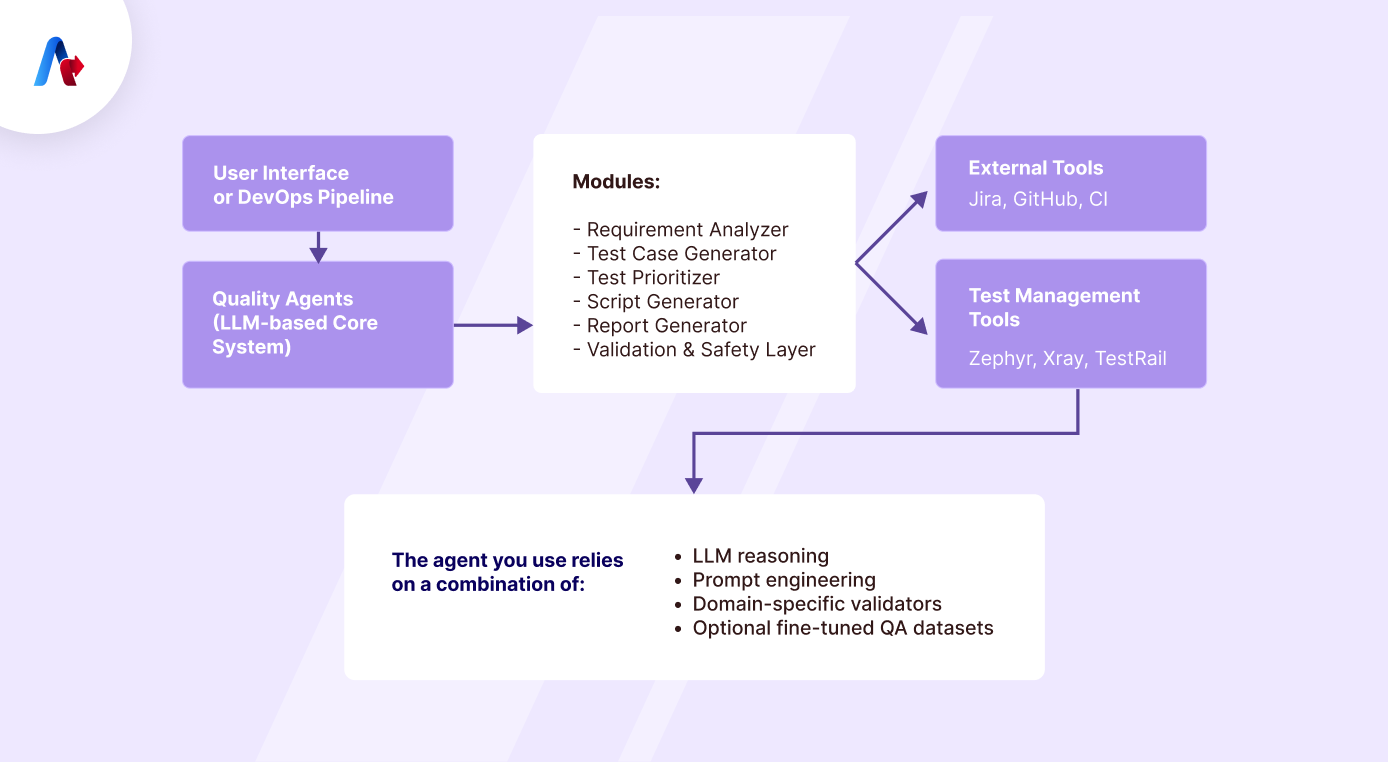
Build the Core Agent with Prompt Templates
The next step is to explain how the agent should think and work by using prompt templates. There are many templates, and each tells the agent what role it is playing and how it should handle a specific task in a particular testing workflow.
-
System Prompt (Identity & Role):
This prompt is crucial to set the agent’s identity. It explains the model, what it is, the responsibilities it should perform, and how it should behave.
A typical example of this is:
“You are a QA agent responsible for analyzing requirements, generating comprehensive test cases, prioritizing them, and producing outcomes.”
-
Requirement Analysis Prompt:
In this template, you can focus on analyzing the following requirement.
- Testable conditions
- Constraints
- Risks and ambiguities
- Acceptance criteria
-
Test Case Generation Prompt
This prompt explains how to write test cases using an industry-specific format.
- Test case ID
- Objective
- Preconditions
- Test steps and more
-
Script Generation Prompt
Here, you can specify the following things:
- Framework (Playwright, Selenium, Cypress)
- Language preference
- Naming conventions
- Folder structure
-
Reporting Prompt:
You can explain how to generate a clear, concise, and stakeholder-friendly test report.
- Summary of test cases
- Passed vs. failed cases
- Defects found
- Risks
- Recommendations
Need help setting up prompt templates for your agent?
Talk to our experts nowIntegration with Test Management Tools
The initial processes are ready now. The next one is to connect the agent to your existing tools. There are many supported platforms in the market, such as:
- TestRail
- Zephyr
- Xray
- Polarion
- Azure DevOps
The integration is important, but you need to understand how a multi-agent system can help with testing tasks.
Multi-Agent System for Better Accuracy
Some prefer multi-agent systems due to their accuracy and productivity. It doesn't mean that a single agent system is not worthwhile. The difference is that a single one focuses on many jobs, but in a multi-system, the works are divided among each agent.
A multi-agent atmosphere provides:
- Higher accuracy
- Separation of responsibilities
- Easier debugging
- Help with scalability
Choose How You Want to Deploy Your Model
Once your QA agent is ready, you need to decide where it will run. This deployment is decided based on your organization’s security needs, infrastructure, and other criteria.
What are your Options?

-
Cloud-hosted API:
It is a simple and fast method. First, you can host the agent in the cloud and later access it through an API. This is good if you need a quick start without having a server.
-
On-premises LLM deployment:
This is an enterprise option where you can run the LLM and the AI Agents inside your internal servers. It is an option if you need more security, strict compliance, and customization.
-
Hybrid:
Here, the private data stays with you, and the heavy things will go to the cloud. This is better for many as it can offer security and cost-effectiveness. Many companies also choose this method due to its performance.
-
Embedded CI Plugin (in Jenkins/GitHub Actions):
In this method, the agent becomes part of the CI/CD pipeline. It can help you validate scripts, generate tests, run static checks, and produce reports after building.
-
Security Considerations
It is not a matter of what type of model you choose for testing, but security must be your first preference.
- Don't feed raw sensitive data to LLM without encryption
- Apply role-based access for agent interaction.
- Implement audit logs to know the user's details and the time.
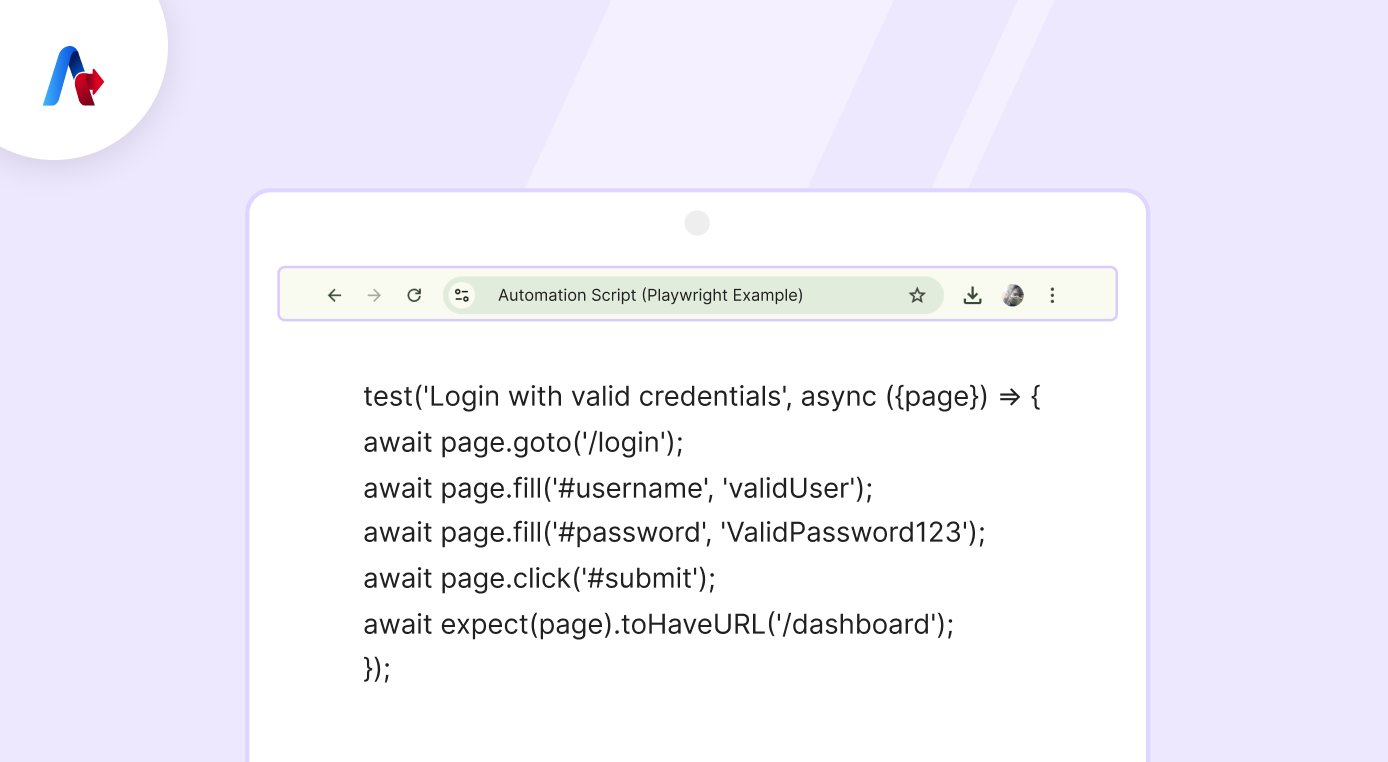
Sample Output
Do you want to see what the output looks like before you deploy the agent to all workflows? This section is going to explain everything from top to bottom with more clarity.
Test Case (AI-Generated)
TC-001: Login with valid credentials
Preconditions:
- User account exists
Steps:
1. Navigate to the login page
2. Enter a valid username
3. Enter a valid password
4. Click login
Expected Result:
- User is redirected to the dashboard
Priority: High
Automation Script (Playwright Example)
Maintenance & Continuous Improvement
Building a testing agent is the first phase, but an update is vital to keep the outcome accurate and valuable. Let's see what a team should do when using a QA agent.
- If you have a product or service that grows, update the agent’s prompts. If requirements, test formats, or naming conventions change, update the templates. It is essential for your QA AI agents to stay up to date and fit with the business standard.
- A company can add more rules in the future. It can be anything, like IDs must follow a set pattern, no missing steps or ambiguous statements.
- Versioning test templates is also vital for the agent to ensure the correct structure. Just check them and update the formats without confusion.
- Keep a metric to track your agent's performance. You can review performance based on the number of corrections, test case accuracy, script compilation success rate, and feedback.
- Check validator agent feedback regularly. This will help you understand where the AI is struggling, and you can act accordingly.
Build and Deploy Your Tailored QA Agent
It is easy to build a testing agent from the existing one. Building an agent faster can speed up your work and streamline QA processes. With the right prompts, rules, and workflows, your agents can create quality outcomes that meet your business needs.
With the help of a strong structure, a validation layer, and tool integration, the QA agent in your work can reduce manual work and speed up testing with higher quality. It is also important that regular updates will make your testing more stable and meet future needs.