



Quick Summary
Prompt engineering best practices help improve AI output quality by structuring instructions, defining formats, and using examples. Techniques like few-shot prompting, measurable instructions, and iterative testing enable consistent, accurate, and scalable results across GPT, Claude, and other AI models. Research and industry usage show that structured prompting can improve task accuracy by over 30–50% in complex workflows, making it an imperative skill for developers, analysts, and business users working with AI at scale.
Here's the harsh truth. Two developers using the exact same AI model on the exact same task can get wildly different results, simply because of how they wrote their prompts. The model hasn't changed. The difference is entirely in the prompting.
That gap is what prompt engineering closes. It's not about tricks or magic keywords. It's about how you tell the model what to do, just as you would brief an experienced persona. The more direct you are, the more work you get.
These best practices in prompt engineering will enable you to achieve consistent, high-quality outputs whether you are building production workflows, operating chat models in your everyday tasks, or automating tasks at scale, no matter what model you are using.
Are your prompts giving you consistent results or forcing you to rewrite outputs repeatedly?
Let’s discussWhat Are the Best Practices for Prompt Engineering?
Modern language models are powerful, but they respond heavily to how you guide them. If your request is vague, the output will usually be generic. But when your prompt is clear and well-structured, the response becomes far more specific, useful, and something you can actually act on.
Consider prompting as a communication skill. The model is smart, but it doesn't know what's in your head. The more precisely you describe the task, the audience, the format, and the constraints, the closer the output lands to what you actually need.
This isn't just true for cutting-edge models. These prompt engineering techniques apply across GPT-4, Claude, Gemini, Mistral, and any other model you use. The principles are universal.
According to research from Microsoft and OpenAI, structured prompts can improve response reliability by up to 40% in enterprise use cases.
1. Start With the Right Model - Then Still Write a Good Prompt
Newer, more capable models do handle ambiguous instructions more gracefully. But that's not a reason to get lazy with prompting. A capable model given a vague prompt will still produce a vague answer.
Key Considerations for Choose the Right Model for the Job:
- Use reasoning-focused models for complex logic
- Use faster models for high-volume tasks
- Invest in prompt quality regardless
- Balance cost, speed, and accuracy
Model choice and prompt quality compound each other; neither replaces the other.
A BCG report highlights that model selection combined with prompt optimization can improve task efficiency by up to 2x.
2. Put the Main Instruction First
The single most impactful structural change you can make is put the task at the top, before context, examples, or background. Models read prompts sequentially, and front-loading the core request helps them stay focused on what they're supposed to do.
Burying your instruction at the end of a long paragraph of context is one of the most common causes of off-target responses.

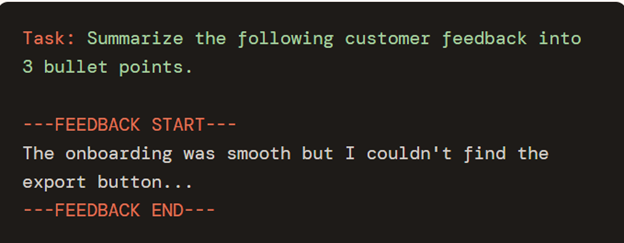
3. Separate Instructions From Context Using Delimiters
When your prompt includes long documents, raw transcripts, or multi-part inputs, use clear visual separators to mark what's the task versus what's the material to work with. Quotes, Brackets, XML-style tags, or headers all work well.
This reduces the chance the model treats your context as part of the instruction, a surprisingly common failure mode in summarization, extraction, and analysis tasks.
4. Be Precise About What You Actually Want
Vague prompts produce generic output. If you want something specific, say so. Specify the audience, the tone, the length, the format, and the depth of analysis. When you leave out important details, the model fills in the gaps with its own assumptions, which may not always match what you had in mind. Adding context makes a big difference. One simple way to do that is by creating a scenario. It helps the model better understand the situation and leads to more detailed, relevant, and thoughtful responses, especially for complex or real-world tasks.
Precision also improves consistency. If you’re using prompts repeatedly or across a team, clear and specific instructions lead to more predictable results, even across different runs or model versions.
Rule of thumb: If someone reading your prompt for the first time could interpret it two different ways, the model will pick one of them - probably not the one you intended. Eliminate the ambiguity.
5. Show the Model What the Output Should Look Like
Instead of only describing the task, it helps to show the model what the output should look like. Sharing a template, a structure, or even a short example makes a big difference in accuracy. This is especially useful for structured tasks like data extraction, labeling, report generation, or formatting responses in JSON.
The model performs better when it can imitate a target shape rather than invent one from scratch.

6. Use Examples Before Asking for Scale (Few-Shot Prompting)
For simple, clear tasks, a direct prompt is fine. But for anything involving style, classification, rewriting, or nuanced extraction - give one or two examples first. This technique, called few-shot prompting, significantly improves reliability by anchoring the model to your exact expectations.
One well-chosen example is often worth pages of instructions. You're showing, not just telling.
| Approach | When to Use | Output Quality |
|---|---|---|
| Zero-shot | Simple, clear, well-defined tasks | Good for standard tasks |
| One-shot | Style-specific or nuanced output | Better consistency |
| Few-shot | Complex extraction, classification, rewriting | Best reliability |
7. Replace Vague Language with Measurable Instructions
Words like "short," "detailed," "comprehensive," or "clear" mean different things to different people - and different things to a model depending on context. Replace them with concrete numbers and formats.
- Instead of "write a short summary" → "write a 3-sentence summary"
- Instead of "list the key points" → "list exactly 5 key points as bullet points"
- Instead of "explain in detail" → "write 2 paragraphs for a non-technical audience"
This is especially important when building production prompts that need to behave consistently across hundreds or thousands of runs.
8. Tell the Model What to Do - Not Just What to Avoid
Negative constraints ("don't be too formal," "avoid jargon," "don't make it too long") are weak guardrails. The model has to guess what you want instead. Positive instructions are far more effective because they describe the actual target behavior. But that doesn't mean negative prompts are unnecessary, it does improve the prompting and the output eventually.
You can also guide accuracy by asking it to quote sources- directing the model to cite sources can reduce the risk of hallucinations.

When you do need to set limits, frame them as an alternative behavior: "If you're unsure, say so instead of guessing" is stronger than "don't hallucinate."
9. Use Starter Cues for Structured and Code Output
For code, SQL, JSON, Markdown, or other structured output, seed the response with a starter token or opening cue. This steers the model into the right output pattern immediately, rather than starting with prose and transitioning into structure.

Use cues to support the prompt - not to replace clear instructions. A starter token helps the model enter the right mode; a well-written prompt gives it the right task.
10. Iterate Systematically - Good Prompts Are Built, Not Written
The best prompts almost never come from a first draft. Treat prompting like software: test it, observe failures, make targeted changes, and compare versions. A disciplined iteration habit is what separates prompts that work reliably from ones that work occasionally.
- Run the same prompt on 5–10 representative inputs to spot edge cases
- Change one variable at a time - don't rewrite everything at once
- Keep a version history of what changed and why
- Consider temperature settings: lower for consistent outputs, higher for creative ones
Generation settings - temperature, max tokens, stop sequences - are a lever that works alongside your prompt. Tune both together for the best results.
Related Read: Prompt Engineering vs Prompt Testing
Before writing your next prompt, ask: Is my request specific enough for someone else to execute without confusion?
Let’s discussWhat Are the Important Model Parameters for Using AI Models?
When using AI models, it is not only about the prompts that you give. It also involves setting certain configurations that influence the quality of the response. These settings are referred to as parameters. While they might not be set manually all the time, they do influence the output.
Key Parameters to Know
- Model – Quality vs. speed/cost
- Temperature – Low = factual, High = creative
- Top_p – Controls response diversity
- Max Tokens – Limits response length
- Stop Sequences – Defines where output ends
- Frequency Penalty – Reduces repetition
- Presence Penalty – Encourages new ideas
- Response Format – Enables structured outputs
Why Are They Helpful?
- Shape how the model responds
- Improve accuracy, creativity, and consistency
- Reduce repetition and randomness
Parameters act as fine-tuning controls. If you have access to them, they can help you further refine responses making them more creative, consistent, or structured based on your needs.
Quick Reference: AI Prompting Best Practices at a Glance
| # | Practice | Core Principle |
|---|---|---|
| 1 | Choose the right model | Model + prompt quality compound each other |
| 2 | Instruction first | Don't bury the task in context |
| 3 | Use delimiters | Separate task from material clearly |
| 4 | Be precise | Specify audience, tone, format, length |
| 5 | Show output shape | Templates beat descriptions |
| 6 | Few-shot examples | One example is worth many instructions |
| 7 | Use measurable language | "3 bullets" beats "concise list" |
| 8 | Positive direction | Tell it what to do, not what to avoid |
| 9 | Use starter cues | Seed structured output patterns |
| 10 | Iterate and test | Good prompts are built, not written |
What Makes a Good Prompt to Ensure More Effective Output?
Prompt engineering isn't a niche skill for anyone who is interested in AI. It's the everyday practice of communicating clearly with a powerful tool and like any communication skill, it improves with intention and iteration.
Effective prompting is a practical skill that improves with use. The most reliable prompts share four traits: Clear instructions, specific requirements, structured format, continuous testing.
Apply even three or four of the prompt engineering tips in this guide consistently, and you'll notice an immediate improvement in output quality regardless of which model you use or what you're building.
If your AI outputs improved by 30% tomorrow, what would that mean for your workflow?
Let’s get that doneFAQs
The most impactful prompt engineering best practices are: leading with the instruction, separating context from the task using delimiters, specifying output format explicitly, using examples (few-shot prompting) for complex tasks, and iterating systematically based on real outputs. These apply to all major models including GPT-4, Claude, and Gemini.
Few-shot prompting means providing one or more examples of the input-output pair you expect before asking the model to generate its own. It's most useful for tasks involving classification, style-matching, structured extraction, and nuanced rewriting - anywhere a simple description of the task isn't enough to anchor the model's behavior.
Delimiters - such as triple dashes (---), XML-style tags, or labeled sections - visually and structurally separate the instruction from the content being processed. This prevents the model from confusing background context with the actual task, which is a common cause of off-target responses in summarization and analysis prompts.
Yes. Advanced models are more forgiving of vague prompts, but they still produce significantly better results when given clear, structured instructions. Prompt quality and model capability compound each other - a precise prompt on a capable model consistently outperforms a vague prompt on the same model. Prompt engineering is a multiplier, not a workaround.
Zero-shot prompting means asking the model to complete a task with no examples - just instructions. Few-shot prompting includes one or more input-output examples in the prompt to demonstrate the expected behavior. Zero-shot works well for simple, well-defined tasks. Few-shot is more reliable for tasks that require style, format, or reasoning consistency.
Start by running your prompt on 5–10 diverse inputs to surface edge cases. Change one variable at a time so you know what's driving improvement. Keep a version log. Compare outputs side by side. Also tune generation parameters (temperature, max tokens) alongside the prompt wording - both affect output quality and consistency.