



Summary
Many business processes today use AI-Augmented Integration to connect systems, reduce manual effort, and enable data to flow more smoothly. It’s being used by teams for CRM and ERP data sync, document processing, invoice processing, customer data updates, fraud and compliance checks and other repetitive integration tasks. Businesses have cut the time spent on manual data tasks by 45%, freeing up teams to work on higher-value work.
Is AI-Augmented Integration just another form of automation? Does it actually replace traditional integration tools or add AI on top of existing systems? These are the questions many leaders are still trying to answer, and that uncertainty can lead to the wrong tools, disconnected AI projects, and more complexity instead of less.
To understand where AI Integration fits, it is first important to know what it changes in existing systems, where it adds value, and when it makes sense to use it. Having answers to this will help teams avoid any unnecessary tools, reduce integration gaps, and focus on use cases that can scale.
What Is AI-Augmented Integration?
AI-Augmented Integration connects multiple systems, data and applications through AI and machine learning. While traditional integration mainly moves information from one system to another using fixed rules, AI adds another layer by helping teams gather information from multiple systems, interpret data and give responses more intelligently.
As Augmented Integration adds intelligence across the wider workflows, it helps teams handle growing data and workflow complexity by reducing manual workload, delays and time. It gives organisations a strong, flexible foundation to scale automation, connect newer systems and support wider workflows over time.
Turn connected systems into smarter, more scalable workflows
Book a demo todayAI-Augmented Integration vs. Augmented Data Integration vs. AI Integration: What’s the Difference?
Here’s how the three approaches differ while handling data, systems and workflows
| Approach | Core Focus | AI Operating Layer | Technical Use Case |
|---|---|---|---|
| AI-Augmented Integration | Processes and workflows | Across connected systems | AI uses data from several systems to help move a workflow forward |
| Augmented Data Integration | Data pipelines | Inside data integration tasks | AI maps fields, cleans data, or flags unusual values |
| AI Integration | Apps and products | Inside or alongside one system | A CRM uses AI to give predictions or recommendations |
How AI-Augmented Integration Works
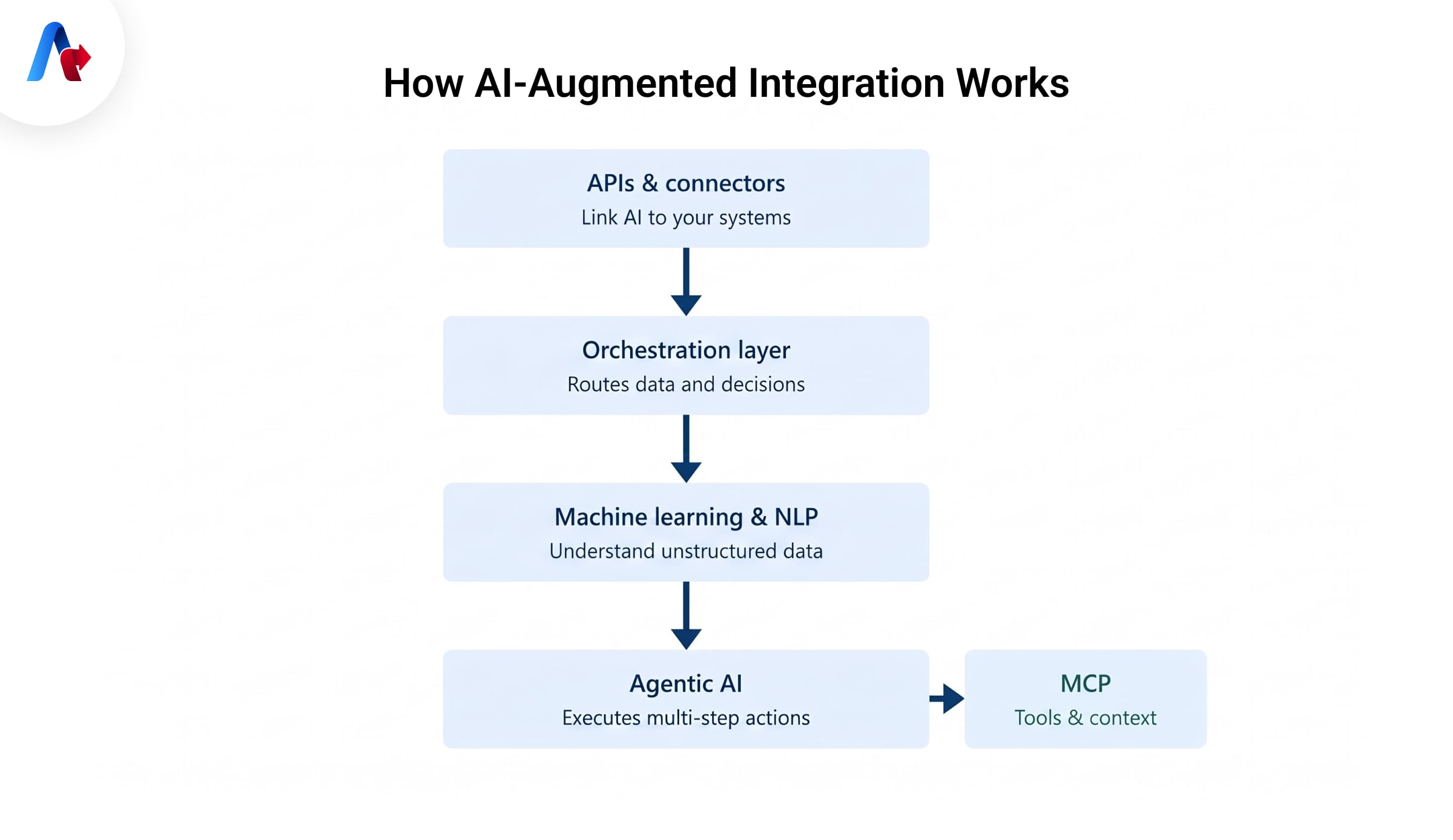
AI-Augmented Integration begins with APIs and connectors that link AI models to databases, cloud apps, CRM systems, and other business platforms. An orchestration layer manages how data moves, when AI is used, and where the output goes, making AI Integration part of the workflow rather than a separate tool. This creates a connected foundation where systems can exchange information without relying on constant manual handoffs.
Machine learning and NLP then help AI understand and organize unstructured data such as emails, PDFs, documents, notes, and messages. Agentic AI can take that understood information and actually perform a sequence of actions; meanwhile, MCP (Model Context Protocol) provides access to the tools, data, and context needed to do so.
Key Technologies Powering AI-Powered Integration
Here are some key technologies that work together to make AI-powered integration smarter, faster, and easier to manage.
1- Machine Learning–Based Data Mapping and Schema Matching:
Machine learning helps match fields and schemas across systems with less manual mapping.
2- iPaaS and Low-Code/No-Code AI Connectors:
These connectors can connect AI with existing business systems without any heavy coding requirements
3- Predictive / Self-Healing Pipelines:
These data pipelines can analyze, detect and fix anomalies or errors automatically to ensure smooth data flow
4- Retrieval-Augmented Generation (RAG) and Semantic Layers:
RAG provides AI with approved, most relevant company data, whereas the semantic layer adds structure and meaning to it.
5- Natural Language Processing (NLP):
NLP helps AI understand unorganised data that it receives from emails, reports, contracts, and other text-heavy documents.
6- AI Agents and Autonomous Workflow Orchestration:
AI agents can understand goals and carry out several tasks, while workflow orchestration helps to coordinate these steps in the right direction
Want these capabilities in your existing systems
Talk to our experts todayTop Use Cases of AI-Augmented Integration
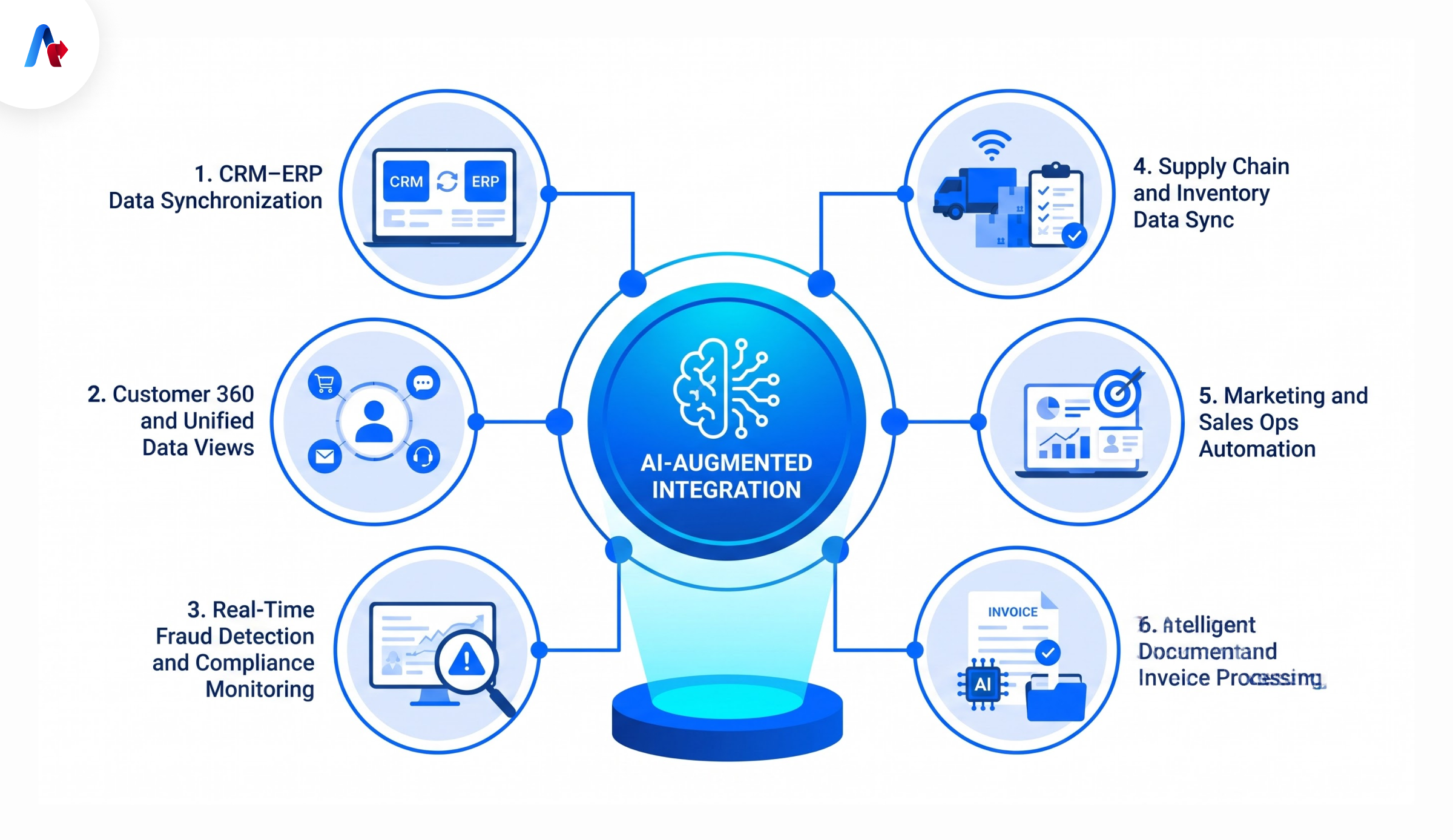
Let's understand how these capabilities support AI-Augmented Integration in real-world use cases
CRM–ERP Data Synchronization
AI can help match, validate, and transform customer and transaction data as it moves between CRM and ERP systems, reducing manual mapping, duplicate entries, and mismatched records between sales and finance teams.
Customer 360 and Unified Data Views
AI can bring together customer data from sales, marketing, service, and other systems so teams can work with a more complete and consistent view of each customer across departments.
Real-Time Fraud Detection and Compliance Monitoring
AI helps finance teams spot duplicate activity, unexpected changes, or other warning signs efficiently by reviewing transactions, claims, payments, account activity and other incoming records.
Supply Chain and Inventory Data Sync
AI helps logistics teams to spot unusual inventory changes, missing updates, or mismatched records and use the latest data to support demand forecasting, replenishment, and supply planning.
Marketing and Sales Ops Automation
Connected AI can use data across customer and business systems to automate repetitive data processing, surface relevant insights, and support faster follow-up actions.
Intelligent Document and Invoice Processing
NLP and machine learning can read invoices, forms, emails and reports, extracting key information and classifying it into different categories, reducing errors and human efforts
Benefits of AI-Augmented Integration
Here's what teams benefit from AI-powered integration:
Reduced Manual Mapping and Human Error:
Teams reported a 45% decrease in time spent on data management duties.Scalability Without Adding Headcount:
Teams can scale their workflows by automating their tasks instead of hiring new staffBetter Data Quality and Governance:
AI gives team consistent data for reporting, analysis and decision-making by flagging issues and errorsFaster Time-to-Insight:
AI can pull and process data from multiple systems much faster than manual reporting
Recently, Accelirate has helped a global retailer to connect Agentic AI with MuleSoft across SAP, Salesforce, and Shopify to improve inventory management. This results in reduced delays, improved stock visibility and faster inventory actions with less manual effort. The solution also helped save $3.8M per quarter in markdown losses.
Common Challenges and How Integration Services Help Solve Them
AI-Augmented Integration can be harder to implement when systems, data, security, or skills are not aligned. Here's how integration services help teams to solve them:
Legacy System Compatibility
Modern APIs and cloud tools can not be easily connected with legacy systems. Integration services use connectors, middleware and custom integration layers to link these systems with newer AI tools without needing full system replacement
Data Quality and Governance Gaps
Using duplicate, outdated, or incomplete data can make AI results unreliable. Integration services help clean and standardize data, define usage and governance rules so that connected systems work with trusted and more consistent information.
Security, Compliance, and Access Control
As data volume increases, it becomes difficult for systems to manage it, resulting in unauthorized access, privacy issues or compliance failures. Integration services help to prevent these security issues by setting access rules, permissions, security controls and monitoring.
Skills Gaps — Why Businesses Turn to Integration Services
AI-Augmented Integration can require skills across APIs, data, security, cloud platforms, AI, and workflow design, and many internal teams may not have all of that expertise. Integration services help teams with the technical and implementation support required to scale integration.
Turn integration roadblocks into a stronger foundation for AI
Call our experts todayHow to Choose the Right AI Integration Services Partner
How can you tell if an AI integration partner is actually the right fit? Ask how they handle legacy systems, data quality, security, ongoing support and augmented integration. The answers will reveal whether they can manage the full integration lifecycle or just the initial setup. It also helps reveal whether the partner can adapt integrations as your systems, data needs, and AI use cases change over time.
A strong integration partner should think beyond getting systems connected. They should also plan for data quality, testing, security, monitoring, and how the integration will perform as the business scales.— QA Lead, Accelirate
Then compare build, buy, or managed integration services. Building gives you control, buying speeds things up, and managed services reduce the burden on internal teams. The right choice will depend on internal skills, integration complexity, budget and support needed.
From AI Experiments to Scalable Integration
As AI-Augmented Integration evolves, the real value will come from how well the key technologies work together across existing systems, data, and workflows to make integration more intelligent, reliable, and adaptable. Starting with one high-value workflow can help uncover integration gaps and create a stronger foundation for scale. Accelirate leads enterprises in building and managing the integration foundation needed for smooth, enterprise-wide AI adoption.
Ready to build a stronger foundation for AI integration that can scale with your business?
Book a Demo NowFAQs
No. RPA automates rule-based tasks, while AI-Augmented Integration connects systems and uses AI to make workflows more intelligent and adaptive.
Costs vary based on the number of systems, data complexity, AI capabilities, customization, and ongoing support required.
Yes. Small businesses can start with one high-value workflow and scale AI-Augmented Integration as their needs grow.
Teams typically need integration, data, API, AI, security, and governance skills to manage it effectively.
No. It usually works alongside ETL and iPaaS tools by adding AI-driven mapping, analysis, decision support, and workflow automation.